


Building an XPath Query Tool in PHP — Slice XML Like a Pro
A zero-dependency PHP CLI that queries XML files with XPath and outputs matching nodes as XML, text, attribute values, or JSON.
XML is not trendy. JSON won the API format war years ago. But XML remains deeply embedded in enterprise systems, RSS/Atom feeds, SVG files, XHTML documents, Maven POMs, Android manifests, SOAP responses, and countless configuration formats. When you need to extract data from an XML file, you reach for one of three options: write a one-off script, pipe through xmllint, or install a heavyweight tool. None of these are satisfying for quick, repeatable queries.
I built xml-query to fill that gap. It takes an XML file and an XPath expression, and prints the results. Five output modes cover every extraction pattern I encounter in practice. The entire tool runs on PHP's built-in DOMDocument and DOMXPath — no Composer dependencies, no external libraries, just the standard library that ships with every PHP installation.
GitHub: https://github.com/sen-ltd/xml-query
Why XPath still matters
XPath is the query language for XML the way SQL is the query language for relational databases. It lets you navigate the document tree with path expressions, predicates, and functions. Unlike regex-based extraction (which breaks on nested elements, CDATA sections, and namespaces), XPath understands the document structure.
Consider a bookstore catalog:
<library>
  <book id="1" lang="en">
    <title>The Pragmatic Programmer</title>
    <author>David Thomas</author>
    <year>2019</year>
  </book>
  <book id="2" lang="ja">
    <title>リーダブルコード</title>
    <author>Dustin Boswell</author>
    <year>2012</year>
  </book>
</library>
With XPath, extracting all titles is //book/title. Filtering by language is //book[@lang="ja"]/title. Finding books after 2015 is //book[year > 2015]. These expressions are concise, readable, and correct regardless of document depth or formatting.
Architecture: four classes, zero dependencies
The tool follows a clean separation of concerns across four classes:
XmlLoader handles parsing. It accepts a file path or raw string, feeds it to DOMDocument::loadXML(), and captures any libxml errors. If the XML is malformed, it throws a RuntimeException with the parser's error messages. This gives callers a single point of failure for all parsing issues.
final class XmlLoader
{
    public readonly DOMDocument $document;

    public static function fromFile(string $path): self
    {
        if (!file_exists($path)) {
            throw new \RuntimeException("File not found: {$path}");
        }
        $content = file_get_contents($path);
        return self::fromString($content);
    }

    public static function fromString(string $xml): self
    {
        if (trim($xml) === '') {
            throw new \RuntimeException('Malformed XML: empty input');
        }
        $doc = new DOMDocument();
        $prev = libxml_use_internal_errors(true);
        $result = $doc->loadXML($xml);
        $errors = libxml_get_errors();
        libxml_clear_errors();
        libxml_use_internal_errors($prev);

        if (!$result || count($errors) > 0) {
            $messages = array_map(
                fn(\LibXMLError $e) => trim($e->message),
                $errors
            );
            throw new \RuntimeException(
                'Malformed XML: ' . implode('; ', $messages)
            );
        }
        return new self($doc);
    }
}
The libxml_use_internal_errors(true) pattern is critical. Without it, PHP's libxml extension writes warnings directly to stderr, bypassing your error handling. By capturing errors into an array, you get structured error information that you can format however you want.
QueryEngine wraps DOMXPath. It takes a DOMDocument, creates the XPath evaluator, and exposes query() and count() methods. The query method returns a DOMNodeList, keeping the caller's options open for formatting.
final class QueryEngine
{
    private readonly DOMXPath $xpath;

    public function __construct(DOMDocument $document)
    {
        $this->xpath = new DOMXPath($document);
    }

    public function query(string $expression): DOMNodeList
    {
        $prev = libxml_use_internal_errors(true);
        $result = $this->xpath->query($expression);
        $errors = libxml_get_errors();
        libxml_clear_errors();
        libxml_use_internal_errors($prev);

        if ($result === false) {
            throw new \RuntimeException(
                'Invalid XPath expression: ' . $expression
            );
        }
        return $result;
    }
}
Formatter is a static utility class with five output methods: toXml(), toText(), toAttribute(), toJson(), and toCount(). Each takes a DOMNodeList (or an integer for count) and returns a string. No state, no side effects, easy to test.
Cli ties everything together. It parses command-line arguments, instantiates the loader and engine, runs the query, and formats the output. Exit codes follow Unix convention: 0 for success (matches found), 1 for no matches, 2 for errors.
The five output modes
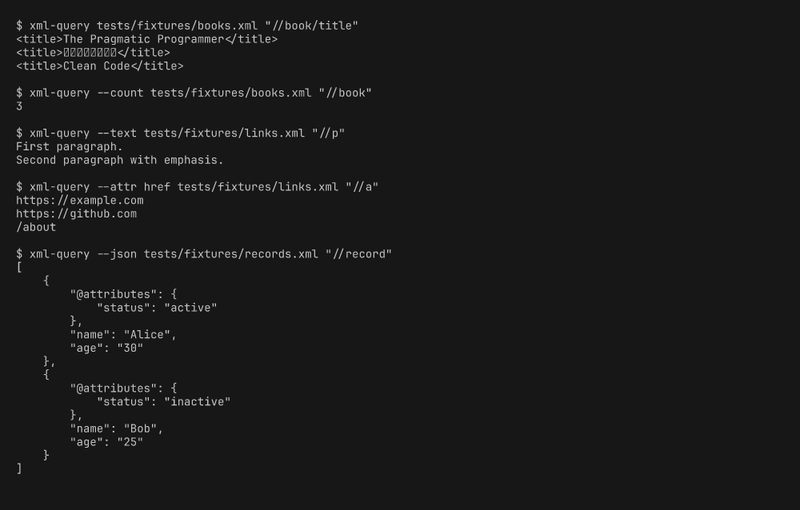
Default: XML output
The simplest mode prints each matching node as its XML representation:
$ xml-query books.xml "//book/title"
<title>The Pragmatic Programmer</title>
<title>リーダブルコード</title>
<title>Clean Code</title>
This uses DOMDocument::saveXML($node) on each match, which preserves the original markup including attributes, child elements, and namespaces.
Text extraction with --text
When you want content without markup, --text strips all tags:
$ xml-query --text page.xml "//p"
First paragraph.
Second paragraph with emphasis.
This reads $node->textContent, which recursively concatenates all text nodes within the element. The second paragraph contains an <em>emphasis</em> child, but textContent flattens it to plain text.
Attribute extraction with --attr
For pulling specific attribute values, --attr takes the attribute name:
$ xml-query --attr href page.xml "//a"
https://example.com
https://github.com
/about
This is particularly useful for extracting URLs from link elements, IDs from records, or any attribute-heavy XML format.
Count mode with --count
Sometimes you just need to know how many nodes match:
$ xml-query --count books.xml "//book"
3
The exit code still reflects whether any matches were found, so you can use it in shell conditionals:
if xml-query --count config.xml "//deprecated" > /dev/null 2>&1; then
    echo "Warning: deprecated elements found"
fi
JSON output with --json
The most complex mode converts XML nodes to JSON objects:
$ xml-query --json records.xml "//record"
[
    {
        "@attributes": {
            "status": "active"
        },
        "name": "Alice",
        "age": "30"
    }
]
The conversion follows a convention where attributes go into an @attributes key, child elements become object properties, and text-only elements become strings. When multiple sibling elements share the same tag name, they become a JSON array. This is opinionated but practical — it handles the common cases well without requiring a configuration file.
Handling XML namespaces
Namespaces are the feature of XML that trips up most tools. An Atom feed, for example, puts its elements in the http://www.w3.org/2005/Atom namespace:
<feed xmlns:atom="http://www.w3.org/2005/Atom">
  <atom:entry>
    <atom:title>First Entry</atom:title>
  </atom:entry>
</feed>
To query namespaced elements, you must register the namespace prefix with the XPath engine before evaluating expressions. xml-query supports this in two ways.
Manual registration with --ns:
xml-query --ns atom=http://www.w3.org/2005/Atom feed.xml "//atom:entry/atom:title"
Automatic detection with --auto-ns:
xml-query --auto-ns feed.xml "//atom:entry/atom:title"
The auto-detection scans the document element's attributes for xmlns: declarations and registers each one. For documents with a default namespace (no prefix), it registers under the prefix default. This covers the majority of real-world namespace usage without manual configuration.
The implementation walks the root element's attributes:
public function registerDocumentNamespaces(): void
{
    $root = $this->xpath->document->documentElement;
    foreach (iterator_to_array($root->attributes ?? []) as $attr) {
        if ($attr->prefix === 'xmlns') {
            $this->registerNamespace($attr->localName, $attr->nodeValue);
        } elseif ($attr->nodeName === 'xmlns') {
            $this->registerNamespace('default', $attr->nodeValue);
        }
    }
}
JSON conversion: the tricky parts
Converting XML to JSON is inherently lossy. XML has attributes, mixed content, processing instructions, comments, CDATA sections, and namespace declarations. JSON has objects, arrays, strings, numbers, booleans, and null. Any conversion must make choices about what to preserve and what to discard.
The nodeToArray method handles the recursive conversion:
private static function nodeToArray(DOMNode $node): mixed
{
    if (!$node instanceof \DOMElement) {
        return $node->textContent;
    }

    $result = [];

    if ($node->hasAttributes()) {
        $attrs = [];
        foreach ($node->attributes as $attr) {
            $attrs[$attr->nodeName] = $attr->nodeValue;
        }
        $result['@attributes'] = $attrs;
    }

    if ($node->hasChildNodes()) {
        $children = [];
        $textOnly = true;

        foreach ($node->childNodes as $child) {
            if ($child instanceof \DOMElement) {
                $textOnly = false;
                $name = $child->nodeName;
                $value = self::nodeToArray($child);
                if (isset($children[$name])) {
                    if (!is_array($children[$name]) || !isset($children[$name][0])) {
                        $children[$name] = [$children[$name]];
                    }
                    $children[$name][] = $value;
                } else {
                    $children[$name] = $value;
                }
            }
        }

        if ($textOnly) {
            $text = trim($node->textContent);
            if (empty($result)) {
                return $text;
            }
            $result['#text'] = $text;
        } else {
            $result = array_merge($result, $children);
        }
    }

    return $result;
}
The key design decisions: elements with only text content collapse to a plain string (not {"#text": "value"}), unless they also have attributes. Repeated sibling elements automatically become arrays. This produces clean JSON for the common case of data-oriented XML while preserving enough structure for attribute-rich documents.
Testing strategy
The test suite covers all four classes with 19 tests. The fixtures directory contains purpose-built XML files: books.xml for basic queries and predicates, links.xml for attribute and text extraction, namespaced.xml for namespace handling, and records.xml for JSON conversion.
Each formatter output mode has dedicated tests that verify the exact string output. Edge cases include: empty attribute extraction (no matches but no crash), malformed XML error messages, empty input handling, and zero-count queries.
$ vendor/bin/phpunit --testdox
OK (19 tests, 35 assertions)
The tests run in under 10 milliseconds. No network calls, no file system mutations, no randomness. Every test is deterministic and self-contained.
Exit codes for scripting
Unix tools communicate success and failure through exit codes. xml-query follows this convention with three codes:
- 0: Success — at least one node matched the expression
- 1: No matches — the expression was valid but returned zero nodes
- 2: Error — file not found, malformed XML, or invalid XPath
This makes the tool composable with shell scripts:
# Check if a config has deprecated settings
if xml-query --count config.xml "//deprecated" > /dev/null; then
    echo "Found deprecated settings"
fi

# Extract and process URLs
xml-query --attr href sitemap.xml "//url/loc" | while read -r url; do
    curl -s -o /dev/null -w "%{http_code} $url\n" "$url"
done

# Convert XML records to JSON for jq processing
xml-query --json data.xml "//record" | jq '.[].name'
Docker deployment
The Dockerfile uses php:8.2-cli-alpine for a minimal image. No Composer, no dev dependencies, no test files — just the source and the entry point:
FROM php:8.2-cli-alpine
RUN addgroup -g 1000 app && adduser -u 1000 -G app -D app
WORKDIR /app
COPY src/ src/
COPY bin/ bin/
RUN chmod +x bin/xml-query
USER app
ENTRYPOINT ["php", "bin/xml-query"]
The non-root user follows security best practices. The resulting image is under 30 MB.
docker build -t xml-query .
docker run --rm -v "$PWD/data.xml:/data/input.xml:ro" \
    xml-query /data/input.xml "//book/title"
Why PHP for a CLI tool?
PHP gets dismissed as a CLI language, but it has genuine strengths for XML processing. The ext-dom extension wraps libxml2, one of the most battle-tested XML parsers in existence. DOMXPath supports the full XPath 1.0 specification. The extension ships with every standard PHP installation — no pecl install, no Composer package, no compilation step.
PHP 8.2+ brings modern language features that make the code clean: readonly properties, named arguments, match expressions, first-class callable syntax, and strict types. The resulting code reads like any modern typed language.
For a tool that loads a file, runs a query, and prints results, PHP's startup overhead (around 10ms) is negligible. The actual XML parsing and XPath evaluation happen in C via libxml2, so performance is comparable to tools written in compiled languages for typical document sizes.
Wrapping up
xml-query solves a narrow problem well: given an XML file and an XPath expression, extract and format the results. Five output modes cover the common extraction patterns. Namespace support handles real-world XML. Exit codes enable shell scripting. The entire implementation is four classes and about 300 lines of PHP, with no external dependencies.
The tool is particularly useful in CI/CD pipelines where you need to extract values from Maven POMs, Android manifests, or SOAP responses without installing heavy XML tooling. Mount the file, run the query, pipe the output.
The source code is on GitHub under the MIT license. Clone, chmod +x bin/xml-query, and start querying.


Top comments (0)