


Building a MIME Type Lookup CLI in TypeScript — 800+ Types, Magic Bytes, and Zero Dependencies
A TypeScript CLI that looks up MIME types by filename, performs reverse lookups from MIME to extensions, shows detailed type info, and detects file types by reading magic bytes — all with zero runtime dependencies.
Every web developer eventually needs to know what MIME type a file extension maps to. You reach for a lookup table, copy a snippet from Stack Overflow, or install a package. But what if you had a single CLI tool that answered every MIME question you could ask — forward lookup, reverse lookup, detailed info, and even binary file detection — without pulling in a single runtime dependency?
I built mime-lookup to be that tool. It embeds a database of 800+ MIME types derived from the IANA media type registry directly in the source code, so there is no network request, no external database file, and no dependency resolution at runtime.
📦 GitHub: https://github.com/sen-ltd/mime-lookup
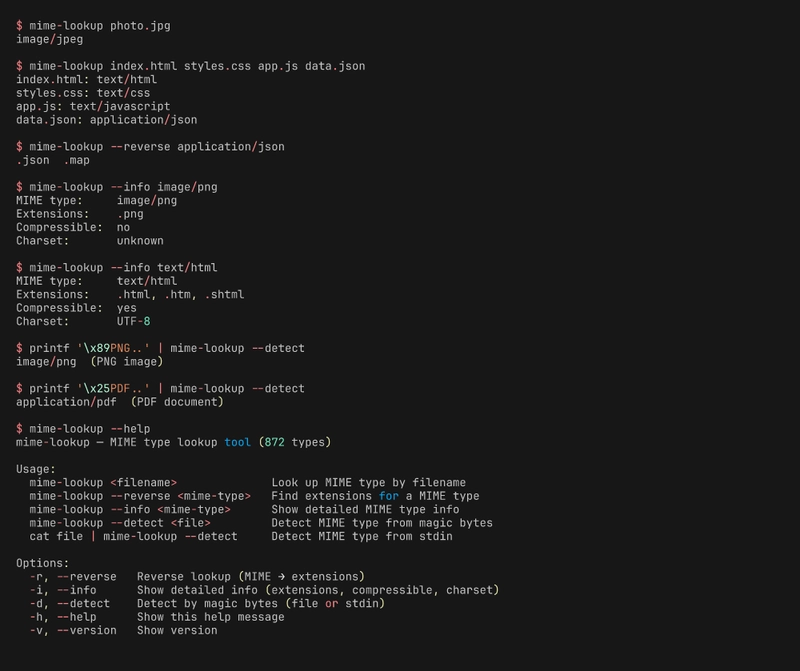
What it does
The tool supports four modes of operation, each designed for a different workflow:
# Forward lookup: filename → MIME type
$ mime-lookup photo.jpg
image/jpeg

# Multiple files at once
$ mime-lookup index.html styles.css app.js
index.html: text/html
styles.css: text/css
app.js: text/javascript

# Reverse lookup: MIME type → extensions
$ mime-lookup --reverse application/json
.json  .map

# Detailed info
$ mime-lookup --info image/png
MIME type:     image/png
Extensions:    .png
Compressible:  no
Charset:       unknown

# Magic byte detection from file or stdin
$ mime-lookup --detect mystery.bin
application/pdf  (PDF document)
The forward lookup is the most common use case — you have a filename and want to know what Content-Type header to send. The reverse lookup helps when you have a MIME type from an HTTP response and need to decide what file extension to save it as. The info mode is useful for build tools that need to know whether a file type is compressible (for gzip/brotli decisions) or what charset to declare.
Architecture: Three Modules, Clear Boundaries
The project is structured around three core modules with distinct responsibilities:
The Database (src/db.ts)
The heart of the tool is a TypeScript Record<string, MimeEntry> containing 800+ MIME type definitions. Each entry includes an array of file extensions, an optional compressible flag, and an optional charset field:
export interface MimeEntry {
  extensions: string[];
  compressible?: boolean;
  charset?: string;
}

export const mimeDb: Record<string, MimeEntry> = {
  "text/html": {
    extensions: [".html", ".htm", ".shtml"],
    compressible: true,
    charset: "UTF-8"
  },
  "image/jpeg": {
    extensions: [".jpg", ".jpeg", ".jpe"],
    compressible: false
  },
  // ... 800+ more entries
};
I chose to embed the database as a TypeScript const rather than loading a JSON file at runtime. This means the type checker validates every entry at compile time. If someone accidentally sets compressible to a string instead of a boolean, the build fails. No runtime surprises.
The database covers text types, application types (documents, archives, data formats, web, crypto, geo), image types (including RAW camera formats like CR2, NEF, ARW), audio, video, font, model, chemical, and hundreds of vendor-specific types. It is organized by category with comments for navigability.
The Lookup Engine (src/lookup.ts)
The lookup module builds a reverse index at import time — a Map<string, string[]> that maps each extension to all MIME types that use it:
const extIndex = new Map<string, string[]>();
for (const [mime, entry] of Object.entries(mimeDb)) {
  for (const ext of entry.extensions) {
    const lower = ext.toLowerCase();
    const list = extIndex.get(lower) ?? [];
    list.push(mime);
    extIndex.set(lower, list);
  }
}
This is a one-time cost at startup. After that, lookups by extension are O(1) map reads. The reverse index also reveals an interesting property of the MIME system: some extensions map to multiple MIME types. For example, .xml maps to both text/xml and application/xml. The allByExtension() function exposes all matches, while lookupByFilename() returns only the first — which is typically the most canonical one.
The lookupByFilename() function uses Node's path.extname() to extract the extension, normalizes it to lowercase, and looks it up in the reverse index. If nothing is found, it returns application/octet-stream — the MIME type that means "I don't know what this is, treat it as binary data."
Magic Byte Detection (src/magic.ts)
Extension-based lookup fails when files are misnamed, extensionless, or arrive from untrusted sources. This is where magic byte detection comes in. Every file format defines a unique sequence of bytes at the beginning of the file — its "magic number" or "file signature."
The magic module defines a table of known signatures:
export interface MagicSignature {
  bytes: string;     // Hex bytes to match
  offset: number;    // Byte offset
  mime: string;       // MIME type
  description: string;
}

export const signatures: MagicSignature[] = [
  { bytes: "89504e47", offset: 0, mime: "image/png",
    description: "PNG image" },
  { bytes: "ffd8ff",   offset: 0, mime: "image/jpeg",
    description: "JPEG image" },
  { bytes: "25504446", offset: 0, mime: "application/pdf",
    description: "PDF document" },
  // ... 40+ more
];
Detection reads the first 64 bytes of a file (or stdin), converts them to a hex string, and scans through the signature table looking for a prefix match:
export function detectFromBuffer(buf: Buffer): MagicSignature | null {
  const hex = buf.subarray(0, 64).toString("hex");
  for (const sig of signatures) {
    const start = sig.offset * 2;
    const end = start + sig.bytes.length;
    if (hex.length >= end && hex.slice(start, end) === sig.bytes) {
      return sig;
    }
  }
  return null;
}
This is deliberately simple — a linear scan through ~45 signatures. For a CLI tool, this takes microseconds and avoids the complexity of a trie or hash-based lookup. The signature table covers the most common formats: PNG, JPEG (JFIF, EXIF, Adobe variants), GIF, BMP, WebP, TIFF, PDF, ZIP, GZIP, BZIP2, XZ, Zstandard, 7-Zip, RAR, ELF, Mach-O (32/64-bit, both endianness), WebAssembly, FLAC, OGG, MP3, MKV/WebM, SQLite, WOFF/WOFF2, TrueType, and OpenType.
One subtle detail: JPEG files don't have a single magic number. They all start with FF D8 FF, but the fourth byte varies — E0 for JFIF, E1 for EXIF, EE for Adobe, DB for raw. The signature table lists specific variants first (for accurate description strings) and falls through to the generic three-byte match.
The CLI Layer (src/cli.ts)
The CLI uses Node's built-in parseArgs from node:util — no argument parsing library needed:
const { values, positionals } = parseArgs({
  allowPositionals: true,
  options: {
    reverse: { type: "boolean", short: "r", default: false },
    info:    { type: "boolean", short: "i", default: false },
    detect:  { type: "boolean", short: "d", default: false },
    help:    { type: "boolean", short: "h", default: false },
    version: { type: "boolean", short: "v", default: false },
  },
});
The detect mode has a nice ergonomic touch: if a positional argument is given, it reads that file. If not, and stdin is not a terminal, it reads from stdin. This means you can pipe data directly:
curl -s https://example.com/unknown | mime-lookup --detect
Zero Dependencies: Why and How
The package.json has zero runtime dependencies. All dev dependencies (tsx, typescript, vitest, @types/node) are compile-time only. This matters for several reasons:
-
Install speed —
npm installpulls only dev tools, not a tree of transitive dependencies - Security surface — fewer packages means fewer supply chain attack vectors
- Bundle size — the compiled JavaScript is self-contained
-
Docker image — the production stage only needs the
dist/directory andnode
The Dockerfile uses a multi-stage build. The builder stage installs all dev dependencies and compiles TypeScript. The production stage copies only the compiled JavaScript, runs as a non-root user, and has no node_modules at all:
FROM node:20-alpine AS builder
WORKDIR /app
COPY package.json package-lock.json* ./
RUN npm ci
COPY tsconfig.json ./
COPY src/ src/
RUN npx tsc

FROM node:20-alpine
RUN addgroup -g 1001 appgroup && \
    adduser -u 1001 -G appgroup -s /bin/sh -D appuser
WORKDIR /app
COPY --from=builder /app/dist/ dist/
COPY package.json ./
USER appuser
ENTRYPOINT ["node", "dist/cli.js"]
Building the MIME Database
The most tedious part of this project was assembling 800+ MIME type entries. I started with the IANA media type registry as the canonical source, then cross-referenced with the mime-db npm package (which itself draws from Apache and nginx configurations) to fill in extension mappings.
The database is organized into sections: text types, application types (further split into documents, data formats, web, crypto/security, geo, and miscellaneous), image types, audio, video, font, model, chemical, and a large block of vendor-specific (vnd.*) types. The vendor types are the longest section — they include everything from application/vnd.ms-excel to application/vnd.yamaha.smaf-phrase.
Some interesting edge cases I encountered:
-
.jsmaps to bothtext/javascriptandapplication/javascript. The IANA standard saystext/javascript, butapplication/javascriptwas used for years. The lookup returnstext/javascript(it appears first in the database). -
.xmlis claimed by multiple types —text/xml,application/xml,application/xhtml+xmlvariants. The reverse index stores all of them. -
.tsis ambiguous — it could be TypeScript (text/x-typescript) or MPEG transport stream (video/mp2t). Context matters, and a simple extension-based lookup cannot resolve this. -
Some MIME types have no extensions — types like
multipart/form-dataorapplication/vnd.api+jsonare used in HTTP headers but never as file extensions.
Testing Strategy
The test suite covers all four modes with 32 tests:
describe("lookupByFilename", () => {
  it("resolves .jpg to image/jpeg", () => {
    expect(lookupByFilename("photo.jpg")).toBe("image/jpeg");
  });
  it("is case-insensitive", () => {
    expect(lookupByFilename("image.JPG")).toBe("image/jpeg");
  });
  it("returns octet-stream for unknown extensions", () => {
    expect(lookupByFilename("file.xyz123"))
      .toBe("application/octet-stream");
  });
});
Magic byte detection tests create buffers from hex strings and verify detection:
it("detects PNG", () => {
  const buf = Buffer.from("89504e470d0a1a0a", "hex");
  const result = detectFromBuffer(buf);
  expect(result?.mime).toBe("image/png");
});
The database size test ensures we maintain 800+ entries — a guard against accidentally deleting sections during edits:
it("has 800+ MIME types", () => {
  expect(dbSize()).toBeGreaterThanOrEqual(800);
});
Practical Use Cases
Beyond manual lookups, mime-lookup fits into several workflows:
Static file servers: Determine the correct Content-Type header for any file you serve. Many simple file servers hardcode a small lookup table — this tool provides a comprehensive one.
Build tools: Decide whether a file is compressible before applying gzip or brotli. The --info mode's compressible flag answers this directly.
Security scanning: Verify that uploaded files match their claimed MIME type. Compare the extension-based lookup against magic byte detection — if they disagree, the file may be misnamed (intentionally or not).
CI pipelines: Validate that generated artifacts have expected MIME types. A build that produces a .wasm file should see application/wasm, not application/octet-stream.
Data pipelines: When processing files from heterogeneous sources, detect the actual format before choosing a parser. A file named data.txt might actually be gzipped CSV — magic byte detection catches this.
What I Learned
MIME types are a mess. The IANA registry is the canonical source, but real-world usage deviates significantly. Browser behavior, server configurations, and historical accidents have created a situation where multiple MIME types exist for the same format, and the "correct" one depends on context.
Magic bytes are more reliable than extensions for format identification, but they have limits. Some formats share prefixes (ZIP-based formats like DOCX, XLSX, JAR all start with PK), and some formats have no fixed signature at all (plain text, CSV).
Embedding data in source code works surprisingly well for databases of this size. The TypeScript compiler type-checks every entry, the bundler inlines everything, and there is no file I/O at startup. The tradeoff is a larger source file (~900 lines for the database), but that is a price worth paying for simplicity.
node:util.parseArgs is good enough for most CLI tools. You do not need commander, yargs, or meow unless you have subcommands or complex validation. For a tool with five boolean flags and positional arguments, the built-in parser is perfect.
Conclusion
mime-lookup solves a small, well-defined problem completely. It answers the question "what is this file?" in four different ways, covers 800+ MIME types, detects 45+ file formats by their binary signature, and does it all without runtime dependencies.
The source code is MIT-licensed and runs on any system with Node.js 20+. Clone it, build it, use it in your scripts, or study the MIME database for your own projects.
This is entry #198 in my series of building 200 developer tools. Each tool solves a real problem, ships as a complete CLI, and is published as open source.


Top comments (0)