
close
COUCHBASE
Keshav Murthy
Senior Director, Couchbase R&D
Rio de Janeiro, Brazil
August, 27th, 2018
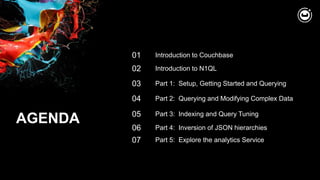
AGENDA
02
03
Introduction to N1QL
Part 1: Setup, Getting Started and Querying
01 Introduction to Couchbase
04 Part 2: Querying and Modifying Complex Data
05 Part 3: Indexing and Query Tuning
06 Part 4: Inversion of JSON hierarchies
07 Part 5: Explore the analytics Service
1 INTRODUCTION TO
COUCHBASE
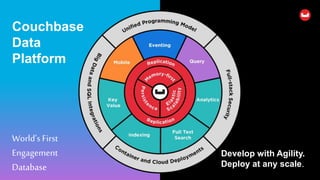
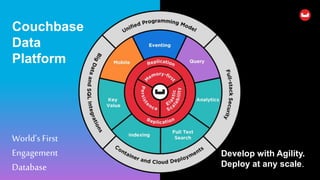
Couchbase
Data
Platform
Develop with Agility.
Deploy at any scale.
World’sFirst
Engagement
Database
5
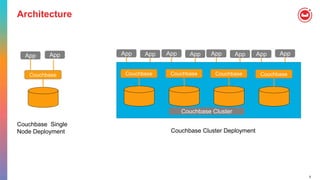
Architecture
App App
Couchbase
App App
Couchbase
App App
Couchbase
App App
Couchbase
Couchbase Cluster
App App
Couchbase
Couchbase Single
Node Deployment Couchbase Cluster Deployment
6
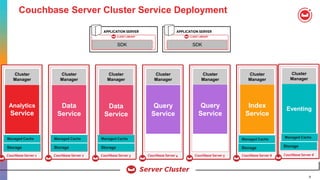
Couchbase Server Cluster Service Deployment
STORAGE
Couchbase Server 1
SHARD
7
SHARD
9
SHARD
5
SHARDSHARDSHARD
Managed Cache
Cluster
ManagerCluster
Manager
Managed Cache
Storage
Analytics
Service STORAGE
Couchbase Server 2
Managed Cache
Cluster
ManagerCluster
Manager
Data
Service STORAGE
Couchbase Server 3
SHARD
7
SHARD
9
SHARD
5
SHARDSHARDSHARD
Managed Cache
Cluster
ManagerCluster
Manager
Data
Service STORAGE
Couchbase Server 4
SHARD
7
SHARD
9
SHARD
5
SHARDSHARDSHARD
Managed Cache
Cluster
ManagerCluster
Manager
Query
Service STORAGE
Couchbase Server 5
SHARD
7
SHARD
9
SHARD
5
SHARDSHARDSHARD
Managed Cache
Cluster
ManagerCluster
Manager
Query
Service STORAGE
Couchbase Server 6
SHARD
7
SHARD
9
SHARD
5
SHARDSHARDSHARD
Managed Cache
Cluster
ManagerCluster
Manager
Index
Service
Managed Cache
Storage
Managed Cache
Storage Storage
STORAGE
Couchbase Server 6
SHARD
7
SHARD
9
SHARD
5
SHARDSHARDSHARD
Managed Cache
Cluster
ManagerCluster
Manager
Eventing
Storage
Managed Cache
Managed Cache
SDK SDK
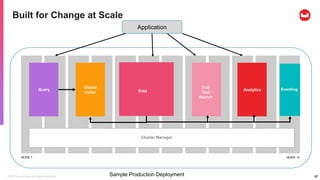
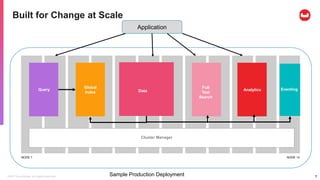
©2017 Couchbase. All rights reserved. 7Sample Production Deployment
NODE 1 NODE 12
Cluster Manager
Data
Full
Text
Search
Analytics
Global
Index
Query
Built for Change at Scale
Application
Eventing
8
COUCHBASE
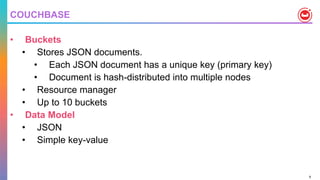
• Buckets
• Stores JSON documents.
• Each JSON document has a unique key (primary key)
• Document is hash-distributed into multiple nodes
• Resource manager
• Up to 10 buckets
• Data Model
• JSON
• Simple key-value
9
COUCHBASE
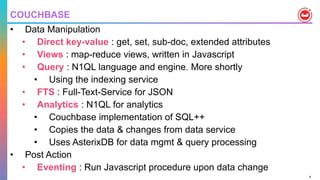
• Data Manipulation
• Direct key-value : get, set, sub-doc, extended attributes
• Views : map-reduce views, written in Javascript
• Query : N1QL language and engine. More shortly
• Using the indexing service
• FTS : Full-Text-Service for JSON
• Analytics : N1QL for analytics
• Couchbase implementation of SQL++
• Copies the data & changes from data service
• Uses AsterixDB for data mgmt & query processing
• Post Action
• Eventing : Run Javascript procedure upon data change
10
COUCHBASE – Open source
• https://github.com/couchbase
• AsterixDB used inside analytics service is an Apache Project
• https://asterixdb.apache.org/
2 N1QL = SQL + JSON
12
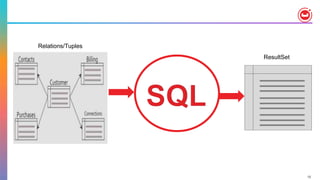
ResultSet
Relations/Tuples
13
{
"Name" : "Jane Smith",
"DOB" : "1990-01-30",
"Billing" : [
{
"type" : "visa",
"cardnum" : "5827-2842-2847-3909",
"expiry" : "2019-03"
},
{
"type" : "master",
"cardnum" : "6274-2842-2847-3909",
"expiry" : "2019-03"
}
],
"Connections" : [
{
"CustId" : "XYZ987",
"Name" : "Joe Smith"
},
{
"CustId" : "PQR823",
"Name" : "Dylan Smith"
}
{
"CustId" : "PQR823",
"Name" : "Dylan Smith"
}
],
"Purchases" : [
{ "id":12, item: "mac", "amt": 2823.52 }
{ "id":19, item: "ipad2", "amt": 623.52 }
]
}
LoyaltyInfo
Results
Orders
CUSTOMER
• NoSQL systems provide specialized APIs
• Key-Value get and set
• Each task requires custom built program
• Should test & maintain it
14
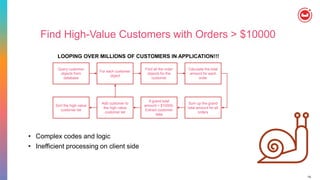
Find High-Value Customers with Orders > $10000
Query customer
objects from
database
• Complex codes and logic
• Inefficient processing on client side
For each customer
object
Find all the order
objects for the
customer
Calculate the total
amount for each
order
Sum up the grand
total amount for all
orders
If grand total
amount > $10000,
Extract customer
data
Add customer to
the high-value
customer list
Sort the high-value
customer list
LOOPING OVER MILLIONS OF CUSTOMERS IN APPLICATION!!!
15
{
"Name" : "Jane Smith",
"DOB" : "1990-01-30",
"Billing" : [
{
"type" : "visa",
"cardnum" : "5827-2842-2847-3909",
"expiry" : "2019-03"
},
{
"type" : "master",
"cardnum" : "6274-2842-2847-3909",
"expiry" : "2019-03"
}
],
"Connections" : [
{
"CustId" : "XYZ987",
"Name" : "Joe Smith"
},
{
"CustId" : "PQR823",
"Name" : "Dylan Smith"
}
{
"CustId" : "PQR823",
"Name" : "Dylan Smith"
}
],
"Purchases" : [
{ "id":12, item: "mac", "amt": 2823.52 }
{ "id":19, item: "ipad2", "amt": 623.52 }
]
}
LoyaltyInfo
ResultDocuments
Orders
CUSTOMER
16
N1QL = SQL + JSON
Give developers and enterprises an
expressive, powerful, and complete language
for querying, transforming, and manipulating
JSON data.
17
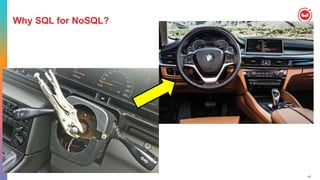
Why SQL for NoSQL?
18
N1QL : Data Types from JSON
Data Type Example
Numbers { "id": 5, "balance":2942.59 }
Strings { "name": "Joe", "city": "Morrisville" }
Boolean { "premium": true, "balance pending": false}
Null { "last_address": Null }
Array { "hobbies": ["tennis", "skiing", "lego"]}
Object { "address": {"street": "1, Main street", "city":
Morrisville, "state":"CA", "zip":"94824"}}
MISSING
Arrays of objects of arrays [
{
"type": "visa",
"cardnum": "5827-2842-2847-3909",
"expiry": "2019-03"
},
{
"type": "master",
"cardnum": "6274-2542-5847-3949",
"expiry": "2018-12"
}
]
19
N1QL: Data Manipulation Statements
•SELECT Statement-
•UPDATE … SET … WHERE …
•DELETE FROM … WHERE …
•INSERT INTO … ( KEY, VALUE ) VALUES …
•INSERT INTO … ( KEY …, VALUE … ) SELECT …
•MERGE INTO … USING … ON …
WHEN [ NOT ] MATCHED THEN …
Note: Couchbase provides per-document atomicity.
20
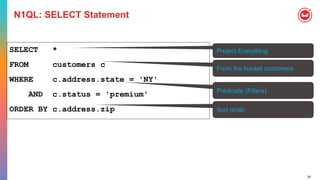
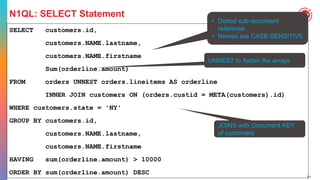
N1QL: SELECT Statement
SELECT *
FROM customers c
WHERE c.address.state = 'NY'
AND c.status = 'premium'
ORDER BY c.address.zip
Project Everything
From the bucket customers
Sort order
Predicate (Filters)
21
N1QL: SELECT Statement
SELECT customers.id,
customers.NAME.lastname,
customers.NAME.firstname
Sum(orderline.amount)
FROM orders UNNEST orders.lineitems AS orderline
INNER JOIN customers ON (orders.custid = META(customers).id)
WHERE customers.state = 'NY'
GROUP BY customers.id,
customers.NAME.lastname,
customers.NAME.firstname
HAVING sum(orderline.amount) > 10000
ORDER BY sum(orderline.amount) DESC
• Dotted sub-document
reference
• Names are CASE-SENSITIVE
UNNEST to flatten the arrays
JOINS with Document KEY
of customers
22
N1QL: SELECT Statement Highlights
• Querying across relationships
• INNER JOIN, LEFT OUTER JOIN, RIGHT OUTER JOIN (5.5)
• Subqueries
• Aggregation (HUGE PERFORMANCE IMPROVEMENT IN 5.5)
• MIN, MAX
• SUM, COUNT, AVG, ARRAY_AGG [ DISTINCT ]
• Combining result sets using set operators
• UNION, UNION ALL, INTERSECT, INTERSECT ALL, EXCEPT, EXCEPT ALL
23
N1QL : Query Operators [ 1 of 2 ]
•USE KEYS …
• Direct primary key lookup bypassing index scans
• Ideal for hash-distributed datastore
• Available in SELECT, UPDATE, DELETE
•JOINs
• INNER, LEFT OUTER, limited RIGHT-OUTER
• Nested loop JOIN is the default
• HASH JOIN for significantly better performance with larger amount of data.
• Ideal for hash-distributed datastore
24
N1QL : Query Operators [ 2 of 2 ]
• UNNEST
• Flattening JOIN that surfaces nested objects as top-level documents
• Ideal for decomposing JSON hierarchies
• Example: Flatten customer document to customer-orders
•NEST
• Does the opposite of UNNEST
• Special JOIN that embeds external child documents under their parent
• Ideal for JSON encapsulation
•JOIN, NEST, and UNNEST can be chained in any combination
25
UNNEST
{
"Name" : "Jane Smith",
"DOB" : "1990-01-30",
"Billing" : [
{
"type" : "visa",
"cardnum" : "5827-2842-2847-3909",
"expiry" : "2019-03"
},
{
"type" : "master",
"cardnum" : "6274-2842-2847-3909",
"expiry" : "2019-03"
}
]
}
"c": {
"Name" : "Jane Smith",
"DOB" : "1990-01-30",
"Billing" : [
{
"type" : "visa",
"cardnum" : "5827-2842-2847-3909",
"expiry" : "2019-03"
},
{
"type" : "master",
"cardnum" : "6274-2842-2847-3909",
"expiry" : "2019-03"
}
]
},
"type" : "master",
"cardnum" : "6274-2842-2847-3909”
}
SELECT c, b.type, b.cardnum
FROM customer c
UNNEST c.Billing AS b
"c": {
"Name" : "Jane Smith",
"DOB" : "1990-01-30",
"Billing" : [
{
"type" : "visa",
"cardnum" : "5827-2842-2847-3909",
"expiry" : "2019-03"
},
{
"type" : "master",
"cardnum" : "6274-2842-2847-3909",
"expiry" : "2019-03"
}
]
},
"type" : "visa",
"cardnum" : "5827-2842-2847-3909”
}
26
N1QL : Expressions for JSON
Ranging over collections
• WHERE ANY c IN children SATISFIES c.age > 10 END
• WHERE EVERY r IN ratings SATISFIES r > 3 END
Mapping with filtering • ARRAY c.name FOR c IN children WHEN c.age > 10 END
Deep traversal, SET,
and UNSET
• WHERE ANY node WITHIN request SATISFIES node.type = “xyz” END
• UPDATE doc UNSET c.field1 FOR c WITHIN doc END
Dynamic Construction
• SELECT { “a”: expr1, “b”: expr2 } AS obj1, name FROM … // Dynamic
object
• SELECT [ a, b ] FROM … // Dynamic array
Nested traversal • SELECT x.y.z, a[0] FROM a.b.c …
IS [ NOT ] MISSING • WHERE name IS MISSING
27
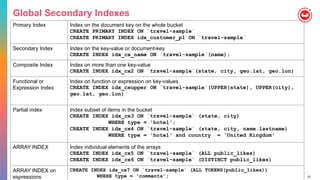
Global Secondary Indexes
Primary Index Index on the document key on the whole bucket
CREATE PRIMARY INDEX ON `travel-sample`
CREATE PRIMARY INDEX idx_customer_p1 ON `travel-sample`
Secondary Index Index on the key-value or document-key
CREATE INDEX idx_cx_name ON `travel-sample`(name);
Composite Index Index on more than one key-value
CREATE INDEX idx_cx2 ON `travel-sample`(state, city, geo.lat, geo.lon)
Functional or
Expression Index
Index on function or expression on key-values
CREATE INDEX idx_cxupper ON `travel-sample`(UPPER(state), UPPER(city),
geo.lat, geo.lon)
Partial index Index subset of items in the bucket
CREATE INDEX idx_cx3 ON `travel-sample` (state, city)
WHERE type = 'hotel';
CREATE INDEX idx_cx4 ON `travel-sample` (state, city, name.lastname)
WHERE type = 'hotel' and country = 'United Kingdom'
ARRAY INDEX Index individual elements of the arrays
CREATE INDEX idx_cx5 ON `travel-sample` (ALL public_likes)
CREATE INDEX idx_cx6 ON `travel-sample` (DISTINCT public_likes)
ARRAY INDEX on
expressions
CREATE INDEX idx_cx7 ON `travel-sample` (ALL TOKENS(public_likes))
WHERE type = ‘comments’;
28
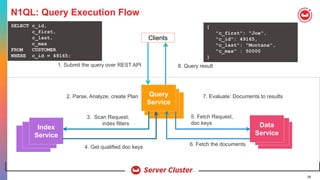
N1QL: Query Execution Flow
Clients
1. Submit the query over REST API 8. Query result
2. Parse, Analyze, create Plan 7. Evaluate: Documents to results
3. Scan Request;
index filters
6. Fetch the documents
Index
Service
Query
Service
Data
Service
4. Get qualified doc keys
5. Fetch Request,
doc keys
SELECT c_id,
c_first,
c_last,
c_max
FROM CUSTOMER
WHERE c_id = 49165;
{
"c_first": "Joe",
"c_id": 49165,
"c_last": "Montana",
"c_max" : 50000
}
29
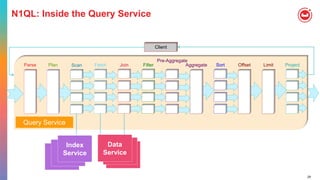
N1QL: Inside the Query Service
Client
FetchParse Plan Join Filter
Pre-Aggregate
Offset Limit ProjectSortAggregateScan
Query Service
Index
Service
Data
Service
30
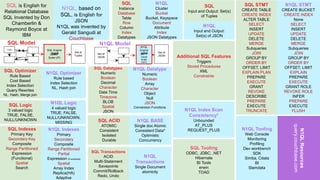
SQL is English for
Relational Database
SQL Invented by Don
Chamberlin &
Raymond Boyce at
IBM
N1QL, based on
SQL, is English for
JSON
N1QL was invented by
Gerald Sangudi at
Couchbase
SQL
Instance
Database
Table
Row
Column
Index
Datatypes
N1QL
Cluster
Bucket
Bucket, Keyspace
Document
Attribute
Index
JSON Datatypes
SQL
Input and Output: Set(s)
of Tuples
N1QL STMT
CREATE BUCKET
CREATE INDEX
None
SELECT
INSERT
UPDATE
DELETE
MERGE
Subqueries
JOIN
GROUP BY
ORDER BY
OFFSET, LIMIT
EXPLAIN
PREPARE
EXECUTE
GRANT ROLE
REVOKE ROLE
INFER
PREPARE
EXECUTE
FLUSH
Tuples
SQL Model
Set of
JSON
N1QL Model
Set of
Tuples
Set of
JSON
N1QL Tooling
Web Console
Monitoring
Profiling
Dev workbench
SDK
Simba, Cdata
BI
Slamdata
SQL Tooling
ODBC, JDBC, .NET
Hibernate
BI Tools
erwin
TOAD
N1QLResources
query.couchbase.com
SQL Indexes
Primary Key
Secondary Key
Composite
Range Partitioned
Expression
(Functional)
Spatial
Search
N1QL Indexes
Primary
Secondary
Composite
Range Partitioned
Partial
Expression (Functional)
Spatial
Array Index
Replica(HA)
Adaptive
SQL Logic
3 valued logic
TRUE, FALSE,
NULL/UNKNOWN
N1QL Logic
4 valued logic
TRUE, FALSE,
NULL/UNKNOWN,
MISSING
SQL Transactions
ACID
Multi-Statement
Savepoints
Commit/Rollback
Redo, Undo
N1QL
Transactions
Single Document
atomicity
SQL Datatypes
Numeric
Boolean
Decimal
Character
Date Time
Timezone
BLOB
Spatial
JSON
N1QL Datatype
Numeric
Boolean
Array
Character
Object
Null
JSON
Conversion Functions
SQL Optimizer
Rule Based
Cost Based
Index Selection
Query Rewrites
NL, Hash, Merge join
N1QL Optimizer
Rule based
Index Selection
NL, Hash join
SQL ACID
ATOMIC
Consistent
Isolated
Durable
N1QL BASE
Single doc Atomic
Consistent Data*
Optimistic
Concurrency
N1QL Index Scan
Consistency*
Unbounded
AT_PLUS
REQUEST_PLUS
SQL Engine
(SMP
Scale UP)
N1QL
Engine
(MPP
Cluste
Scale
OUT)
Additional SQL Features
Triggers
Stored Procedures
XML
Constraints
SQL STMT
CREATE TABLE
CREATE INDEX
ALTER TABLE
SELECT
INSERT
UPDATE
DELETE
MERGE
Subqueries
JOIN
GROUP BY
ORDER BY
OFFSET, LIMIT
EXPLAIN PLAN
PREPARE
EXECUTE
GRANT
REVOKE
DESCRIBE
PREPARE
EXECUTE
TRUNCATE
N1QL
Input and Output:
Set(s) of JSON
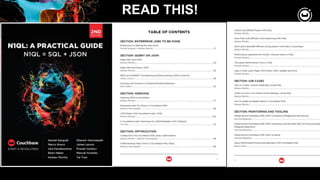
READ THIS!
READ THIS!
3
PART 1: SETUP, GETTING
STARTED AND QUERYING
34
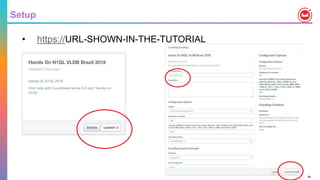
Setup
• https://URL-SHOWN-IN-THE-TUTORIAL
35
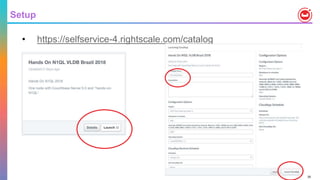
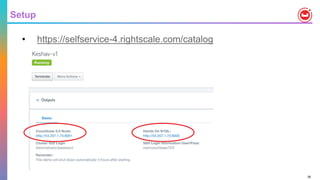
Setup
• https://selfservice-4.rightscale.com/catalog
36
Setup
• https://selfservice-4.rightscale.com/catalog
37
More workshop
Part 2: Querying and Modifying Complex Data
Part 3: Indexing and Query Tuning
Part 4: Inversion of JSON hierarchies
7 COUCHBASE ANALYTICS
39
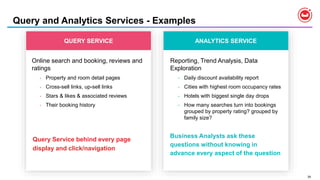
QUERY SERVICE
Online search and booking, reviews and
ratings
• Property and room detail pages
• Cross-sell links, up-sell links
• Stars & likes & associated reviews
• Their booking history
Query Service behind every page
display and click/navigation
ANALYTICS SERVICE
Reporting, Trend Analysis, Data
Exploration
• Daily discount availability report
• Cities with highest room occupancy rates
• Hotels with biggest single day drops
• How many searches turn into bookings
grouped by property rating? grouped by
family size?
Business Analysts ask these
questions without knowing in
advance every aspect of the question
Query and Analytics Services - Examples
Confidential and Proprietary. Do not distribute without Couchbase consent. © Couchbase 2018. All rights reserved. 40
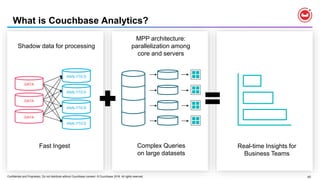
Shadow data for processing
What is Couchbase Analytics?
Fast Ingest Complex Queries
on large datasets
Real-time Insights for
Business Teams
DATA
DATA
DATA
ANALYTICS
ANALYTICS
ANALYTICS
ANALYTICS
MPP architecture:
parallelization among
core and servers
Confidential and Proprietary. Do not distribute without Couchbase consent. © Couchbase 2018. All rights reserved. 41
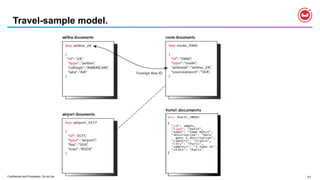
Travel-sample model.
42
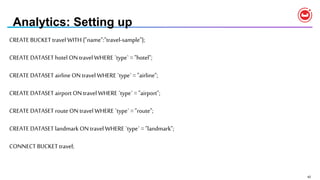
Analytics: Setting up
CREATE BUCKET travel WITH {"name":"travel-sample"};
CREATE DATASET hotel ON travel WHERE `type` = "hotel";
CREATE DATASET airline ON travel WHERE `type` = "airline";
CREATE DATASET airport ON travel WHERE `type` = "airport";
CREATE DATASET route ON travel WHERE `type` = "route";
CREATE DATASET landmarkON travel WHERE `type` = "landmark";
CONNECT BUCKET travel;
43
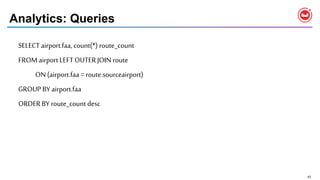
Analytics: Queries
SELECT airport.faa, count(*) route_count
FROM airport LEFT OUTER JOIN route
ON (airport.faa = route.sourceairport)
GROUP BY airport.faa
ORDER BY route_count desc
44
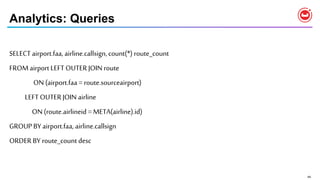
Analytics: Queries
SELECT airport.faa, airline.callsign,count(*) route_count
FROM airport LEFT OUTER JOIN route
ON (airport.faa = route.sourceairport)
LEFT OUTERJOIN airline
ON (route.airlineid = META(airline).id)
GROUP BY airport.faa, airline.callsign
ORDER BY route_count desc
45
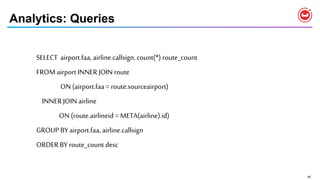
Analytics: Queries
SELECT airport.faa, airline.callsign,count(*) route_count
FROM airport INNER JOIN route
ON (airport.faa = route.sourceairport)
INNER JOIN airline
ON (route.airlineid = META(airline).id)
GROUP BY airport.faa, airline.callsign
ORDER BY route_count desc
Couchbase
Data
Platform
Develop with Agility.
Deploy at any scale.
World’sFirst
Engagement
Database
©2017 Couchbase. All rights reserved. 47Sample Production Deployment
NODE 1 NODE 12
Cluster Manager
Data
Full
Text
Search
Analytics
Global
Index
Query
Built for Change at Scale
Application
Eventing
*
N1QL FEATURES IN
COUCHBASE 5.0 AND 5.5
49
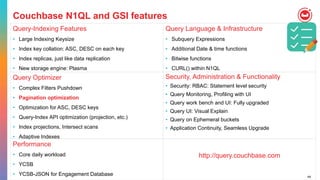
Couchbase N1QL and GSI features
Query-Indexing Features
• Large Indexing Keysize
• Index key collation: ASC, DESC on each key
• Index replicas, just like data replication
• New storage engine: Plasma
Query Language & Infrastructure
• Subquery Expressions
• Additional Date & time functions
• Bitwise functions
• CURL() within N1QL
Query Optimizer
• Complex Filters Pushdown
• Pagination optimization
• Optimization for ASC, DESC keys
• Query-Index API optimization (projection, etc.)
• Index projections, Intersect scans
• Adaptive Indexes
Security, Administration & Functionality
• Security: RBAC: Statement level security
• Query Monitoring, Profiling with UI
• Query work bench and UI: Fully upgraded
• Query UI: Visual Explain
• Query on Ephemeral buckets
• Application Continuity, Seamless Upgrade
Performance
• Core daily workload
• YCSB
• YCSB-JSON for Engagement Database
http://query.couchbase.com
50
Query-Indexing Enhancements
Index key collation: ASC, DESC on each key
• Prior to 5.0, each index key was sorted and kept in ASCENDING order only
• To sort the key in descending order, you did
• CREATE INDEX i1 ON t(c1 ASC, -c2, -c3)
• SELECT * FROM t WHERE c1 = 10 and -c2 < -20 ORDER BY c1, -c2
• Query formulations becomes confusing
• Cannot use this trick on all data types and expressions
In Couchbase 5.0:
• CREATE INDEX i1 ON t(c1 ASC, c2 DESC, c3 DESC)
• SELECT * FROM t WHERE c1 = 10 and c2 < 20 ORDER BY c1,c2 DESC
• You need to create an index to match the ORDER BY order
• Reverse scans are still unsupported
51
Query-Indexing Enhancements
Large Indexing Keysize
• Prior to 5.0, the sum of index key size could be up to 4096 bytes
• This was controlled by the setting
• For ARRAY keys, sum of all array key sizes could be up to 10240.
• This is controlled by the setting max_array_seckey_size
In Couchbase 5.0:
• The total keysize could be pretty high – high up to 20 MB
• This is true for single key, composite key, expressions and array indexes as well.
• Simply do nothing, except create the index and issue the query.
• The index entries that exceed 20MB will still generate error in the index log
52
Query-Indexing Enhancements
Index replicas, just like data replication
• Prior to 5.0, you could create multiple indexes with same keys & condition
• This is needed for load balancing and index high availabilitt
CREATE INDEX i1 ON t(c1, c2, c3)
CREATE INDEX i2 ON t(c1, c2, c3)
CREATE INDEX i3 ON t(c1, c2, c3)
• Indexer automatically recognizes these to be equivalent and does load balancing on all o these.
In Couchbase 5.0:
• Simply create one index and set the num_replica at CREATE or ALTER time
• CREATE INDEX i1 ON t(c1, c2, c3) WITH {"num_replica":2}
• Number of replicas can be up to number of nodes in the cluster
• You can ALTER the number of replica dynamically
53
Query-Indexing Enhancements
New storage engine: Plasma
• Index size can be arbitrarily large
• Uses lock-free skip list
• All the performance benefits of MOI – Memory Optimized Index
• Automatically does IO as needed
• From usage point of view:
• Choose the standard secondary Index during installation
• simply create any kind of index and use it.
54
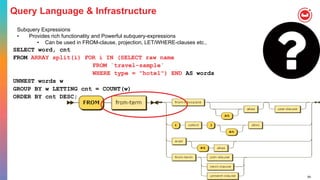
Query Language & Infrastructure
Subquery Expressions
• Provides rich functionality and Powerful subquery-expressions
• Can be used in FROM-clause, projection, LET/WHERE-clauses etc.,
SELECT word, cnt
FROM ARRAY split(i) FOR i IN (SELECT raw name
FROM `travel-sample`
WHERE type = "hotel") END AS words
UNNEST words w
GROUP BY w LETTING cnt = COUNT(w)
ORDER BY cnt DESC;
55
Query Language & Infrastructure
Additional Date, time, timestamp functions
• JSON does not directly support date and time related data types
• Store the date and time in extended ISO 8901 format
• "2017-10-16T18:44:43.308-07:00”
• Need extract, conversion and arithmetic functions
• Detailed article with all the functions and Oracle to Couchbase mapping
https://dzone.com/articles/comparing-oracle-and-n1ql-support-for-the-date-tim
• If you can’t do something, let us know!
56
Query Language & Infrastructure
CURL() within N1QL
• CURL (URL, [options])
• The first argument is the URL, which represents any URL that points to a JSON
endpoint.
• Only URLs with the http:// or the https:// protocol are supported.
• Redirection is disabled.
• The second argument is a list of options.
• This is a JSON object that contains a list of curl options and their corresponding
values.
• For a full list of options that we support, please refer to the Dzone article on
CURL in N1QL by Isha Kandaswamy
•
57
CURL() from N1QL
• Search for Santa Cruz in Spain using my Google dev api key
SELECT CURL("GET","https://maps.googleapis.com/maps/api/geocode/json",
{"data":"address=santa+cruz&components=country:ES&key=AIzaSyCT6niGCMsgegJkQ
SYasfoLZ4_rSO59XQQ"}) ;
• Live translate your text to another language.
SELECT ginfo
FROM (
SELECT r.content as english,
curl("https://translation.googleapis.com/language/translate/v2?key=PUT YOUR KEYS HERE",
{"request": "POST", "header":"Content-Type: application/json",
"data": mydata }) AS french
FROM `travel-sample` h USE KEYS "hotel_10142" UNNEST h.reviews r
LET mydata = '{ "q":"' || r.content || '", "target": "fr"}') AS ginfo
58
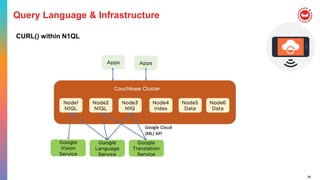
Query Language & Infrastructure
CURL() within N1QL
59
Query Language & Infrastructure
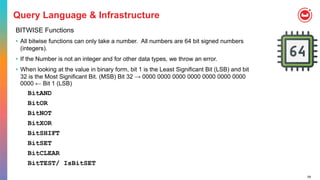
BITWISE Functions
• All bitwise functions can only take a number. All numbers are 64 bit signed numbers
(integers).
• If the Number is not an integer and for other data types, we throw an error.
• When looking at the value in binary form, bit 1 is the Least Significant Bit (LSB) and bit
32 is the Most Significant Bit. (MSB) Bit 32 → 0000 0000 0000 0000 0000 0000 0000
0000 ← Bit 1 (LSB)
BitAND
BitOR
BitNOT
BitXOR
BitSHIFT
BitSET
BitCLEAR
BitTEST/ IsBitSET
60
Query Optimizer & Execution: Stable Scans
• IndexScan use to do single range scan (i.e single Span)
• If the query has multiple ranges (i.e. OR, IN, NOT clauses) Query service used
to do separate IndexScan for each range.
• This causes Indexer can use different snapshot for each scan (make it unstable scan)
• Number of IndexScans can grow and result increase in index connections
• In 5.0.0 multiple ranges are passed into indexer and indexer uses same
snapshot for all the ranges.
• This makes stable Scan for given IndexScan (i.e. IndexScan2 in the EXPLAIN).
• This will not make stable scan for query due to Subqueries, Joins etc
• Example:
CREATE INDEX ix1 ON default(k0);
EXPLAIN SELECT META().id FROM default WHERE k0 IN [10,12,13];
61
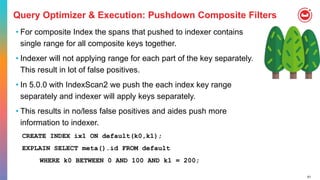
Query Optimizer & Execution: Pushdown Composite Filters
• For composite Index the spans that pushed to indexer contains
single range for all composite keys together.
• Indexer will not applying range for each part of the key separately.
This result in lot of false positives.
• In 5.0.0 with IndexScan2 we push the each index key range
separately and indexer will apply keys separately.
• This results in no/less false positives and aides push more
information to indexer.
CREATE INDEX ix1 ON default(k0,k1);
EXPLAIN SELECT meta().id FROM default
WHERE k0 BETWEEN 0 AND 100 AND k1 = 200;
62
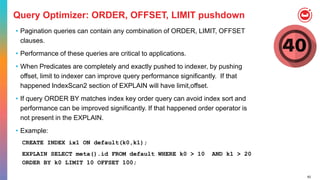
Query Optimizer: ORDER, OFFSET, LIMIT pushdown
• Pagination queries can contain any combination of ORDER, LIMIT, OFFSET
clauses.
• Performance of these queries are critical to applications.
• When Predicates are completely and exactly pushed to indexer, by pushing
offset, limit to indexer can improve query performance significantly. If that
happened IndexScan2 section of EXPLAIN will have limit,offset.
• If query ORDER BY matches index key order query can avoid index sort and
performance can be improved significantly. If that happened order operator is
not present in the EXPLAIN.
• Example:
CREATE INDEX ix1 ON default(k0,k1);
EXPLAIN SELECT meta().id FROM default WHERE k0 > 10 AND k1 > 20
ORDER BY k0 LIMIT 10 OFFSET 100;
63
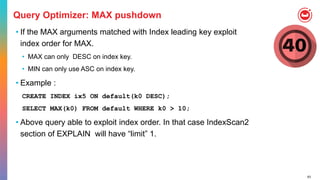
Query Optimizer: MAX pushdown
• If the MAX arguments matched with Index leading key exploit
index order for MAX.
• MAX can only DESC on index key.
• MIN can only use ASC on index key.
• Example :
CREATE INDEX ix5 ON default(k0 DESC);
SELECT MAX(k0) FROM default WHERE k0 > 10;
• Above query able to exploit index order. In that case IndexScan2
section of EXPLAIN will have “limit” 1.
64
Query Optimizer: Index Projection
• The index can have many keys but query might be interested only
subset of keys.
• By only requesting required information can save lot of network
transportation, memory, cpu, backfill etc. All this can help in
performance and scaling the cluster.
• The requested information can be found in “IndexScan2” Section of
EXPLAIN as “index_projection”
"index_projection": {
"entry_keys": [1, 5 ],
"primary_key": true
}
CREATE INDEX ix1 ON default(k0,k1,k2,k3,k4, k5);
EXPLAIN SELECT meta().id, k1, k5
FROM default
WHERE k0 > 10 AND k1 > 20;
65
Query Optimizer: Index Projection
CREATE INDEX ix1 ON default(k0,k1);
Covered query
SELECT k0 FROM default WHERE k0 = 10 AND k1 = 100;
"index_projection": {"entry_keys": [0,1]}
SELECT k0 FROM default WHERE k0 = 10;
"index_projection": {"entry_keys": [0]}
SELECT k0 ,META().idFROM default WHERE k0 = 10;
"index_projection": {"entry_keys": [0],“primary_key”: true}
Non-covered query
SELECT k0 ,k5 FROM default WHERE k0 = 10 AND k1 = 100;
"Index_projetion": { “primary_key”: true }
66
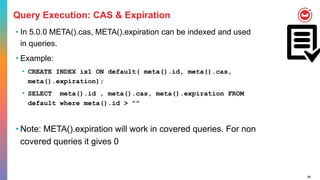
Query Execution: CAS & Expiration
• In 5.0.0 META().cas, META().expiration can be indexed and used
in queries.
• Example:
• CREATE INDEX ix1 ON default( meta().id, meta().cas,
meta().expiration);
• SELECT meta().id , meta().cas, meta().expiration FROM
default where meta().id > ""
• Note: META().expiration will work in covered queries. For non
covered queries it gives 0
67
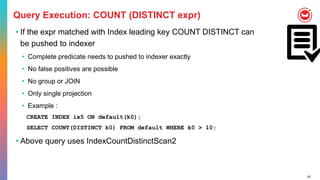
Query Execution: COUNT (DISTINCT expr)
• If the expr matched with Index leading key COUNT DISTINCT can
be pushed to indexer
• Complete predicate needs to pushed to indexer exactly
• No false positives are possible
• No group or JOIN
• Only single projection
• Example :
CREATE INDEX ix5 ON default(k0);
SELECT COUNT(DISTINCT k0) FROM default WHERE k0 > 10;
• Above query uses IndexCountDistinctScan2
68
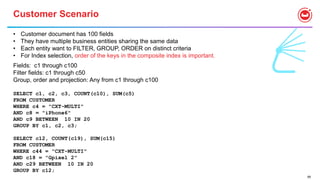
Customer Scenario
• Customer document has 100 fields
• They have multiple business entities sharing the same data
• Each entity want to FILTER, GROUP, ORDER on distinct criteria
• For Index selection, order of the keys in the composite index is important.
Fields: c1 through c100
Filter fields: c1 through c50
Group, order and projection: Any from c1 through c100
SELECT c1, c2, c3, COUNT(c10), SUM(c5)
FROM CUSTOMER
WHERE c4 = "CXT-MULTI"
AND c8 = "iPhone6"
AND c9 BETWEEN 10 IN 20
GROUP BY c1, c2, c3;
SELECT c12, COUNT(c19), SUM(c15)
FROM CUSTOMER
WHERE c44 = "CXT-MULTI"
AND c18 = "Gpixel 2"
AND c29 BETWEEN 10 IN 20
GROUP BY c12;
69
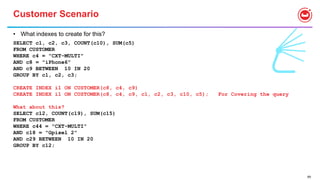
Customer Scenario
• What indexes to create for this?
SELECT c1, c2, c3, COUNT(c10), SUM(c5)
FROM CUSTOMER
WHERE c4 = "CXT-MULTI"
AND c8 = "iPhone6"
AND c9 BETWEEN 10 IN 20
GROUP BY c1, c2, c3;
CREATE INDEX i1 ON CUSTOMER(c8, c4, c9)
CREATE INDEX i1 ON CUSTOMER(c8, c4, c9, c1, c2, c3, c10, c5); For Covering the query
What about this?
SELECT c12, COUNT(c19), SUM(c15)
FROM CUSTOMER
WHERE c44 = "CXT-MULTI"
AND c18 = "Gpixel 2"
AND c29 BETWEEN 10 IN 20
GROUP BY c12;
70
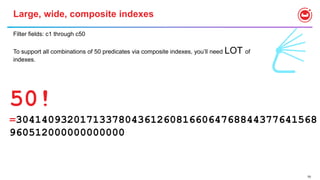
Large, wide, composite indexes
Filter fields: c1 through c50
To support all combinations of 50 predicates via composite indexes, you’ll need LOT of
indexes.
50!
=30414093201713378043612608166064768844377641568
960512000000000000
71
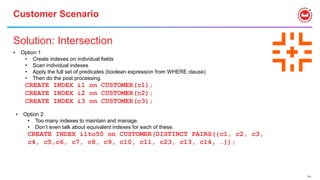
Customer Scenario
Solution: Intersection
• Option 1
• Create indexes on individual fields
• Scan individual indexes
• Apply the full set of predicates (boolean expression from WHERE clause)
• Then do the post processing.
CREATE INDEX i1 on CUSTOMER(c1);
CREATE INDEX i2 on CUSTOMER(c2);
CREATE INDEX i3 on CUSTOMER(c3);
• Option 2
• Too many indexes to maintain and manage.
• Don’t even talk about equivalent indexes for each of these.
CREATE INDEX i1to50 on CUSTOMER(DISTINCT PAIRS({c1, c2, c3,
c4, c5,c6, c7, c8, c9, c10, c11, c23, c13, c14, …});
72
Solution: Intersection
• Option 3
• Too many keys to manage/specify
• The document is flexible. I want the index to be flexible.
CREATE INDEX ixpairon CUSTOMER(DISTINCT PAIRS(self));
SELECT * FROM CUSTOMER WHERE a = 10 and b < 20 and c between 30 and 40;
"#operator": "IntersectScan",
"scans": [
{
"#operator": "DistinctScan",
"scan": {
"#operator": "IndexScan2",
"index": "ixpair",
"index_id": "466c0c5c4c3b21c1",
"index_projection": {
"primary_key": true
},
"keyspace": "test",
"namespace": "default",
"spans": [
{
"exact": true,
"range": [
{
"high": "["a", 10]",
"inclusion": 3,
"low": "["a", 10]"
}
"range": [
{
"high": "["b", 20]",
"inclusion": 1,
"low": "["b", false]"
}
"range": [
{
"high": "[successor("c")]",
"inclusion": 1,
"low": "["c", 30]"
}
]
73
Flexible Indexing
• This is not a silver bullet, yet.
• TRY THIS OUT
• SIZING is a concern because we {“Key“:“value“}
• Give us feedback
74
SECURITY : GRANT and REVOKE to roles
• Query_select, query_insert, query_update, query_delete roles
• Parameterized: query_select[customers] or query_insert[*]
• Query_manage_index[foo]
• Create, delete, build indexes on bucket foo
• Query_system_catalog
• Full access to the system tables (which are controlled now)
• Query_external_access
• Allows access to CURL() function (disabled by default)
GRANT cluster_admin TO spock
GRANT query_select ON default TO kirk
REVOKE query_insert, query_delete ON bridge, engineering FROM mccoy, scotty
75
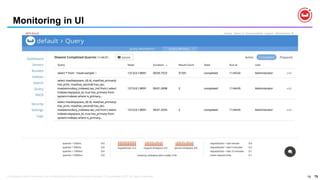
Monitoring in UI
75Confidential and Proprietary. Do not distribute without Couchbase consent. © Couchbase 2017. All rights reserved.
76
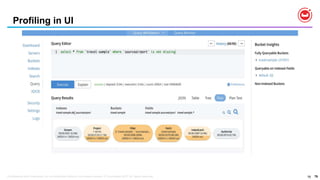
Profiling in UI
76Confidential and Proprietary. Do not distribute without Couchbase consent. © Couchbase 2017. All rights reserved.
77
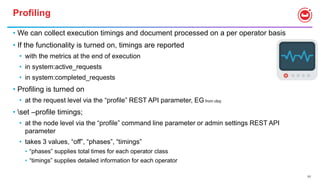
Profiling
• We can collect execution timings and document processed on a per operator basis
• If the functionality is turned on, timings are reported
• with the metrics at the end of execution
• in system:active_requests
• in system:completed_requests
• Profiling is turned on
• at the request level via the “profile” REST API parameter, EG from cbq:
• set –profile timings;
• at the node level via the “profile” command line parameter or admin settings REST API
parameter
• takes 3 values, “off”, “phases”, “timings”
• “phases” supplies total times for each operator class
• “timings” supplies detailed information for each operator
78
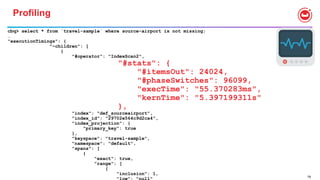
Profiling
cbq> select * from `travel-sample` where source-airport is not missing;
…
"executionTimings": {
"~children": [
{
"#operator": "IndexScan2",
"#stats": {
"#itemsOut": 24024,
"#phaseSwitches": 96099,
"execTime": "55.370283ms",
"kernTime": "5.397199311s"
},
"index": "def_sourceairport",
"index_id": "29702e564c9d2ca4",
"index_projection": {
"primary_key": true
},
"keyspace": "travel-sample",
"namespace": "default",
"spans": [
{
"exact": true,
"range": [
{
"inclusion": 1,
79
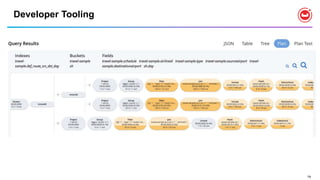
Developer Tooling
80
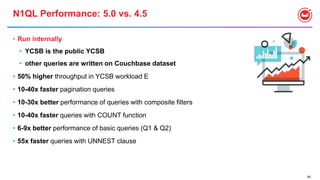
N1QL Performance: 5.0 vs. 4.5
• Run internally
• YCSB is the public YCSB
• other queries are written on Couchbase dataset
• 50% higher throughput in YCSB workload E
• 10-40x faster pagination queries
• 10-30x better performance of queries with composite filters
• 10-40x faster queries with COUNT function
• 6-9x better performance of basic queries (Q1 & Q2)
• 55x faster queries with UNNEST clause
81
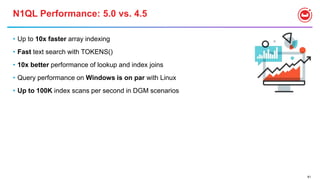
N1QL Performance: 5.0 vs. 4.5
• Up to 10x faster array indexing
• Fast text search with TOKENS()
• 10x better performance of lookup and index joins
• Query performance on Windows is on par with Linux
• Up to 100K index scans per second in DGM scenarios
4
N1QL FEATURES IN
COUCHBASE 5.5
83
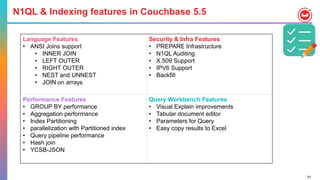
Language Features
• ANSI Joins support
• INNER JOIN
• LEFT OUTER
• RIGHT OUTER
• NEST and UNNEST
• JOIN on arrays
Security & Infra Features
• PREPARE Infrastructure
• N1QL Auditing
• X.509 Support
• IPV6 Support
• Backfill
Performance Features
• GROUP BY performance
• Aggregation performance
• Index Partitioning
• parallelization with Partitioned index
• Query pipeline performance
• Hash join
• YCSB-JSON
Query Workbench Features
• Visual Explain improvements
• Tabular document editor
• Parameters for Query
• Easy copy results to Excel
N1QL & Indexing features in Couchbase 5.5
84
5.5 Features: ANSI JOIN
What?
• ANSI standard for SQL join specification
• Supported in all major relational databases
Why?
• Lowering barrier for migration to Couchbase
• Especially from relational databases
• Address limitation of N1QL joins
• Lookup join and index join requires joining on document key
• Parent-child or child-parent join only
• Only equi-join
• Proprietary syntax
How?
• ON-clause to specify join condition, which can be any expression
85
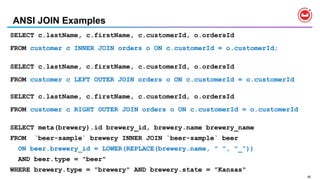
ANSI JOIN Examples
SELECT c.lastName, c.firstName, c.customerId, o.ordersId
FROM customer c INNER JOIN orders o ON c.customerId = o.customerId;
SELECT c.lastName, c.firstName, c.customerId, o.ordersId
FROM customer c LEFT OUTER JOIN orders o ON c.customerId = o.customerId
SELECT c.lastName, c.firstName, c.customerId, o.ordersId
FROM customer c RIGHT OUTER JOIN orders o ON c.customerId = o.customerId
SELECT meta(brewery).id brewery_id, brewery.name brewery_name
FROM `beer-sample` brewery INNER JOIN `beer-sample` beer
ON beer.brewery_id = LOWER(REPLACE(brewery.name, " ", "_"))
AND beer.type = "beer"
WHERE brewery.type = "brewery" AND brewery.state = ”Kansas"
86
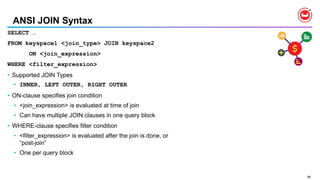
ANSI JOIN Syntax
SELECT …
FROM keyspace1 <join_type> JOIN keyspace2
ON <join_expression>
WHERE <filter_expression>
• Supported JOIN Types
• INNER, LEFT OUTER, RIGHT OUTER
• ON-clause specifies join condition
• <join_expression> is evaluated at time of join
• Can have multiple JOIN clauses in one query block
• WHERE-clause specifies filter condition
• <filter_expression> is evaluated after the join is done, or
“post-join”
• One per query block
87
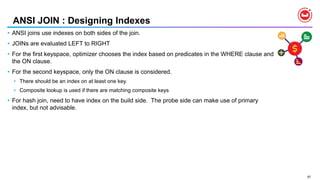
ANSI JOIN : Designing Indexes
• ANSI joins use indexes on both sides of the join.
• JOINs are evaluated LEFT to RIGHT
• For the first keyspace, optimizer chooses the index based on predicates in the WHERE clause and
the ON clause.
• For the second keyspace, only the ON clause is considered.
• There should be an index on at least one key.
• Composite lookup is used if there are matching composite keys
• For hash join, need to have index on the build side. The probe side can make use of primary
index, but not advisable.
88
N1QL : Arrays
Array { "hobbies": ["tennis", "skiing", "lego"]}
{ "orders": [582, 9721, 3814]}
Object { "address": {"street": "1, Main street",
"city": Morrisville, "state":"CA",
"zip":"94824"} }
Arrays of objects of arrays [
{
"type": "visa",
"cardnum": "5827-2842-2847-3909",
"expiry": "2019-03"
},
{
"type": "master",
"cardnum": "6274-2542-5847-3949",
"expiry": "2018-12"
}
]
89
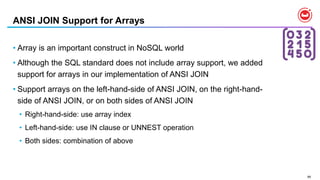
ANSI JOIN Support for Arrays
• Array is an important construct in NoSQL world
• Although the SQL standard does not include array support, we added
support for arrays in our implementation of ANSI JOIN
• Support arrays on the left-hand-side of ANSI JOIN, on the right-hand-
side of ANSI JOIN, or on both sides of ANSI JOIN
• Right-hand-side: use array index
• Left-hand-side: use IN clause or UNNEST operation
• Both sides: combination of above
90
Play with ANSI JOIN Support for Arrays - Setup
CREATE PRIMARY INDEX ON product;
"product01", {"productId":
"product01", "category": "Toys",
"name": "Truck", "unitPrice":
9.25}
"product02", {"productId":
"product02", "category":
"Kitchen", "name": "Bowl",
"unitPrice": 5.50}
"product03", {"productId":
"product03", "category":
"utensil", "name": "Spoons",
"unitPrice": 2.40}
CREATE PRIMARY INDEX ON purchase;
"purchase01", {"purchaseId": "purchase01",
"customerId": "customer01", "lineItems": [
{"productId": "product01", "count": 3},
{"productId": "product02", "count": 1} ],
"purchasedAt": "2017-11-24T15:03:22”}
"purchase02", {"purchaseId": "purchase02",
"customerId": "customer02", "lineItems": [
{"productId": "product03", "count": 2} ],
"purchasedAt": "2017-11-27T09:08:37”}
91
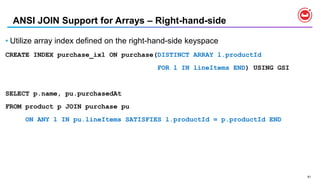
ANSI JOIN Support for Arrays – Right-hand-side
• Utilize array index defined on the right-hand-side keyspace
CREATE INDEX purchase_ix1 ON purchase(DISTINCT ARRAY l.productId
FOR l IN lineItems END) USING GSI
SELECT p.name, pu.purchasedAt
FROM product p JOIN purchase pu
ON ANY l IN pu.lineItems SATISFIES l.productId = p.productId END
92
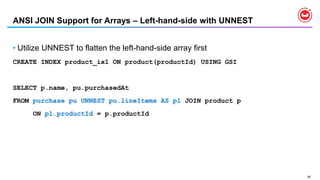
ANSI JOIN Support for Arrays – Left-hand-side with UNNEST
• Utilize UNNEST to flatten the left-hand-side array first
CREATE INDEX product_ix1 ON product(productId) USING GSI
SELECT p.name, pu.purchasedAt
FROM purchase pu UNNEST pu.lineItems AS pl JOIN product p
ON pl.productId = p.productId
93
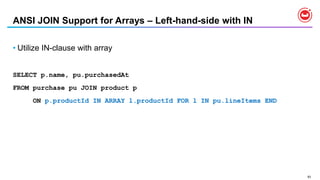
ANSI JOIN Support for Arrays – Left-hand-side with IN
• Utilize IN-clause with array
SELECT p.name, pu.purchasedAt
FROM purchase pu JOIN product p
ON p.productId IN ARRAY l.productId FOR l IN pu.lineItems END
94
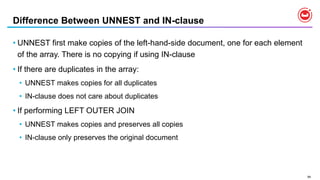
Difference Between UNNEST and IN-clause
• UNNEST first make copies of the left-hand-side document, one for each element
of the array. There is no copying if using IN-clause
• If there are duplicates in the array:
• UNNEST makes copies for all duplicates
• IN-clause does not care about duplicates
• If performing LEFT OUTER JOIN
• UNNEST makes copies and preserves all copies
• IN-clause only preserves the original document
95
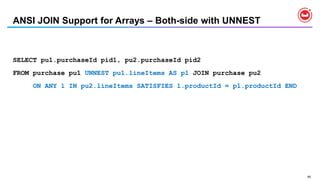
ANSI JOIN Support for Arrays – Both-side with UNNEST
SELECT pu1.purchaseId pid1, pu2.purchaseId pid2
FROM purchase pu1 UNNEST pu1.lineItems AS pl JOIN purchase pu2
ON ANY l IN pu2.lineItems SATISFIES l.productId = pl.productId END
96
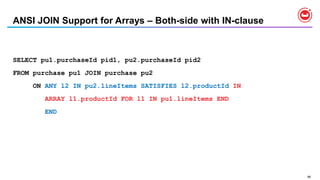
ANSI JOIN Support for Arrays – Both-side with IN-clause
SELECT pu1.purchaseId pid1, pu2.purchaseId pid2
FROM purchase pu1 JOIN purchase pu2
ON ANY l2 IN pu2.lineItems SATISFIES l2.productId IN
ARRAY l1.productId FOR l1 IN pu1.lineItems END
END
97
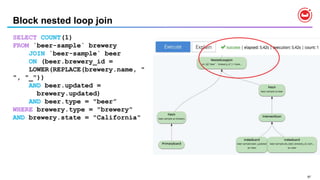
Block nested loop join
SELECT COUNT(1)
FROM `beer-sample` brewery
JOIN `beer-sample` beer
ON (beer.brewery_id =
LOWER(REPLACE(brewery.name, "
", "_"))
AND beer.updated =
brewery.updated)
AND beer.type = "beer”
WHERE brewery.type = "brewery"
AND brewery.state = "California"
98
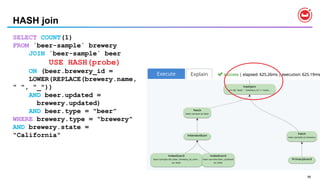
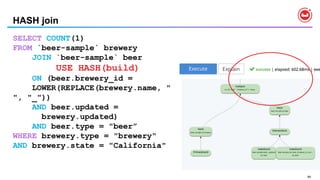
HASH join
SELECT COUNT(1)
FROM `beer-sample` brewery
JOIN `beer-sample` beer
USE HASH(probe)
ON (beer.brewery_id =
LOWER(REPLACE(brewery.name,
" ", "_"))
AND beer.updated =
brewery.updated)
AND beer.type = "beer”
WHERE brewery.type = "brewery"
AND brewery.state =
"California"
99
HASH join
SELECT COUNT(1)
FROM `beer-sample` brewery
JOIN `beer-sample` beer
USE HASH(build)
ON (beer.brewery_id =
LOWER(REPLACE(brewery.name, "
", "_"))
AND beer.updated =
brewery.updated)
AND beer.type = "beer”
WHERE brewery.type = "brewery"
AND brewery.state = "California"
100
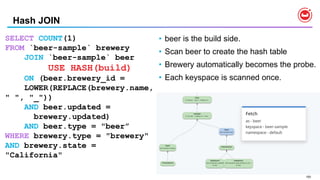
Hash JOIN
• beer is the build side.
• Scan beer to create the hash table
• Brewery automatically becomes the probe.
• Each keyspace is scanned once.
SELECT COUNT(1)
FROM `beer-sample` brewery
JOIN `beer-sample` beer
USE HASH(build)
ON (beer.brewery_id =
LOWER(REPLACE(brewery.name,
" ", "_"))
AND beer.updated =
brewery.updated)
AND beer.type = "beer”
WHERE brewery.type = "brewery"
AND brewery.state =
"California"

Couchbase Tutorial: Big data Open Source Systems: VLDB2018

  • 1.
    COUCHBASE Keshav Murthy Senior Director,Couchbase R&D Rio de Janeiro, Brazil August, 27th, 2018
  • 2.
    AGENDA 02 03 Introduction to N1QL Part1: Setup, Getting Started and Querying 01 Introduction to Couchbase 04 Part 2: Querying and Modifying Complex Data 05 Part 3: Indexing and Query Tuning 06 Part 4: Inversion of JSON hierarchies 07 Part 5: Explore the analytics Service
  • 3.
  • 4.
    Couchbase Data Platform Develop with Agility. Deployat any scale. World’sFirst Engagement Database
  • 5.
    5 Architecture App App Couchbase App App Couchbase AppApp Couchbase App App Couchbase Couchbase Cluster App App Couchbase Couchbase Single Node Deployment Couchbase Cluster Deployment
  • 6.
    6 Couchbase Server ClusterService Deployment STORAGE Couchbase Server 1 SHARD 7 SHARD 9 SHARD 5 SHARDSHARDSHARD Managed Cache Cluster ManagerCluster Manager Managed Cache Storage Analytics Service STORAGE Couchbase Server 2 Managed Cache Cluster ManagerCluster Manager Data Service STORAGE Couchbase Server 3 SHARD 7 SHARD 9 SHARD 5 SHARDSHARDSHARD Managed Cache Cluster ManagerCluster Manager Data Service STORAGE Couchbase Server 4 SHARD 7 SHARD 9 SHARD 5 SHARDSHARDSHARD Managed Cache Cluster ManagerCluster Manager Query Service STORAGE Couchbase Server 5 SHARD 7 SHARD 9 SHARD 5 SHARDSHARDSHARD Managed Cache Cluster ManagerCluster Manager Query Service STORAGE Couchbase Server 6 SHARD 7 SHARD 9 SHARD 5 SHARDSHARDSHARD Managed Cache Cluster ManagerCluster Manager Index Service Managed Cache Storage Managed Cache Storage Storage STORAGE Couchbase Server 6 SHARD 7 SHARD 9 SHARD 5 SHARDSHARDSHARD Managed Cache Cluster ManagerCluster Manager Eventing Storage Managed Cache Managed Cache SDK SDK
  • 7.
    ©2017 Couchbase. Allrights reserved. 7Sample Production Deployment NODE 1 NODE 12 Cluster Manager Data Full Text Search Analytics Global Index Query Built for Change at Scale Application Eventing
  • 8.
    8 COUCHBASE • Buckets • StoresJSON documents. • Each JSON document has a unique key (primary key) • Document is hash-distributed into multiple nodes • Resource manager • Up to 10 buckets • Data Model • JSON • Simple key-value
  • 9.
    9 COUCHBASE • Data Manipulation •Direct key-value : get, set, sub-doc, extended attributes • Views : map-reduce views, written in Javascript • Query : N1QL language and engine. More shortly • Using the indexing service • FTS : Full-Text-Service for JSON • Analytics : N1QL for analytics • Couchbase implementation of SQL++ • Copies the data & changes from data service • Uses AsterixDB for data mgmt & query processing • Post Action • Eventing : Run Javascript procedure upon data change
  • 10.
    10 COUCHBASE – Opensource • https://github.com/couchbase • AsterixDB used inside analytics service is an Apache Project • https://asterixdb.apache.org/
  • 11.
    2 N1QL =SQL + JSON
  • 12.
  • 13.
    13 { "Name" : "JaneSmith", "DOB" : "1990-01-30", "Billing" : [ { "type" : "visa", "cardnum" : "5827-2842-2847-3909", "expiry" : "2019-03" }, { "type" : "master", "cardnum" : "6274-2842-2847-3909", "expiry" : "2019-03" } ], "Connections" : [ { "CustId" : "XYZ987", "Name" : "Joe Smith" }, { "CustId" : "PQR823", "Name" : "Dylan Smith" } { "CustId" : "PQR823", "Name" : "Dylan Smith" } ], "Purchases" : [ { "id":12, item: "mac", "amt": 2823.52 } { "id":19, item: "ipad2", "amt": 623.52 } ] } LoyaltyInfo Results Orders CUSTOMER • NoSQL systems provide specialized APIs • Key-Value get and set • Each task requires custom built program • Should test & maintain it
  • 14.
    14 Find High-Value Customerswith Orders > $10000 Query customer objects from database • Complex codes and logic • Inefficient processing on client side For each customer object Find all the order objects for the customer Calculate the total amount for each order Sum up the grand total amount for all orders If grand total amount > $10000, Extract customer data Add customer to the high-value customer list Sort the high-value customer list LOOPING OVER MILLIONS OF CUSTOMERS IN APPLICATION!!!
  • 15.
    15 { "Name" : "JaneSmith", "DOB" : "1990-01-30", "Billing" : [ { "type" : "visa", "cardnum" : "5827-2842-2847-3909", "expiry" : "2019-03" }, { "type" : "master", "cardnum" : "6274-2842-2847-3909", "expiry" : "2019-03" } ], "Connections" : [ { "CustId" : "XYZ987", "Name" : "Joe Smith" }, { "CustId" : "PQR823", "Name" : "Dylan Smith" } { "CustId" : "PQR823", "Name" : "Dylan Smith" } ], "Purchases" : [ { "id":12, item: "mac", "amt": 2823.52 } { "id":19, item: "ipad2", "amt": 623.52 } ] } LoyaltyInfo ResultDocuments Orders CUSTOMER
  • 16.
    16 N1QL = SQL+ JSON Give developers and enterprises an expressive, powerful, and complete language for querying, transforming, and manipulating JSON data.
  • 17.
  • 18.
    18 N1QL : DataTypes from JSON Data Type Example Numbers { "id": 5, "balance":2942.59 } Strings { "name": "Joe", "city": "Morrisville" } Boolean { "premium": true, "balance pending": false} Null { "last_address": Null } Array { "hobbies": ["tennis", "skiing", "lego"]} Object { "address": {"street": "1, Main street", "city": Morrisville, "state":"CA", "zip":"94824"}} MISSING Arrays of objects of arrays [ { "type": "visa", "cardnum": "5827-2842-2847-3909", "expiry": "2019-03" }, { "type": "master", "cardnum": "6274-2542-5847-3949", "expiry": "2018-12" } ]
  • 19.
    19 N1QL: Data ManipulationStatements •SELECT Statement- •UPDATE … SET … WHERE … •DELETE FROM … WHERE … •INSERT INTO … ( KEY, VALUE ) VALUES … •INSERT INTO … ( KEY …, VALUE … ) SELECT … •MERGE INTO … USING … ON … WHEN [ NOT ] MATCHED THEN … Note: Couchbase provides per-document atomicity.
  • 20.
    20 N1QL: SELECT Statement SELECT* FROM customers c WHERE c.address.state = 'NY' AND c.status = 'premium' ORDER BY c.address.zip Project Everything From the bucket customers Sort order Predicate (Filters)
  • 21.
    21 N1QL: SELECT Statement SELECTcustomers.id, customers.NAME.lastname, customers.NAME.firstname Sum(orderline.amount) FROM orders UNNEST orders.lineitems AS orderline INNER JOIN customers ON (orders.custid = META(customers).id) WHERE customers.state = 'NY' GROUP BY customers.id, customers.NAME.lastname, customers.NAME.firstname HAVING sum(orderline.amount) > 10000 ORDER BY sum(orderline.amount) DESC • Dotted sub-document reference • Names are CASE-SENSITIVE UNNEST to flatten the arrays JOINS with Document KEY of customers
  • 22.
    22 N1QL: SELECT StatementHighlights • Querying across relationships • INNER JOIN, LEFT OUTER JOIN, RIGHT OUTER JOIN (5.5) • Subqueries • Aggregation (HUGE PERFORMANCE IMPROVEMENT IN 5.5) • MIN, MAX • SUM, COUNT, AVG, ARRAY_AGG [ DISTINCT ] • Combining result sets using set operators • UNION, UNION ALL, INTERSECT, INTERSECT ALL, EXCEPT, EXCEPT ALL
  • 23.
    23 N1QL : QueryOperators [ 1 of 2 ] •USE KEYS … • Direct primary key lookup bypassing index scans • Ideal for hash-distributed datastore • Available in SELECT, UPDATE, DELETE •JOINs • INNER, LEFT OUTER, limited RIGHT-OUTER • Nested loop JOIN is the default • HASH JOIN for significantly better performance with larger amount of data. • Ideal for hash-distributed datastore
  • 24.
    24 N1QL : QueryOperators [ 2 of 2 ] • UNNEST • Flattening JOIN that surfaces nested objects as top-level documents • Ideal for decomposing JSON hierarchies • Example: Flatten customer document to customer-orders •NEST • Does the opposite of UNNEST • Special JOIN that embeds external child documents under their parent • Ideal for JSON encapsulation •JOIN, NEST, and UNNEST can be chained in any combination
  • 25.
    25 UNNEST { "Name" : "JaneSmith", "DOB" : "1990-01-30", "Billing" : [ { "type" : "visa", "cardnum" : "5827-2842-2847-3909", "expiry" : "2019-03" }, { "type" : "master", "cardnum" : "6274-2842-2847-3909", "expiry" : "2019-03" } ] } "c": { "Name" : "Jane Smith", "DOB" : "1990-01-30", "Billing" : [ { "type" : "visa", "cardnum" : "5827-2842-2847-3909", "expiry" : "2019-03" }, { "type" : "master", "cardnum" : "6274-2842-2847-3909", "expiry" : "2019-03" } ] }, "type" : "master", "cardnum" : "6274-2842-2847-3909” } SELECT c, b.type, b.cardnum FROM customer c UNNEST c.Billing AS b "c": { "Name" : "Jane Smith", "DOB" : "1990-01-30", "Billing" : [ { "type" : "visa", "cardnum" : "5827-2842-2847-3909", "expiry" : "2019-03" }, { "type" : "master", "cardnum" : "6274-2842-2847-3909", "expiry" : "2019-03" } ] }, "type" : "visa", "cardnum" : "5827-2842-2847-3909” }
  • 26.
    26 N1QL : Expressionsfor JSON Ranging over collections • WHERE ANY c IN children SATISFIES c.age > 10 END • WHERE EVERY r IN ratings SATISFIES r > 3 END Mapping with filtering • ARRAY c.name FOR c IN children WHEN c.age > 10 END Deep traversal, SET, and UNSET • WHERE ANY node WITHIN request SATISFIES node.type = “xyz” END • UPDATE doc UNSET c.field1 FOR c WITHIN doc END Dynamic Construction • SELECT { “a”: expr1, “b”: expr2 } AS obj1, name FROM … // Dynamic object • SELECT [ a, b ] FROM … // Dynamic array Nested traversal • SELECT x.y.z, a[0] FROM a.b.c … IS [ NOT ] MISSING • WHERE name IS MISSING
  • 27.
    27 Global Secondary Indexes PrimaryIndex Index on the document key on the whole bucket CREATE PRIMARY INDEX ON `travel-sample` CREATE PRIMARY INDEX idx_customer_p1 ON `travel-sample` Secondary Index Index on the key-value or document-key CREATE INDEX idx_cx_name ON `travel-sample`(name); Composite Index Index on more than one key-value CREATE INDEX idx_cx2 ON `travel-sample`(state, city, geo.lat, geo.lon) Functional or Expression Index Index on function or expression on key-values CREATE INDEX idx_cxupper ON `travel-sample`(UPPER(state), UPPER(city), geo.lat, geo.lon) Partial index Index subset of items in the bucket CREATE INDEX idx_cx3 ON `travel-sample` (state, city) WHERE type = 'hotel'; CREATE INDEX idx_cx4 ON `travel-sample` (state, city, name.lastname) WHERE type = 'hotel' and country = 'United Kingdom' ARRAY INDEX Index individual elements of the arrays CREATE INDEX idx_cx5 ON `travel-sample` (ALL public_likes) CREATE INDEX idx_cx6 ON `travel-sample` (DISTINCT public_likes) ARRAY INDEX on expressions CREATE INDEX idx_cx7 ON `travel-sample` (ALL TOKENS(public_likes)) WHERE type = ‘comments’;
  • 28.
    28 N1QL: Query ExecutionFlow Clients 1. Submit the query over REST API 8. Query result 2. Parse, Analyze, create Plan 7. Evaluate: Documents to results 3. Scan Request; index filters 6. Fetch the documents Index Service Query Service Data Service 4. Get qualified doc keys 5. Fetch Request, doc keys SELECT c_id, c_first, c_last, c_max FROM CUSTOMER WHERE c_id = 49165; { "c_first": "Joe", "c_id": 49165, "c_last": "Montana", "c_max" : 50000 }
  • 29.
    29 N1QL: Inside theQuery Service Client FetchParse Plan Join Filter Pre-Aggregate Offset Limit ProjectSortAggregateScan Query Service Index Service Data Service
  • 30.
    30 SQL is Englishfor Relational Database SQL Invented by Don Chamberlin & Raymond Boyce at IBM N1QL, based on SQL, is English for JSON N1QL was invented by Gerald Sangudi at Couchbase SQL Instance Database Table Row Column Index Datatypes N1QL Cluster Bucket Bucket, Keyspace Document Attribute Index JSON Datatypes SQL Input and Output: Set(s) of Tuples N1QL STMT CREATE BUCKET CREATE INDEX None SELECT INSERT UPDATE DELETE MERGE Subqueries JOIN GROUP BY ORDER BY OFFSET, LIMIT EXPLAIN PREPARE EXECUTE GRANT ROLE REVOKE ROLE INFER PREPARE EXECUTE FLUSH Tuples SQL Model Set of JSON N1QL Model Set of Tuples Set of JSON N1QL Tooling Web Console Monitoring Profiling Dev workbench SDK Simba, Cdata BI Slamdata SQL Tooling ODBC, JDBC, .NET Hibernate BI Tools erwin TOAD N1QLResources query.couchbase.com SQL Indexes Primary Key Secondary Key Composite Range Partitioned Expression (Functional) Spatial Search N1QL Indexes Primary Secondary Composite Range Partitioned Partial Expression (Functional) Spatial Array Index Replica(HA) Adaptive SQL Logic 3 valued logic TRUE, FALSE, NULL/UNKNOWN N1QL Logic 4 valued logic TRUE, FALSE, NULL/UNKNOWN, MISSING SQL Transactions ACID Multi-Statement Savepoints Commit/Rollback Redo, Undo N1QL Transactions Single Document atomicity SQL Datatypes Numeric Boolean Decimal Character Date Time Timezone BLOB Spatial JSON N1QL Datatype Numeric Boolean Array Character Object Null JSON Conversion Functions SQL Optimizer Rule Based Cost Based Index Selection Query Rewrites NL, Hash, Merge join N1QL Optimizer Rule based Index Selection NL, Hash join SQL ACID ATOMIC Consistent Isolated Durable N1QL BASE Single doc Atomic Consistent Data* Optimistic Concurrency N1QL Index Scan Consistency* Unbounded AT_PLUS REQUEST_PLUS SQL Engine (SMP Scale UP) N1QL Engine (MPP Cluste Scale OUT) Additional SQL Features Triggers Stored Procedures XML Constraints SQL STMT CREATE TABLE CREATE INDEX ALTER TABLE SELECT INSERT UPDATE DELETE MERGE Subqueries JOIN GROUP BY ORDER BY OFFSET, LIMIT EXPLAIN PLAN PREPARE EXECUTE GRANT REVOKE DESCRIBE PREPARE EXECUTE TRUNCATE N1QL Input and Output: Set(s) of JSON
  • 31.
  • 32.
  • 33.
    3 PART 1: SETUP,GETTING STARTED AND QUERYING
  • 34.
  • 35.
  • 36.
  • 37.
    37 More workshop Part 2:Querying and Modifying Complex Data Part 3: Indexing and Query Tuning Part 4: Inversion of JSON hierarchies
  • 38.
  • 39.
    39 QUERY SERVICE Online searchand booking, reviews and ratings • Property and room detail pages • Cross-sell links, up-sell links • Stars & likes & associated reviews • Their booking history Query Service behind every page display and click/navigation ANALYTICS SERVICE Reporting, Trend Analysis, Data Exploration • Daily discount availability report • Cities with highest room occupancy rates • Hotels with biggest single day drops • How many searches turn into bookings grouped by property rating? grouped by family size? Business Analysts ask these questions without knowing in advance every aspect of the question Query and Analytics Services - Examples
  • 40.
    Confidential and Proprietary.Do not distribute without Couchbase consent. © Couchbase 2018. All rights reserved. 40 Shadow data for processing What is Couchbase Analytics? Fast Ingest Complex Queries on large datasets Real-time Insights for Business Teams DATA DATA DATA ANALYTICS ANALYTICS ANALYTICS ANALYTICS MPP architecture: parallelization among core and servers
  • 41.
    Confidential and Proprietary.Do not distribute without Couchbase consent. © Couchbase 2018. All rights reserved. 41 Travel-sample model.
  • 42.
    42 Analytics: Setting up CREATEBUCKET travel WITH {"name":"travel-sample"}; CREATE DATASET hotel ON travel WHERE `type` = "hotel"; CREATE DATASET airline ON travel WHERE `type` = "airline"; CREATE DATASET airport ON travel WHERE `type` = "airport"; CREATE DATASET route ON travel WHERE `type` = "route"; CREATE DATASET landmarkON travel WHERE `type` = "landmark"; CONNECT BUCKET travel;
  • 43.
    43 Analytics: Queries SELECT airport.faa,count(*) route_count FROM airport LEFT OUTER JOIN route ON (airport.faa = route.sourceairport) GROUP BY airport.faa ORDER BY route_count desc
  • 44.
    44 Analytics: Queries SELECT airport.faa,airline.callsign,count(*) route_count FROM airport LEFT OUTER JOIN route ON (airport.faa = route.sourceairport) LEFT OUTERJOIN airline ON (route.airlineid = META(airline).id) GROUP BY airport.faa, airline.callsign ORDER BY route_count desc
  • 45.
    45 Analytics: Queries SELECT airport.faa,airline.callsign,count(*) route_count FROM airport INNER JOIN route ON (airport.faa = route.sourceairport) INNER JOIN airline ON (route.airlineid = META(airline).id) GROUP BY airport.faa, airline.callsign ORDER BY route_count desc
  • 46.
    Couchbase Data Platform Develop with Agility. Deployat any scale. World’sFirst Engagement Database
  • 47.
    ©2017 Couchbase. Allrights reserved. 47Sample Production Deployment NODE 1 NODE 12 Cluster Manager Data Full Text Search Analytics Global Index Query Built for Change at Scale Application Eventing
  • 48.
  • 49.
    49 Couchbase N1QL andGSI features Query-Indexing Features • Large Indexing Keysize • Index key collation: ASC, DESC on each key • Index replicas, just like data replication • New storage engine: Plasma Query Language & Infrastructure • Subquery Expressions • Additional Date & time functions • Bitwise functions • CURL() within N1QL Query Optimizer • Complex Filters Pushdown • Pagination optimization • Optimization for ASC, DESC keys • Query-Index API optimization (projection, etc.) • Index projections, Intersect scans • Adaptive Indexes Security, Administration & Functionality • Security: RBAC: Statement level security • Query Monitoring, Profiling with UI • Query work bench and UI: Fully upgraded • Query UI: Visual Explain • Query on Ephemeral buckets • Application Continuity, Seamless Upgrade Performance • Core daily workload • YCSB • YCSB-JSON for Engagement Database http://query.couchbase.com
  • 50.
    50 Query-Indexing Enhancements Index keycollation: ASC, DESC on each key • Prior to 5.0, each index key was sorted and kept in ASCENDING order only • To sort the key in descending order, you did • CREATE INDEX i1 ON t(c1 ASC, -c2, -c3) • SELECT * FROM t WHERE c1 = 10 and -c2 < -20 ORDER BY c1, -c2 • Query formulations becomes confusing • Cannot use this trick on all data types and expressions In Couchbase 5.0: • CREATE INDEX i1 ON t(c1 ASC, c2 DESC, c3 DESC) • SELECT * FROM t WHERE c1 = 10 and c2 < 20 ORDER BY c1,c2 DESC • You need to create an index to match the ORDER BY order • Reverse scans are still unsupported
  • 51.
    51 Query-Indexing Enhancements Large IndexingKeysize • Prior to 5.0, the sum of index key size could be up to 4096 bytes • This was controlled by the setting • For ARRAY keys, sum of all array key sizes could be up to 10240. • This is controlled by the setting max_array_seckey_size In Couchbase 5.0: • The total keysize could be pretty high – high up to 20 MB • This is true for single key, composite key, expressions and array indexes as well. • Simply do nothing, except create the index and issue the query. • The index entries that exceed 20MB will still generate error in the index log
  • 52.
    52 Query-Indexing Enhancements Index replicas,just like data replication • Prior to 5.0, you could create multiple indexes with same keys & condition • This is needed for load balancing and index high availabilitt CREATE INDEX i1 ON t(c1, c2, c3) CREATE INDEX i2 ON t(c1, c2, c3) CREATE INDEX i3 ON t(c1, c2, c3) • Indexer automatically recognizes these to be equivalent and does load balancing on all o these. In Couchbase 5.0: • Simply create one index and set the num_replica at CREATE or ALTER time • CREATE INDEX i1 ON t(c1, c2, c3) WITH {"num_replica":2} • Number of replicas can be up to number of nodes in the cluster • You can ALTER the number of replica dynamically
  • 53.
    53 Query-Indexing Enhancements New storageengine: Plasma • Index size can be arbitrarily large • Uses lock-free skip list • All the performance benefits of MOI – Memory Optimized Index • Automatically does IO as needed • From usage point of view: • Choose the standard secondary Index during installation • simply create any kind of index and use it.
  • 54.
    54 Query Language &Infrastructure Subquery Expressions • Provides rich functionality and Powerful subquery-expressions • Can be used in FROM-clause, projection, LET/WHERE-clauses etc., SELECT word, cnt FROM ARRAY split(i) FOR i IN (SELECT raw name FROM `travel-sample` WHERE type = "hotel") END AS words UNNEST words w GROUP BY w LETTING cnt = COUNT(w) ORDER BY cnt DESC;
  • 55.
    55 Query Language &Infrastructure Additional Date, time, timestamp functions • JSON does not directly support date and time related data types • Store the date and time in extended ISO 8901 format • "2017-10-16T18:44:43.308-07:00” • Need extract, conversion and arithmetic functions • Detailed article with all the functions and Oracle to Couchbase mapping https://dzone.com/articles/comparing-oracle-and-n1ql-support-for-the-date-tim • If you can’t do something, let us know!
  • 56.
    56 Query Language &Infrastructure CURL() within N1QL • CURL (URL, [options]) • The first argument is the URL, which represents any URL that points to a JSON endpoint. • Only URLs with the http:// or the https:// protocol are supported. • Redirection is disabled. • The second argument is a list of options. • This is a JSON object that contains a list of curl options and their corresponding values. • For a full list of options that we support, please refer to the Dzone article on CURL in N1QL by Isha Kandaswamy •
  • 57.
    57 CURL() from N1QL •Search for Santa Cruz in Spain using my Google dev api key SELECT CURL("GET","https://maps.googleapis.com/maps/api/geocode/json", {"data":"address=santa+cruz&components=country:ES&key=AIzaSyCT6niGCMsgegJkQ SYasfoLZ4_rSO59XQQ"}) ; • Live translate your text to another language. SELECT ginfo FROM ( SELECT r.content as english, curl("https://translation.googleapis.com/language/translate/v2?key=PUT YOUR KEYS HERE", {"request": "POST", "header":"Content-Type: application/json", "data": mydata }) AS french FROM `travel-sample` h USE KEYS "hotel_10142" UNNEST h.reviews r LET mydata = '{ "q":"' || r.content || '", "target": "fr"}') AS ginfo
  • 58.
    58 Query Language &Infrastructure CURL() within N1QL
  • 59.
    59 Query Language &Infrastructure BITWISE Functions • All bitwise functions can only take a number. All numbers are 64 bit signed numbers (integers). • If the Number is not an integer and for other data types, we throw an error. • When looking at the value in binary form, bit 1 is the Least Significant Bit (LSB) and bit 32 is the Most Significant Bit. (MSB) Bit 32 → 0000 0000 0000 0000 0000 0000 0000 0000 ← Bit 1 (LSB) BitAND BitOR BitNOT BitXOR BitSHIFT BitSET BitCLEAR BitTEST/ IsBitSET
  • 60.
    60 Query Optimizer &Execution: Stable Scans • IndexScan use to do single range scan (i.e single Span) • If the query has multiple ranges (i.e. OR, IN, NOT clauses) Query service used to do separate IndexScan for each range. • This causes Indexer can use different snapshot for each scan (make it unstable scan) • Number of IndexScans can grow and result increase in index connections • In 5.0.0 multiple ranges are passed into indexer and indexer uses same snapshot for all the ranges. • This makes stable Scan for given IndexScan (i.e. IndexScan2 in the EXPLAIN). • This will not make stable scan for query due to Subqueries, Joins etc • Example: CREATE INDEX ix1 ON default(k0); EXPLAIN SELECT META().id FROM default WHERE k0 IN [10,12,13];
  • 61.
    61 Query Optimizer &Execution: Pushdown Composite Filters • For composite Index the spans that pushed to indexer contains single range for all composite keys together. • Indexer will not applying range for each part of the key separately. This result in lot of false positives. • In 5.0.0 with IndexScan2 we push the each index key range separately and indexer will apply keys separately. • This results in no/less false positives and aides push more information to indexer. CREATE INDEX ix1 ON default(k0,k1); EXPLAIN SELECT meta().id FROM default WHERE k0 BETWEEN 0 AND 100 AND k1 = 200;
  • 62.
    62 Query Optimizer: ORDER,OFFSET, LIMIT pushdown • Pagination queries can contain any combination of ORDER, LIMIT, OFFSET clauses. • Performance of these queries are critical to applications. • When Predicates are completely and exactly pushed to indexer, by pushing offset, limit to indexer can improve query performance significantly. If that happened IndexScan2 section of EXPLAIN will have limit,offset. • If query ORDER BY matches index key order query can avoid index sort and performance can be improved significantly. If that happened order operator is not present in the EXPLAIN. • Example: CREATE INDEX ix1 ON default(k0,k1); EXPLAIN SELECT meta().id FROM default WHERE k0 > 10 AND k1 > 20 ORDER BY k0 LIMIT 10 OFFSET 100;
  • 63.
    63 Query Optimizer: MAXpushdown • If the MAX arguments matched with Index leading key exploit index order for MAX. • MAX can only DESC on index key. • MIN can only use ASC on index key. • Example : CREATE INDEX ix5 ON default(k0 DESC); SELECT MAX(k0) FROM default WHERE k0 > 10; • Above query able to exploit index order. In that case IndexScan2 section of EXPLAIN will have “limit” 1.
  • 64.
    64 Query Optimizer: IndexProjection • The index can have many keys but query might be interested only subset of keys. • By only requesting required information can save lot of network transportation, memory, cpu, backfill etc. All this can help in performance and scaling the cluster. • The requested information can be found in “IndexScan2” Section of EXPLAIN as “index_projection” "index_projection": { "entry_keys": [1, 5 ], "primary_key": true } CREATE INDEX ix1 ON default(k0,k1,k2,k3,k4, k5); EXPLAIN SELECT meta().id, k1, k5 FROM default WHERE k0 > 10 AND k1 > 20;
  • 65.
    65 Query Optimizer: IndexProjection CREATE INDEX ix1 ON default(k0,k1); Covered query SELECT k0 FROM default WHERE k0 = 10 AND k1 = 100; "index_projection": {"entry_keys": [0,1]} SELECT k0 FROM default WHERE k0 = 10; "index_projection": {"entry_keys": [0]} SELECT k0 ,META().idFROM default WHERE k0 = 10; "index_projection": {"entry_keys": [0],“primary_key”: true} Non-covered query SELECT k0 ,k5 FROM default WHERE k0 = 10 AND k1 = 100; "Index_projetion": { “primary_key”: true }
  • 66.
    66 Query Execution: CAS& Expiration • In 5.0.0 META().cas, META().expiration can be indexed and used in queries. • Example: • CREATE INDEX ix1 ON default( meta().id, meta().cas, meta().expiration); • SELECT meta().id , meta().cas, meta().expiration FROM default where meta().id > "" • Note: META().expiration will work in covered queries. For non covered queries it gives 0
  • 67.
    67 Query Execution: COUNT(DISTINCT expr) • If the expr matched with Index leading key COUNT DISTINCT can be pushed to indexer • Complete predicate needs to pushed to indexer exactly • No false positives are possible • No group or JOIN • Only single projection • Example : CREATE INDEX ix5 ON default(k0); SELECT COUNT(DISTINCT k0) FROM default WHERE k0 > 10; • Above query uses IndexCountDistinctScan2
  • 68.
    68 Customer Scenario • Customerdocument has 100 fields • They have multiple business entities sharing the same data • Each entity want to FILTER, GROUP, ORDER on distinct criteria • For Index selection, order of the keys in the composite index is important. Fields: c1 through c100 Filter fields: c1 through c50 Group, order and projection: Any from c1 through c100 SELECT c1, c2, c3, COUNT(c10), SUM(c5) FROM CUSTOMER WHERE c4 = "CXT-MULTI" AND c8 = "iPhone6" AND c9 BETWEEN 10 IN 20 GROUP BY c1, c2, c3; SELECT c12, COUNT(c19), SUM(c15) FROM CUSTOMER WHERE c44 = "CXT-MULTI" AND c18 = "Gpixel 2" AND c29 BETWEEN 10 IN 20 GROUP BY c12;
  • 69.
    69 Customer Scenario • Whatindexes to create for this? SELECT c1, c2, c3, COUNT(c10), SUM(c5) FROM CUSTOMER WHERE c4 = "CXT-MULTI" AND c8 = "iPhone6" AND c9 BETWEEN 10 IN 20 GROUP BY c1, c2, c3; CREATE INDEX i1 ON CUSTOMER(c8, c4, c9) CREATE INDEX i1 ON CUSTOMER(c8, c4, c9, c1, c2, c3, c10, c5); For Covering the query What about this? SELECT c12, COUNT(c19), SUM(c15) FROM CUSTOMER WHERE c44 = "CXT-MULTI" AND c18 = "Gpixel 2" AND c29 BETWEEN 10 IN 20 GROUP BY c12;
  • 70.
    70 Large, wide, compositeindexes Filter fields: c1 through c50 To support all combinations of 50 predicates via composite indexes, you’ll need LOT of indexes. 50! =30414093201713378043612608166064768844377641568 960512000000000000
  • 71.
    71 Customer Scenario Solution: Intersection •Option 1 • Create indexes on individual fields • Scan individual indexes • Apply the full set of predicates (boolean expression from WHERE clause) • Then do the post processing. CREATE INDEX i1 on CUSTOMER(c1); CREATE INDEX i2 on CUSTOMER(c2); CREATE INDEX i3 on CUSTOMER(c3); • Option 2 • Too many indexes to maintain and manage. • Don’t even talk about equivalent indexes for each of these. CREATE INDEX i1to50 on CUSTOMER(DISTINCT PAIRS({c1, c2, c3, c4, c5,c6, c7, c8, c9, c10, c11, c23, c13, c14, …});
  • 72.
    72 Solution: Intersection • Option3 • Too many keys to manage/specify • The document is flexible. I want the index to be flexible. CREATE INDEX ixpairon CUSTOMER(DISTINCT PAIRS(self)); SELECT * FROM CUSTOMER WHERE a = 10 and b < 20 and c between 30 and 40; "#operator": "IntersectScan", "scans": [ { "#operator": "DistinctScan", "scan": { "#operator": "IndexScan2", "index": "ixpair", "index_id": "466c0c5c4c3b21c1", "index_projection": { "primary_key": true }, "keyspace": "test", "namespace": "default", "spans": [ { "exact": true, "range": [ { "high": "["a", 10]", "inclusion": 3, "low": "["a", 10]" } "range": [ { "high": "["b", 20]", "inclusion": 1, "low": "["b", false]" } "range": [ { "high": "[successor("c")]", "inclusion": 1, "low": "["c", 30]" } ]
  • 73.
    73 Flexible Indexing • Thisis not a silver bullet, yet. • TRY THIS OUT • SIZING is a concern because we {“Key“:“value“} • Give us feedback
  • 74.
    74 SECURITY : GRANTand REVOKE to roles • Query_select, query_insert, query_update, query_delete roles • Parameterized: query_select[customers] or query_insert[*] • Query_manage_index[foo] • Create, delete, build indexes on bucket foo • Query_system_catalog • Full access to the system tables (which are controlled now) • Query_external_access • Allows access to CURL() function (disabled by default) GRANT cluster_admin TO spock GRANT query_select ON default TO kirk REVOKE query_insert, query_delete ON bridge, engineering FROM mccoy, scotty
  • 75.
    75 Monitoring in UI 75Confidentialand Proprietary. Do not distribute without Couchbase consent. © Couchbase 2017. All rights reserved.
  • 76.
    76 Profiling in UI 76Confidentialand Proprietary. Do not distribute without Couchbase consent. © Couchbase 2017. All rights reserved.
  • 77.
    77 Profiling • We cancollect execution timings and document processed on a per operator basis • If the functionality is turned on, timings are reported • with the metrics at the end of execution • in system:active_requests • in system:completed_requests • Profiling is turned on • at the request level via the “profile” REST API parameter, EG from cbq: • set –profile timings; • at the node level via the “profile” command line parameter or admin settings REST API parameter • takes 3 values, “off”, “phases”, “timings” • “phases” supplies total times for each operator class • “timings” supplies detailed information for each operator
  • 78.
    78 Profiling cbq> select *from `travel-sample` where source-airport is not missing; … "executionTimings": { "~children": [ { "#operator": "IndexScan2", "#stats": { "#itemsOut": 24024, "#phaseSwitches": 96099, "execTime": "55.370283ms", "kernTime": "5.397199311s" }, "index": "def_sourceairport", "index_id": "29702e564c9d2ca4", "index_projection": { "primary_key": true }, "keyspace": "travel-sample", "namespace": "default", "spans": [ { "exact": true, "range": [ { "inclusion": 1,
  • 79.
  • 80.
    80 N1QL Performance: 5.0vs. 4.5 • Run internally • YCSB is the public YCSB • other queries are written on Couchbase dataset • 50% higher throughput in YCSB workload E • 10-40x faster pagination queries • 10-30x better performance of queries with composite filters • 10-40x faster queries with COUNT function • 6-9x better performance of basic queries (Q1 & Q2) • 55x faster queries with UNNEST clause
  • 81.
    81 N1QL Performance: 5.0vs. 4.5 • Up to 10x faster array indexing • Fast text search with TOKENS() • 10x better performance of lookup and index joins • Query performance on Windows is on par with Linux • Up to 100K index scans per second in DGM scenarios
  • 82.
  • 83.
    83 Language Features • ANSIJoins support • INNER JOIN • LEFT OUTER • RIGHT OUTER • NEST and UNNEST • JOIN on arrays Security & Infra Features • PREPARE Infrastructure • N1QL Auditing • X.509 Support • IPV6 Support • Backfill Performance Features • GROUP BY performance • Aggregation performance • Index Partitioning • parallelization with Partitioned index • Query pipeline performance • Hash join • YCSB-JSON Query Workbench Features • Visual Explain improvements • Tabular document editor • Parameters for Query • Easy copy results to Excel N1QL & Indexing features in Couchbase 5.5
  • 84.
    84 5.5 Features: ANSIJOIN What? • ANSI standard for SQL join specification • Supported in all major relational databases Why? • Lowering barrier for migration to Couchbase • Especially from relational databases • Address limitation of N1QL joins • Lookup join and index join requires joining on document key • Parent-child or child-parent join only • Only equi-join • Proprietary syntax How? • ON-clause to specify join condition, which can be any expression
  • 85.
    85 ANSI JOIN Examples SELECTc.lastName, c.firstName, c.customerId, o.ordersId FROM customer c INNER JOIN orders o ON c.customerId = o.customerId; SELECT c.lastName, c.firstName, c.customerId, o.ordersId FROM customer c LEFT OUTER JOIN orders o ON c.customerId = o.customerId SELECT c.lastName, c.firstName, c.customerId, o.ordersId FROM customer c RIGHT OUTER JOIN orders o ON c.customerId = o.customerId SELECT meta(brewery).id brewery_id, brewery.name brewery_name FROM `beer-sample` brewery INNER JOIN `beer-sample` beer ON beer.brewery_id = LOWER(REPLACE(brewery.name, " ", "_")) AND beer.type = "beer" WHERE brewery.type = "brewery" AND brewery.state = ”Kansas"
  • 86.
    86 ANSI JOIN Syntax SELECT… FROM keyspace1 <join_type> JOIN keyspace2 ON <join_expression> WHERE <filter_expression> • Supported JOIN Types • INNER, LEFT OUTER, RIGHT OUTER • ON-clause specifies join condition • <join_expression> is evaluated at time of join • Can have multiple JOIN clauses in one query block • WHERE-clause specifies filter condition • <filter_expression> is evaluated after the join is done, or “post-join” • One per query block
  • 87.
    87 ANSI JOIN :Designing Indexes • ANSI joins use indexes on both sides of the join. • JOINs are evaluated LEFT to RIGHT • For the first keyspace, optimizer chooses the index based on predicates in the WHERE clause and the ON clause. • For the second keyspace, only the ON clause is considered. • There should be an index on at least one key. • Composite lookup is used if there are matching composite keys • For hash join, need to have index on the build side. The probe side can make use of primary index, but not advisable.
  • 88.
    88 N1QL : Arrays Array{ "hobbies": ["tennis", "skiing", "lego"]} { "orders": [582, 9721, 3814]} Object { "address": {"street": "1, Main street", "city": Morrisville, "state":"CA", "zip":"94824"} } Arrays of objects of arrays [ { "type": "visa", "cardnum": "5827-2842-2847-3909", "expiry": "2019-03" }, { "type": "master", "cardnum": "6274-2542-5847-3949", "expiry": "2018-12" } ]
  • 89.
    89 ANSI JOIN Supportfor Arrays • Array is an important construct in NoSQL world • Although the SQL standard does not include array support, we added support for arrays in our implementation of ANSI JOIN • Support arrays on the left-hand-side of ANSI JOIN, on the right-hand- side of ANSI JOIN, or on both sides of ANSI JOIN • Right-hand-side: use array index • Left-hand-side: use IN clause or UNNEST operation • Both sides: combination of above
  • 90.
    90 Play with ANSIJOIN Support for Arrays - Setup CREATE PRIMARY INDEX ON product; "product01", {"productId": "product01", "category": "Toys", "name": "Truck", "unitPrice": 9.25} "product02", {"productId": "product02", "category": "Kitchen", "name": "Bowl", "unitPrice": 5.50} "product03", {"productId": "product03", "category": "utensil", "name": "Spoons", "unitPrice": 2.40} CREATE PRIMARY INDEX ON purchase; "purchase01", {"purchaseId": "purchase01", "customerId": "customer01", "lineItems": [ {"productId": "product01", "count": 3}, {"productId": "product02", "count": 1} ], "purchasedAt": "2017-11-24T15:03:22”} "purchase02", {"purchaseId": "purchase02", "customerId": "customer02", "lineItems": [ {"productId": "product03", "count": 2} ], "purchasedAt": "2017-11-27T09:08:37”}
  • 91.
    91 ANSI JOIN Supportfor Arrays – Right-hand-side • Utilize array index defined on the right-hand-side keyspace CREATE INDEX purchase_ix1 ON purchase(DISTINCT ARRAY l.productId FOR l IN lineItems END) USING GSI SELECT p.name, pu.purchasedAt FROM product p JOIN purchase pu ON ANY l IN pu.lineItems SATISFIES l.productId = p.productId END
  • 92.
    92 ANSI JOIN Supportfor Arrays – Left-hand-side with UNNEST • Utilize UNNEST to flatten the left-hand-side array first CREATE INDEX product_ix1 ON product(productId) USING GSI SELECT p.name, pu.purchasedAt FROM purchase pu UNNEST pu.lineItems AS pl JOIN product p ON pl.productId = p.productId
  • 93.
    93 ANSI JOIN Supportfor Arrays – Left-hand-side with IN • Utilize IN-clause with array SELECT p.name, pu.purchasedAt FROM purchase pu JOIN product p ON p.productId IN ARRAY l.productId FOR l IN pu.lineItems END
  • 94.
    94 Difference Between UNNESTand IN-clause • UNNEST first make copies of the left-hand-side document, one for each element of the array. There is no copying if using IN-clause • If there are duplicates in the array: • UNNEST makes copies for all duplicates • IN-clause does not care about duplicates • If performing LEFT OUTER JOIN • UNNEST makes copies and preserves all copies • IN-clause only preserves the original document
  • 95.
    95 ANSI JOIN Supportfor Arrays – Both-side with UNNEST SELECT pu1.purchaseId pid1, pu2.purchaseId pid2 FROM purchase pu1 UNNEST pu1.lineItems AS pl JOIN purchase pu2 ON ANY l IN pu2.lineItems SATISFIES l.productId = pl.productId END
  • 96.
    96 ANSI JOIN Supportfor Arrays – Both-side with IN-clause SELECT pu1.purchaseId pid1, pu2.purchaseId pid2 FROM purchase pu1 JOIN purchase pu2 ON ANY l2 IN pu2.lineItems SATISFIES l2.productId IN ARRAY l1.productId FOR l1 IN pu1.lineItems END END
  • 97.
    97 Block nested loopjoin SELECT COUNT(1) FROM `beer-sample` brewery JOIN `beer-sample` beer ON (beer.brewery_id = LOWER(REPLACE(brewery.name, " ", "_")) AND beer.updated = brewery.updated) AND beer.type = "beer” WHERE brewery.type = "brewery" AND brewery.state = "California"
  • 98.
    98 HASH join SELECT COUNT(1) FROM`beer-sample` brewery JOIN `beer-sample` beer USE HASH(probe) ON (beer.brewery_id = LOWER(REPLACE(brewery.name, " ", "_")) AND beer.updated = brewery.updated) AND beer.type = "beer” WHERE brewery.type = "brewery" AND brewery.state = "California"
  • 99.
    99 HASH join SELECT COUNT(1) FROM`beer-sample` brewery JOIN `beer-sample` beer USE HASH(build) ON (beer.brewery_id = LOWER(REPLACE(brewery.name, " ", "_")) AND beer.updated = brewery.updated) AND beer.type = "beer” WHERE brewery.type = "brewery" AND brewery.state = "California"
  • 100.
    100 Hash JOIN • beeris the build side. • Scan beer to create the hash table • Brewery automatically becomes the probe. • Each keyspace is scanned once. SELECT COUNT(1) FROM `beer-sample` brewery JOIN `beer-sample` beer USE HASH(build) ON (beer.brewery_id = LOWER(REPLACE(brewery.name, " ", "_")) AND beer.updated = brewery.updated) AND beer.type = "beer” WHERE brewery.type = "brewery" AND brewery.state = "California"