


We’re in an incredibly fun era for building. The friction between "I have a weird idea" and "I have a working prototype" is basically zero, especially with the release of Gemma 4, which is now available via the Gemini API and Google AI Studio.
Whether you want to deeply inspect model reasoning or you're just trying to build a pipeline to auto-caption an archive of historical web comics and obscure wiki trivia, you can now hit open-weights models directly from your code without needing to provision a massive GPU rig first.
Here’s a look at the architecture, how to use it, and how to go from the UI to production code in one click.
The Models: Apache 2.0, MoE, and 256k Context
Before we look at the API, the biggest detail about Gemma 4 is the license: it's released under Apache 2.0. This means total developer flexibility and commercial permissiveness. You can prototype with the Gemini API, and eventually run it anywhere from a local rig to your own cloud infrastructure.
The benchmarks are also genuinely impressive. The 31B model is currently sitting at #3 on the Arena AI text leaderboard, out-competing models massively larger than it.
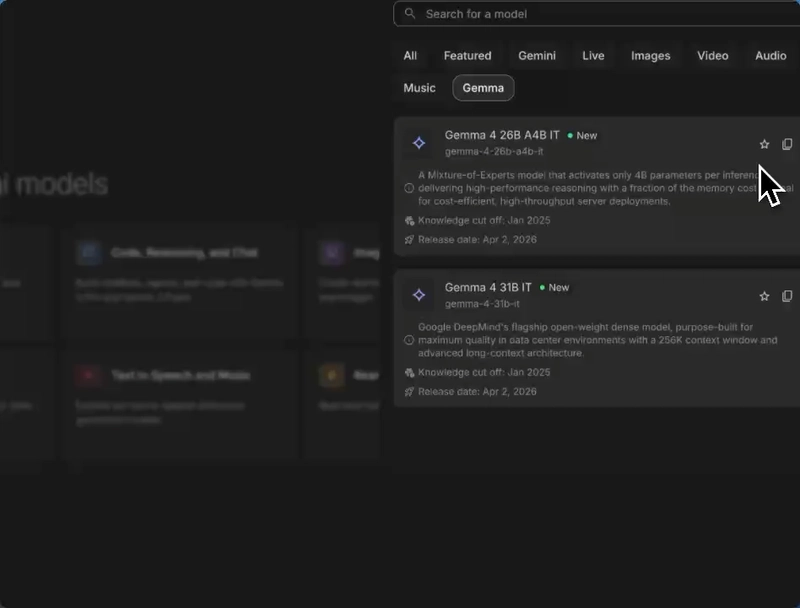
When you drop into Google AI Studio, you'll see two primary models in the picker:
- Gemma 4 31B IT: The flagship dense model. It has a massive 256K context window — perfect for dumping in entire codebases, massive log files, or huge JSON datasets.
- Gemma 4 26B A4B IT: A Mixture-of-Experts (MoE) architecture. It's highly efficient, only activating roughly 4 billion parameters per inference. High throughput, lower cost.
(Note: There are also E2B and E4B "Edge" models meant for local on-device deployment that feature native audio input, but we're focusing on the AI Studio API today. I recommend that you go download and test the smaller models locally, though!)
Multimodal Inputs + Chain of Thought
Text is great, but Gemma 4 is natively multimodal. Let's say you want to build a pipeline to reverse-engineer prompts from a folder of distinct images.
In AI Studio, you can drop images directly into the playground alongside your prompt.
The Prompt:
"Generate descriptions of each of these images, and a prompt that I could give to an image generation model to replicate each one."

Because the Gemma models support advanced reasoning, after you click Run, you can click the Thoughts toggle to literally step through the model's chain-of-thought process before it generates its final output.
If you love understanding the "why" behind model logic, or you're trying to debug why an agent went off the rails, this level of transparency is incredibly useful.

Shipping the code
The bridge between "playing around in a UI" and "writing a script" should be exactly one click. Once you have your prompt, your images, and your reasoning configuration dialed in perfectly, click the Get Code button in the top right corner.
You can grab the exact payload required for TypeScript, Python, Go, or standard cURL. Best of all, if you toggle "Include prompt/history", it automatically handles the base64 encoding of your images and explicitly sets the thinkingConfig parameters in the code for you.

Here's what the TypeScript output looks like when you want to use Gemma 4's reasoning capabilities via the SDK:
import { GoogleGenAI } from '@google/genai';

// Initialize the client
const ai = new GoogleGenAI({ apiKey: process.env.GEMINI_API_KEY });

// Configure Gemma 4 reasoning logic
const config = {
  thinkingConfig: {
    thinkingLevel: 'HIGH',
  }
};

const response = await ai.models.generateContent({
  model: 'gemma-4-31b-it',
  contents: 'Tell me a fascinating, obscure story from internet history.',
  config: config
});

console.log(response.text);
Go build open-source things!
Having Apache 2.0 open-weights models accessible via a fast API completely changes the calculus for weekend projects. Whether you're building a script to summarize deeply technical whitepapers, analyze visual data natively, or wire up autonomous multi-step code generation agents—the friction is basically gone.
I can't wait to see what you build! Let me know in the comments what rabbit hole you're pointing Gemma at first. Happy hacking this weekend. :)


Top comments (9)
The native multimodal capability is HUGE. I did a project with Gemma 3 last year and spent so much time working around preprocessing and ingesting non-text data.
One stat I've started looking at more closely with open models is the ratio of context window size per billion active parameters. Idea being that the higher the number, the less resources we need for larger and longer running tasks. Caveat being that Mixture of Experts models will have a much better ratio than dense models by definition, but still interesting.
Llama 4 Scout doesn't really have accurate benchmarks still and DeepSeek Coder V2 Lite is both code focused and has a more restrictive license. So the reality is nothing is close to Gemma 4 26B-A4B right now!
This is awesome, so excited to try it out!
Though I did have a throught given the rapid emergence of new large language models, both open/closed source and locally deployable/cloud‑hosted, how should one approach selecting the most appropriate model for a particular task? Is the process primarily empirical testing, or is there a more systematic methodology?
In addition, under what circumstances would it be rational to choose a hosted, larger‑parameter Gemma model over a hosted Gemini model, assuming both are accessible via online APIs? At first glance this seems suboptimal if both or hosted, unless the hosted Gemma offering allows per‑tenant or per‑request weight customization that is not available with Gemini.
been trying to build a local-first desktop app for a while and handling images + text together has always been the tricky part. this might actually be a great fit for what I'm building!
The fact that Gemma 4 is released under Apache 2.0 is a massive win for the offline AI future. While the API is great for prototyping, having these open-weights means we can move multimodal capabilities to local edge devices where Wifi and service simply don't exist. The opportunity for building offline apps with native image/audio inference is unbelievable. This could be a vital bridge for technological access in humanitarian crises or war zones. Giving people the power of high-level reasoning and data processing locally when they’ve been systematically cut off from the global grid.
The more easy it is to get hands on local LLMs the more it would be easy to get ai into devices. Memory efficient LLMs are the next big thing, the smaller infra it requires, the cheaper they are to run and the more easy the adaptability would be.
Super excited to try this out
How does the fact that these are open-weights models change things for me as a developer of these kinds of apps?
wow what a completely different perspective
Hello please help me
Some comments may only be visible to logged-in visitors. Sign in to view all comments.