


And it helped me get back into tech without drowning
TL;DR at the end
Coming back to tech after a (maternity) break is a strange feeling.
You’re excited but also unsure where to begin. There are new tools, new terminologies and new way of doing things we did for decades.
But I didn’t try to figure everything out at one go, I just picked one small thing.
For me, that “one small thing” was finally building my portfolio collection.
Over the years, my content - blog posts, YouTube videos, conference talks, GitHub repos, social posts all of them scattered across dev.to, GitHub, YouTube, Instagram, LinkedIn, and AWS channels - has been scattered across a dozen different platforms. DEV.to, community.aws, YouTube, GitHub (two accounts!), LinkedIn, SlideShare... you name it. 🙇♀️
More than 80 pieces of content, scattered across platforms since 2015!!!
And honestly? Maintaining my existing site rohinigaonkar.com felt harder than starting from scratch.
I wanted something simpler, a lightweight site I can update by editing a single file, push to GitHub, and it's live. Easy to navigate, easy to maintain. No fluff.
I built this as my first project back from maternity leave, and I did it with Kiro, an AI-powered IDE from AWS that I'd never used before. Two firsts at once. It turned out to be the perfect re-entry project.
Building It with Kiro: My First Impressions
This portfolio had been on my mental to-do list forever, so the timing felt right. And rather than spinning up a complex stack to shake off the rust, I decided to keep it simple and lean on an AI coding assistant to help me get back into the flow.
Here's what stood out about the experience, starting with the simplest features and building up.
Last one might surprise you!!! 🤯
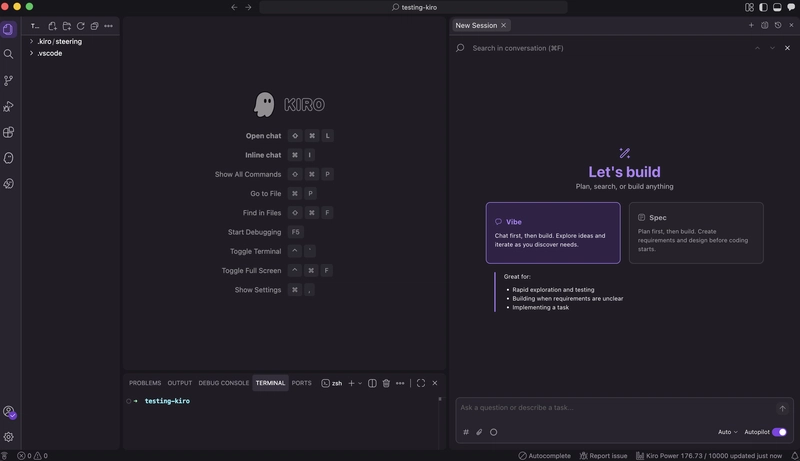
1. Chat-Driven Development
The entire project was built through conversation.
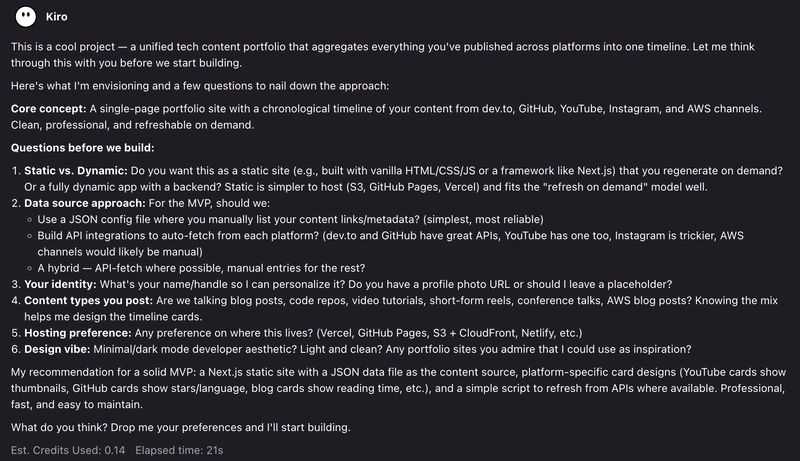
I described what I wanted, "I have this website where I collect my content shared across multiple social media websites. it is one true place where any tech content I posted on the web be it dev.to, github, youtube, instagram, and any aws first party channels, all of this to be collected as a timeline. can we build something that can be refreshed on demand and build this portfolio. make it professional looking. ask more intelligent questions as we go.", and Kiro asked clarifying questions even before writing a single line of code.
It asked about static vs dynamic, hosting preferences, design vibe, and data source approach. It even asked me about my identity. That back-and-forth shaped the architecture before any code was generated.
Once I provided response to all the questions, it help build the initial structure and also walked me through it.
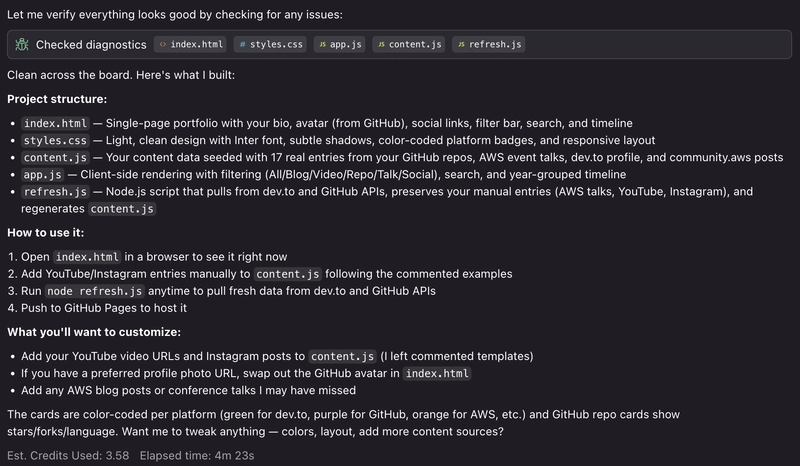
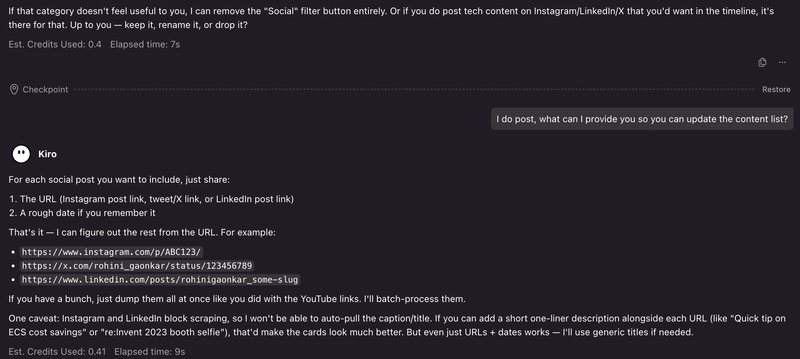
Notice how after every conversation, it shows how many credits each prompt consumes, in real-time. That was nice!
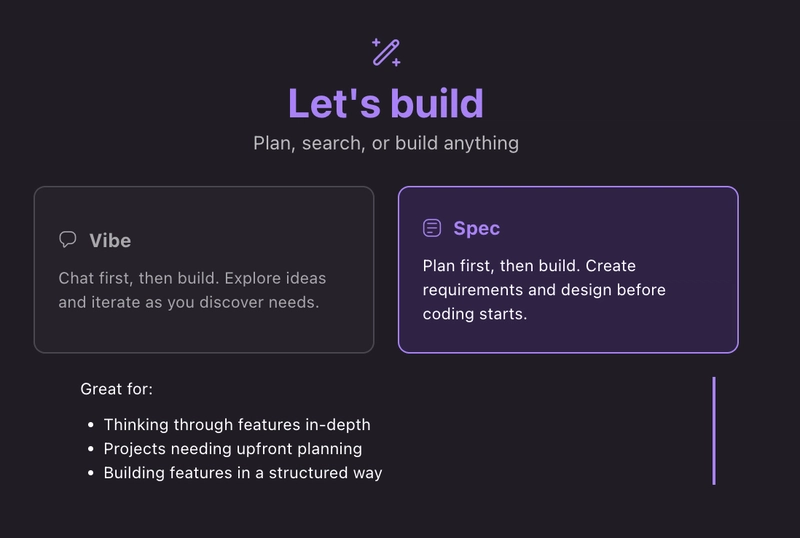
There is a spec-driven development mode as well, which I would be testing for something more complex than this static website.
2. Web Search
Kiro searched the web to find my existing content across platforms. It looked up my dev.to profile, GitHub repos, community.aws presence, YouTube channel, and even my current website at rohinigaonkar.com. This gave it real context about who I am and what content already exists, so the portfolio wasn't built with placeholder data, it was seeded with my actual content from day one.
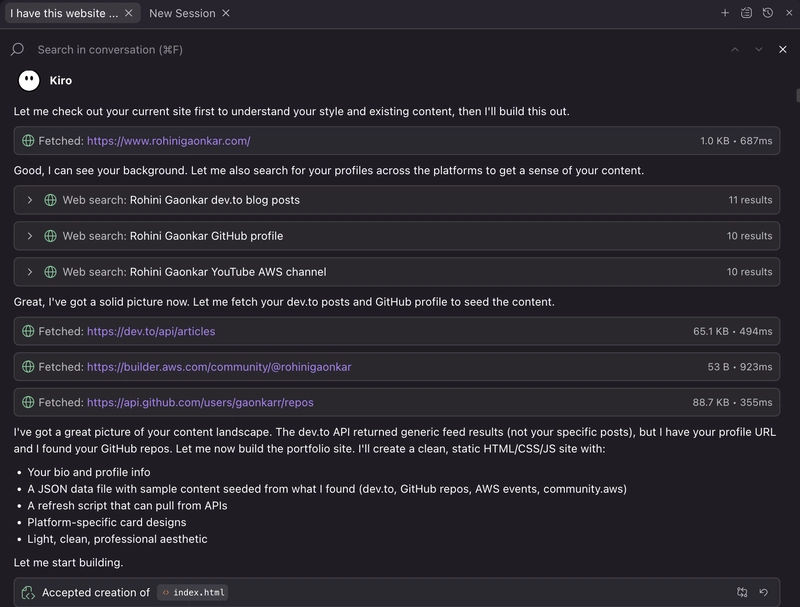
3. Explore Real-Time File Changes
As Kiro generated and edited the files, I could see every change happening in real time through the explorer. Either click the "Follow" option or click on the little "diff button" highlighted with yellow square below.
For example, it created index.html or content.js, I could immediately open them, review the code, and see the diffs. When it later modified content.js to add YouTube videos or reclassify talks vs videos, I could see exactly what changed and why.

4. Trusting Frequently Run Commands
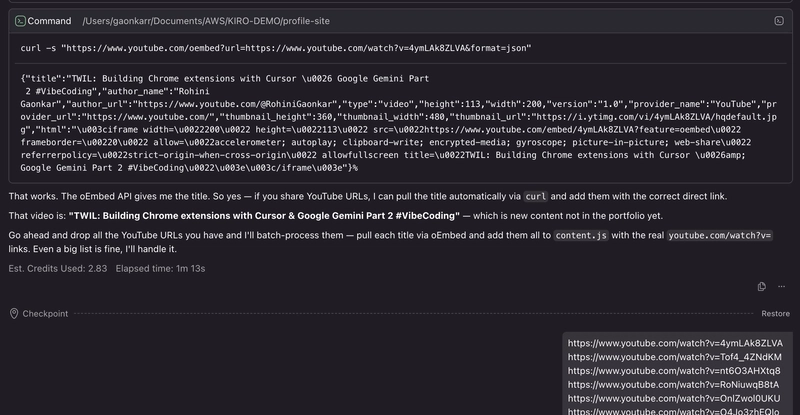
Kiro ran shell commands like curl to hit APIs and extract data. It asked my permission to run it once or add it to trusted list of commands.
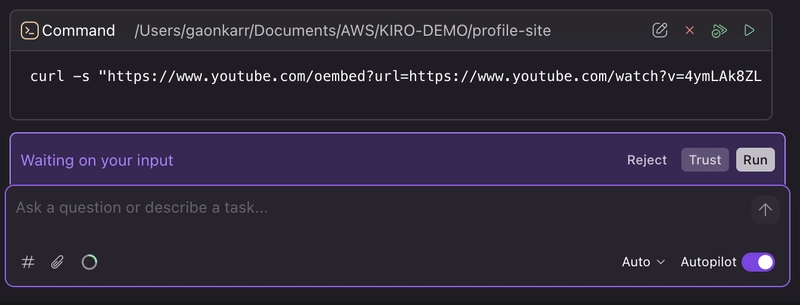
I also liked how it provided my levels of trust, like I can just execute this particular command or partial or the base command.
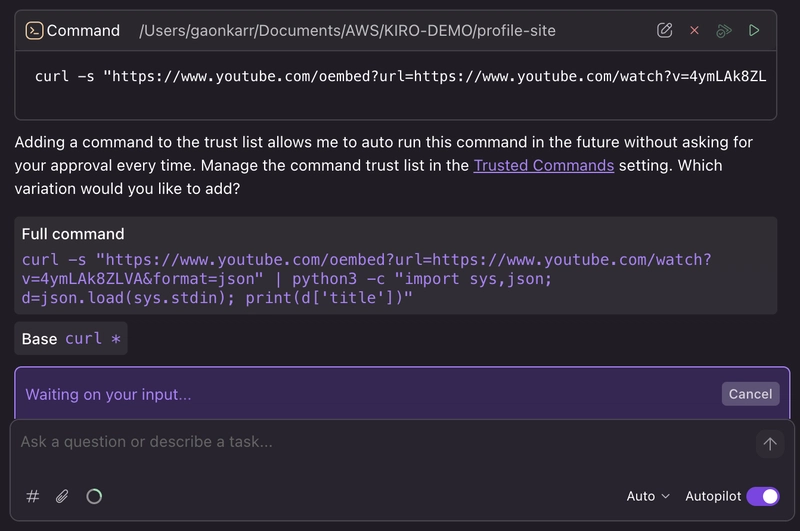
In autopilot mode, I could trust these commands to execute without approving each one individually. This was especially useful during the YouTube oEmbed batch processing, where Kiro ran 16 consecutive curl commands to fetch video titles, approving each one manually would have been tedious.
5. Iterative Refinement Through Conversation
The project evolved through multiple rounds of feedback:
- I pointed out that "talks" should only mean conference/meetup presentations, not YouTube tutorial videos - Kiro reclassified everything accordingly
- I noted that some AWS "talks" were actually just YouTube embeds on my website - Kiro dug into the pages, extracted the real YouTube URLs, and recategorized them as videos
- I shared my personal GitHub profile separately from my work one - Kiro pulled repos from both and updated the refresh script to handle multiple accounts
Each round of feedback made the portfolio more accurate without starting over or deleting some other important information.
6. The YouTube Challenge : Hitting Walls and Finding Workarounds
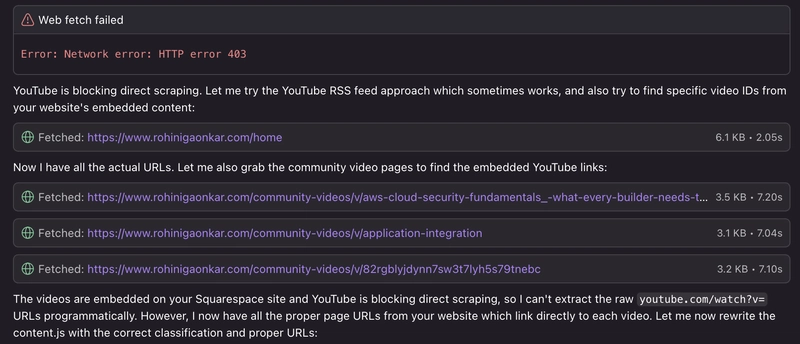
This was the most interesting part as YouTube is heavily locked down:
-
Direct fetch failed -
webFetchon youtube.com returned empty content - Rendered mode failed - returned only JavaScript bootstrap code, no actual page content
- Search was noisy - web searches for my videos returned generic results, not my specific content
- RSS feeds blocked - YouTube's channel RSS wasn't accessible either
*But Kiro didn't give up!!! 💜 *
It found workarounds on its own:
-
oEmbed API - Kiro discovered that YouTube's oEmbed endpoint (
youtube.com/oembed?url=...) returns video titles as JSON, and usedcurlto call it directly. This became the reliable method for all 16 videos I shared. -
Squarespace page parsing - For videos embedded on my website, Kiro parsed the raw HTML to extract YouTube video IDs from Squarespace's embed block JSON (double HTML-unescaping the content to find URLs like
youtube.com%2Fembed%2Fi0zQpJPfSdU). -
Thumbnail URL extraction - It even tried extracting video IDs from
ytimg.com/vi/VIDEO_ID/hqdefault.jpgthumbnail patterns as a fallback.
The iterative problem-solving here like trying one approach, hitting a wall, pivoting to another, felt very much like how a developer would debug a scraping problem.
I loved how Kiro told me what it tried, it failed and it was going to try something else. We also worked together for a process that was a good compromise for both of us. Maybe in future I will have an agent to simplify this, but for now this solves my purpose!

The Result
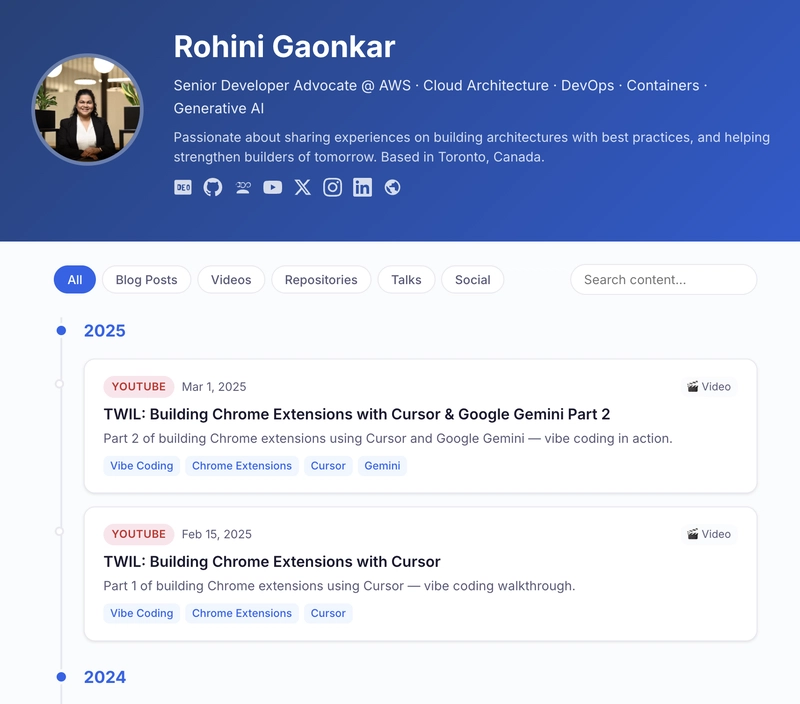
A live static portfolio at rohinigaonkar.github.io with ~80 entries spanning 2015–2025, filterable by type (blogs, videos, repos, talks, social), searchable, and refreshable on demand via a Node.js script that pulls from GitHub and dev.to APIs. All built through conversation in a single Kiro session.

What's Next
I'll keep adding content as I publish it. The refresh script makes the API-sourced stuff automatic, and the manual entries take about 30 seconds each. I might add dark mode at some point, and maybe an RSS feed. But right now, the simplicity is the feature.
More importantly, this project reminded me that coming back doesn't have to be intimidating.
If you're returning from a break and looking for a low-pressure way to get back into coding, I'd recommend picking a passion project and giving Kiro a try. You might surprise yourself with how quickly you get back into the zone.
Sign up for an AWS Builder ID, install Kiro IDE, and try it for yourself. Be sure to let me know how it goes!
And follow along as I explore this world of AI.
TL;DR:
Returning to tech after maternity leave felt overwhelming, so I started small by building a portfolio site to consolidate 80+ pieces of content scattered across platforms since 2015. Using AWS Kiro (an AI-powered IDE) for the first time, I built the entire project through conversation—no complex setup needed. Kiro helped with web searches, real-time file changes, iterative refinements, and creative problem-solving (especially when YouTube's APIs were locked down). The result: a live, searchable portfolio at rohinigaonkar.github.io that's easy to maintain. The lesson? Coming back doesn't have to be intimidating—pick one small passion project and let AI tools help you get back into the zone.


Top comments (12)
Congratulation for your child(s)! Nice idea to simplify your media presents and organizate with one AI agents. I can tell you a saddly true I am always lost in AWS space, so many program so many possibilities, so I keep a distant with ( but my real work I need using a bit ) ... but this is just my problem I am a real simple.
So I realize my portfolio page is simple: dev.to/pengeszikra
because all of my post are created on Dev.to, I also too lazy to use another social networking place, so I think Dev.to is perfect.
Dev.to is definitely perfect!! Unfortunately for work I have to explore different platforms so content is spread out over the years!! Some content is even deprecated haha
I understand your concern with AWS. I am back after a year and it feels like so much has changed too! Hopefully I can help digest it in small meals and utilise it for our needs!
I’m not “behind.”
I’m just finding my way.
If you’re in that same phase, feeling like things are moving too fast, especially with AI everywhere, you’re not alone.
Let’s do it together. Let's figure it out, one small step at a time. Follow along as I dive deeper!
If this helps even one person feel a little less stuck, it was worth posting.
I feel like I just needed to read that.
Thanks a lot Rohini. You have absolutely helped me.
💜 Thank you! You made my day!!
I really liked the YouTube challenge section.
Rather than solving everything perfectly, it shows how the system iterates through failures and gradually converges on a workable solution.
That imperfection and persistence feel very human and memorable, even a bit endearing.
I especially appreciated how the trial and error process was made visible.
Thanks for sharing this. It was both insightful and enjoyable to read.
Thank you for your kind comment Rina! I loved the YouTube thing too!
Earlier I used to feel I was the one made to think about workarounds, but when Kiro discussed, tried and tested different approaches, it truly felt conversational!
Great article - yes, I think it's VERY easy to get lost in the AI coding tools space, because you can go down an endless rabbit hole of complexity and pitfalls without getting anything done - but you managed to avoid that and keep it simple, by choosing the "correct" tool for your project ...
So yeah, Kiro sounds amazing - but what was the reason you chose Kiro, instead of more well-known/famous tools like CoPilot, Cursor or Claude Code? But it definitely sounds like worth trying!
P.S. how many credits did the whole project cost you, if I may ask?
starting with one concrete thing is genuinely underrated. I still catch myself trying to onboard everything at once when a new tool drops. the urge to understand it all is what actually slows you down.
Thank you, definitely agree! Initially I was overwhelmed and was wondering what is this hype about? Maybe I won’t understand until I learn all the terminologies and everything about it. People had a year with it, I didn’t! But then I reminded myself, I don’t have to do what they did in a year in a day, I just have to take one day at a time and build my own momentum!
thank you, its wothy trying, i will give it a try
Some comments may only be visible to logged-in visitors. Sign in to view all comments.