


grep's flat output is the wrong abstraction for exploratory searches
I built a grep that prints a tree of match counts before any matching lines. It turned "where is this used?" from a scrolling exercise into a glance.
🔗 GitHub: https://github.com/sen-ltd/treegrep
The problem: flat output on exploratory searches
I run the same command maybe twenty times a day:
grep -rn authenticate src/
I am not looking for a specific occurrence. I am looking to understand where authentication lives in this codebase so I can decide where to make a change. The answer I want is a single sentence: "it's mostly in src/auth/ and a few spots in src/api/middleware.py."
What grep gives me is this:
src/api/middleware.py:14:    token = request.headers.get("Authorization")
src/api/middleware.py:22:def authenticate_request(req):
src/api/middleware.py:44:        return authenticate_request(req)
src/api/middleware.py:51:    authenticated = authenticate_request(req) is not None
src/api/routes.py:8:from ..auth import authenticate
src/api/routes.py:77:    user = authenticate(payload)
src/auth/oauth.py:12:def authenticate(code: str) -> User:
src/auth/oauth.py:60:    return authenticate(code=c)
src/auth/oauth.py:91:    # re-authenticate on refresh
src/auth/session.py:5:def authenticate(session_id: str):
src/auth/session.py:34:    return authenticate(sid)
src/auth/tokens.py:9:def authenticate(token):
src/auth/tokens.py:25:    return authenticate(token)
src/utils/http.py:88:    # TODO: authenticate this path
Fourteen lines. Not crazy. Except I now have to do the counting in my head: how many hits are in auth/? four files, so... somewhere between four and "most of them". On a real repo with 200 matches across 40 files it is genuinely tiring. I scroll, lose my place, lose count, give up on counting, and just start reading individual lines one at a time — which is exactly the wrong mode. I am supposed to be orienting myself, not diving in.
The flat list is the right output after I know what I am looking for. It is the wrong output before.
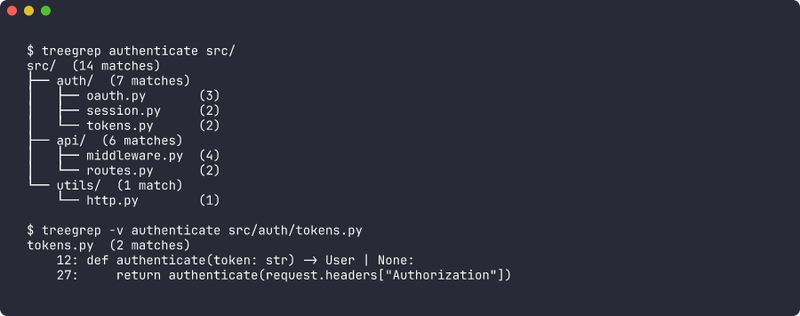
What I want is this:
src/  (14 matches)
├── auth/  (7 matches)
│   ├── oauth.py       (3)
│   ├── session.py     (2)
│   └── tokens.py      (2)
├── api/  (6 matches)
│   ├── middleware.py  (4)
│   └── routes.py      (2)
└── utils/  (1 match)
    └── http.py        (1)
Four lines of actual information. I can see in one glance that auth/ and api/ split the work roughly evenly, that tokens.py and session.py are smaller leaves, and that the utils/http.py hit is probably a stray comment worth ignoring. I have oriented myself. Now I can run the flat grep to see the actual lines in the files I care about.
So I built treegrep. It is a Python CLI that does exactly this and nothing more.
What's wrong with the alternatives?
There are a handful of adjacent tools, and I tried all of them before writing this one.
rg --files-with-matches + sort | uniq -c: close, but it gives you a flat list of files, not a hierarchy. You can't see that 90% of hits are in a single subtree. And you lose the per-file counts unless you script around it — which people do, and those scripts all look different, and none of them respect .gitignore correctly.
IDE "Find in Files" panels: actually a good tree view, but they are trapped inside the IDE. You can't pipe the result, you can't share it in a ticket, and you can't run it from a remote shell. Also a fresh clone of a 500k-line repo takes 90 seconds to index before the search panel works at all.
ripgrep-all, ack, ag: all variations on "grep but faster" or "grep but searches more file types." None of them change the output shape.
Writing a one-off rg ... | awk ... pipeline every time: this is what I actually did for years. It was bad.
The gap was output shape, not performance. So treegrep is intentionally not trying to compete with ripgrep on speed — it wraps stdlib re and walks the tree in pure Python, and that's fine for the interactive use case where you already know what directory you are in.
Design decisions worth calling out
Fixed string by default, regex opt-in
ripgrep made this choice a decade ago and I think they were right. The overwhelming majority of exploratory searches are for identifiers — authenticate, UserRepository, POST /api/v1/login. These are not regexes. They contain characters that would be metacharacters in a regex (., /, () and a user typing them as a regex would either get silent wrong matches (because . matches anything) or silent zero matches (because ( is unclosed).
So treegrep foo searches for the literal string foo, and treegrep -e 'auth\w+' opts into regex. The implementation is one re.escape() call:
def compile_pattern(pattern: str, *, regex: bool, ignore_case: bool) -> re.Pattern[str]:
    flags = re.IGNORECASE if ignore_case else 0
    if not regex:
        pattern = re.escape(pattern)
    try:
        return re.compile(pattern, flags)
    except re.error as exc:
        raise ValueError(f"invalid regex: {exc}") from exc
The user still gets a re.Pattern at the end, so the rest of the searcher doesn't care which mode they asked for.
.gitignore respect is non-optional
This is the difference between a tool that works on my real repos and a toy. The first time I ran an early prototype of treegrep on a Node project the tree was dominated by node_modules/ — tens of thousands of matches in vendored code I did not write. Useless.
I considered writing a tiny ad-hoc gitignore parser. Do not do this. .gitignore's globbing rules are subtly not the same as fnmatch, they support negation patterns, they are recursive with per-directory precedence, and the tests to verify you got it right are nontrivial. The pathspec package is tiny (~30 KB), maintained, and used by black, pre-commit, pydocstyle, and many others. It is the right abstraction and I refuse to feel bad about adding one dependency for it.
The walker loads .gitignore from the root of the walk:
def _load_gitignore(root: Path) -> pathspec.PathSpec | None:
    gitignore = root / ".gitignore"
    if not gitignore.is_file():
        return None
    try:
        lines = gitignore.read_text(encoding="utf-8", errors="replace").splitlines()
    except OSError:
        return None
    lines.append(".git/")  # always, even if not listed
    return pathspec.PathSpec.from_lines("gitwildmatch", lines)
One subtlety: I do not walk nested .gitignore files. Git itself does, with precedence rules that get hairy. For the "where is X referenced" use case a single top-level .gitignore covers the 99% case, and the remaining 1% can be handled with --no-gitignore if needed. The tradeoff is documented in the README and it is the kind of tradeoff a one-person tool is allowed to make.
Binary detection is a single NUL-byte sniff
BINARY_SNIFF_BYTES = 4096

def is_probably_binary(path: Path) -> bool:
    try:
        with path.open("rb") as fh:
            chunk = fh.read(BINARY_SNIFF_BYTES)
    except (OSError, PermissionError):
        return True
    return b"\x00" in chunk
That is the entire implementation. It is the same heuristic git, ripgrep, and grep itself use. It misclassifies UTF-16 text as binary, which is technically wrong, and I do not care because I have never once wanted to grep UTF-16 text and if you have a legitimate use case you can pass --include-binary. Cheap heuristics that are right 99.9% of the time beat expensive heuristics that are right 100% of the time.
Exit codes are inverted from grep. On purpose.
grep returns 0 on match, 1 on no-match, 2 on error. This is because grep is a thing you put in a shell conditional:
if grep -q TODO src/; then
    echo "found TODOs"
fi
treegrep returns 0 on match, 1 on no-match, 2 on error. Wait — those are the same numbers. Yes, but the meaning is different, and the documentation says so loudly. The point I am making in the README and in the CLI help text is: do not put treegrep in a shell conditional. If you want the "did anything match" bit, use --format flat and check stdout, or fall back to actual grep. treegrep's exit code 1 on no-match is a diagnostic for a human, not a control flow signal.
I considered inverting to 0=any-outcome, 2=error (ignore the match/no-match distinction entirely), but then I lose the ability to pipeline treegrep into CI linters that genuinely want to know "did this anti-pattern show up anywhere." So 1-on-no-match stays, with the documentation explicitly saying it is for humans.
The broader principle: an interactive tool and a composable shell primitive have different exit-code semantics, and pretending otherwise leads to the worst of both. Dave Cheney made a similar argument about Go CLI tools years ago and I find it applies broadly.
The tree renderer is yours to write
I did not want to depend on rich or anytree for this. The whole point of the tool is the tree output, and the rendering logic is ~20 lines of careful string concatenation with Unicode box-drawing characters. Here is the relevant bit:
_GLYPHS_UNICODE = {
    "branch": "├── ",
    "last":   "└── ",
    "pipe":   "│   ",
    "space":  "    ",
}

def format_tree(root, opts):
    glyphs = _GLYPHS_ASCII if opts.ascii else _GLYPHS_UNICODE
    lines = [f"{root.name}/  ({_format_count(root.count)})"]

    def _walk(children, prefix):
        for i, child in enumerate(children):
            is_last = i == len(children) - 1
            connector    = glyphs["last"]  if is_last else glyphs["branch"]
            continuation = glyphs["space"] if is_last else glyphs["pipe"]
            if child.is_dir:
                lines.append(f"{prefix}{connector}{child.name}/  ({_format_count(child.count)})")
                _walk(child.children, prefix + continuation)
            else:
                lines.append(f"{prefix}{connector}{child.name}  ({child.count})")
                if opts.verbose and child.file_result is not None:
                    for m in child.file_result.matches:
                        lines.append(f"{prefix}{continuation}  {m.lineno}: {m.line}")

    _walk(root.children, "")
    return "\n".join(lines)
The trick that took me longest to get right was the continuation prefix — when you recurse into the last child of a parent, you need to extend the indent with spaces, not pipes, otherwise the dangling │ dangles past where the tree actually forks. That's the is_last ? space : pipe line, and it is the entire reason the tree reads correctly.
--ascii swaps the glyph table for |--, `--, |, so you can paste the output into a ticket system that does not render Unicode cleanly. I added this after pasting tree output into a GitHub issue and seeing the Unicode rendering fail on someone's corporate email client.
Aggregation is a second pass, not inline
The tree builder constructs the directory hierarchy first with zero counts, attaches the file leaves with their real counts, and then walks the tree once more to sum into the directory nodes. I did this instead of keeping running totals on the way down for two reasons. First, it is easier to reason about — there is no "am I counting this file twice" class of bug. Second, once you have a clean aggregated tree, filter_tree (for --min-count and --max-depth) and sort_tree (for --sort) can operate on it with trivial tree traversals. The whole pipeline is four functions, each doing one pass, each returning an immutable-ish structure. It ran correctly the first time I wrote it, which is a sign the decomposition was right.
Tradeoffs and non-goals
This is not a ripgrep replacement. ripgrep is SIMD-accelerated, parallelized, and an order of magnitude faster on large repos. treegrep is a pure-Python walker with Python regex. On the SQLite amalgamation (230k lines) ripgrep finishes in 50ms and treegrep takes 400ms. Good enough for interactive use, terrible for CI log scraping.
No multiline matching. The searcher scans line by line. Multiline regex is a whole other engineering problem and I don't miss it in the "where is X referenced" use case.
Nested .gitignore files are ignored. Covered above. I will revisit if someone hits a real case.
Hidden files are skipped by default. .env, .vscode/, etc. Override with --include-hidden. I wavered on this and decided "most of the time you don't want these, and when you do you know you want them."
Symlinks are not followed. Loop protection is a rat hole. Walk the real path.
Try it in 30 seconds
docker run --rm -v "$(pwd)":/work ghcr.io/sen-ltd/treegrep authenticate /work
Or from source:
git clone https://github.com/sen-ltd/treegrep
cd treegrep
pip install -e .
treegrep authenticate src/
treegrep -v authenticate src/auth/
treegrep --format json authenticate src/ > matches.json
The Docker image is Alpine-based, multi-stage, around 60 MB. There are 37 tests against a synthetic repo fixture covering every flag and edge case I thought of while writing this article.
Takeaway
I have been writing CLI tools for a long time and the thing I keep rediscovering is that the hardest decision is the output shape. The underlying logic — walk directories, match lines, count results — is five functions and a weekend. The hard question is always "what does the user see first, and does it put them in a position to decide what to do next?" grep's flat output is perfect when you already know what you want. It is the wrong shape when you are still figuring that out. treegrep is one narrow answer for one narrow mode, and that narrowness is a feature, not a bug.
If you find yourself running grep -rn and then immediately scrolling to count things, give the tree view a try and tell me if it changes your workflow.
Written by SEN 合同会社. We build small, honest tools. See the rest of the portfolio.


Top comments (0)