


Every Link Preview in Your App Is the Same 30 Lines You Haven't Written Yet
A small Python CLI called
ogp-fetchthat extracts Open Graph and Twitter Card metadata from a URL (or piped HTML) and emits it as JSON, human text, or a Markdown link card. About 80 lines of real logic on top ofhttpxandhtml.parser. The interesting part wasn't the parser — it was the pile of edge cases that every link-preview implementation has to get right and usually doesn't.
📦 GitHub: https://github.com/sen-ltd/ogp-fetch
The problem: you keep writing the same 30 lines
Pick any non-trivial web app and you will find a function whose job is to turn a URL into a {title, description, image} triple. A Slack bot that unfurls pasted links. A Discord notification pipeline. A blog that renders "what I'm reading" cards. A CMS that imports a URL and pre-fills an embed. An internal dashboard that shows screenshots of linked dashboards. A wiki that inlines external references. A Markdown editor that previews URLs as you paste them.
Every one of those reaches for the same handful of meta tags, applies the same precedence rules, tries (and usually fails) to resolve relative image URLs, and trips over the same edge cases. The code is small — it genuinely is about 30 lines — but nobody gets all 30 lines right the first time. There's always an og:image that's a root-relative /static/hero.png, or a title with & in it, or a site that returns a different page to the default python-requests User-Agent, or a 500 MB response from a misconfigured CDN that eats your Lambda's memory.
So I wrote ogp-fetch, a CLI that does this one job correctly, with one runtime dependency (httpx) and a stdlib parser. It exists mainly as a reference implementation: something I can point at the next time a teammate asks "why is our link preview broken on that one site?" and say this is what the working version looks like. The whole thing is public-domain MIT.
What it does
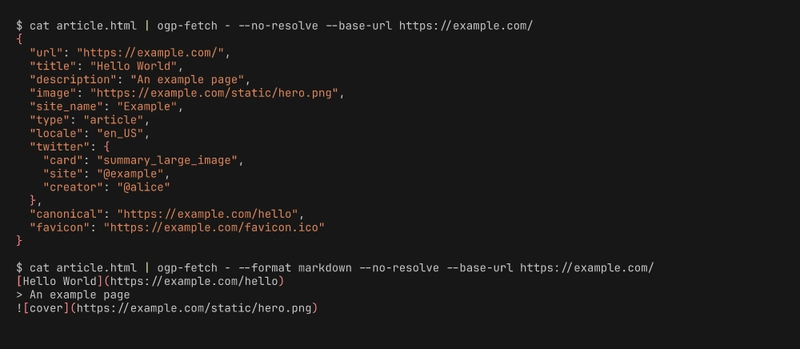
ogp-fetch https://example.com/article
{
  "url": "https://example.com/article",
  "title": "Hello World",
  "description": "An example page",
  "image": "https://example.com/static/hero.png",
  "site_name": "Example",
  "type": "article",
  "locale": "en_US",
  "twitter": {
    "card": "summary_large_image",
    "site": "@example",
    "creator": null
  },
  "canonical": "https://example.com/article",
  "favicon": "https://example.com/favicon.ico"
}
Three output formats: json (default, parseable), human (grep-able key: value), and markdown — the last one emits a link-card preview you can paste directly into a README, Slack message, or static site:
[Hello World](https://example.com/article)
> An example page

And it reads from stdin when you pass - as the URL. That's not an afterthought; it's the whole reason the tool is composable:
curl -s https://example.com/ | ogp-fetch - --no-resolve --base-url https://example.com/
Now your fetching layer (retries, TLS, proxies, auth headers, captured fixtures) is somebody else's problem, and ogp-fetch is just a pure HTML → JSON transformation. You can test it against offline fixtures without mocking anything.
Design: where the 30 lines actually live
The code is split into four pure modules (plus the CLI and the fetcher), which is honestly more structure than 80 lines deserves — but it's the structure that keeps each piece testable in isolation.
src/ogp_fetch/
├── extractor.py    # HTML → raw dict of every meta tag found
├── normalizer.py   # raw dict → OgpData (precedence + URL resolution)
├── fetcher.py      # httpx wrapper with timeout + size cap
├── formatters.py   # OgpData → json / human / markdown
└── cli.py          # argparse glue
extractor.py doesn't know what precedence means. normalizer.py doesn't know what HTTP is. formatters.py doesn't know anything except how to render a dataclass. fetcher.py takes an injectable httpx.Client so tests use httpx.MockTransport and never touch the network. This is boring and unfashionable, and I have come to love it.
1. The html.parser subclass
Here's the whole extractor (with comments trimmed):
class _HeadExtractor(HTMLParser):
    def __init__(self) -> None:
        super().__init__(convert_charrefs=True)
        self.raw: dict[str, str] = {}
        self._in_title = False
        self._title_buf: list[str] = []
        self._stopped = False

    def handle_starttag(self, tag, attrs):
        if self._stopped:
            return
        a = {k.lower(): (v or "") for k, v in attrs}

        if tag == "meta":
            key = a.get("property") or a.get("name")
            content = a.get("content", "")
            if not key or not content:
                return
            key = key.strip().lower()
            if key.startswith("og:") or key.startswith("twitter:") or key in {
                "description", "author", "keywords",
            }:
                target = key if ":" in key else f"__{key}__"
                self.raw.setdefault(target, content)
            return

        if tag == "link":
            rels = set(a.get("rel", "").lower().split())
            href = a.get("href", "")
            if href and "canonical" in rels:
                self.raw.setdefault("__canonical__", href)
            if href and ("icon" in rels or "shortcut" in rels):
                self.raw.setdefault("__favicon__", href)
            return

        if tag == "title":
            self._in_title = True

    def handle_endtag(self, tag):
        if tag == "title":
            if self._title_buf:
                self.raw.setdefault("__title__", "".join(self._title_buf).strip())
            self._in_title = False
        elif tag == "head":
            self._stopped = True
Three small things matter here.
convert_charrefs=True makes the parser decode HTML entities before handing you the text. Without it, & stays as & in your title and your link preview looks like a bug report. You'd be astonished how many half-finished OGP libraries I've seen skip this.
handle_endtag("head") → self._stopped = True bails out once we leave the head. Parsing the body of a 2 MB page is pointless work when everything we care about is in the first few kilobytes, and it also protects against the occasional site that embeds user content containing a <meta property="og:title"> tag inside a comment block somewhere.
setdefault everywhere encodes "first writer wins". Real pages sometimes ship the same tag twice (I blame bad CMS plugins), and the first one is overwhelmingly the correct one.
2. The normalizer's precedence pick
Precedence is enforced in one small helper:
def _pick(raw: dict[str, str], *keys: str) -> Optional[str]:
    for k in keys:
        v = raw.get(k)
        if v:
            v = v.strip()
            if v:
                return v
    return None
And then the rules themselves are just a list:
title = _pick(raw, "og:title", "twitter:title", "__title__")
description = _pick(raw, "og:description", "twitter:description", "__description__")
image = _pick(raw, "og:image", "og:image:url", "twitter:image", "twitter:image:src")
That's the entire precedence logic. I wanted it to be data, not control flow — if the spec changes (or if a site needs a workaround), you add or remove a key in the tuple.
Resolving relative URLs is one urljoin call:
def _resolve(base: Optional[str], value: Optional[str]) -> Optional[str]:
    if value is None:
        return None
    if base is None:
        return value
    try:
        return urljoin(base, value)
    except Exception:
        return value
urllib.parse.urljoin already handles every relative form correctly: absolute (https://other.com/x.png passes through), protocol-relative (//cdn.example.com/x.png picks up the scheme), root-relative (/static/x.png uses the host), and same-directory (x.png uses the host + directory of the base URL). Every OGP library I've read does something with relative URLs. Most of them either use string concatenation (broken on protocol-relative) or urllib.parse.urlparse followed by manual assembly (broken on same-directory). urljoin is right there in the stdlib and it does all four cases.
3. The markdown formatter
def as_markdown(data: OgpData) -> str:
title = data.title or data.url or "(untitled)"
link = data.canonical or data.url
lines: list[str] = []
if link:
lines.append(f"[{title}]({link})")
else:
lines.append(f"**{title}**")
if data.description:
for raw_line in data.description.splitlines():
lines.append(f"> {raw_line}")
if data.image:
alt = data.image_alt or title
lines.append(f"")
return "\n".join(lines)
This is the formatter I use most. The output drops straight into a README, a Slack message, a Discord embed (most platforms render markdown), or a weekly newsletter. When a piece is missing — no description, no image, no canonical — it's omitted cleanly instead of producing a [None](None) embarrassment. That's the entire feature.
Edge cases the spec doesn't prepare you for
User-Agent hygiene
Several large sites (LinkedIn, Medium, some news outlets) return a completely different page to unknown User-Agents. Some return 403. Some return a JavaScript-only skeleton. The minimum bar is to send a User-Agent that looks like a real client. ogp-fetch defaults to ogp-fetch/0.1.0 (+https://github.com/sen-ltd/ogp-fetch) so the target can block it specifically if they want, but most sites are happy.
Size caps as memory protection
Every fetcher that doesn't have a size cap is a memory-exhaustion bug waiting for the wrong URL. The default is 2 MB, which is enormous for a <head> but catches the case where someone pastes a link to a 900 MB video file and the server happily starts streaming it. We stream via httpx.Client.stream() and raise once the buffered size crosses the cap:
buf = bytearray()
for chunk in response.iter_bytes():
    buf.extend(chunk)
    if len(buf) > max_size:
        raise FetchError(f"Response exceeds max size {max_size} bytes")
HTML entity decoding
Already covered above — convert_charrefs=True. Without it your titles look like Tom & Jerry's page, and nobody wants to explain that to a PM.
The honest comparison with PyPI
There are a dozen OGP libraries on PyPI. They're mostly fine. ogp-fetch is not trying to replace them — it's trying to be a small, readable reference implementation that you can pull into an existing codebase and modify, or read when you're trying to understand what your existing library is doing. If pip install opengraph works for you, that's great. If you need to understand why it returned None for og:image on one specific site, the version you can read in twenty minutes is more useful than the one with 500 stars.
Tradeoffs worth naming
-
JavaScript-rendered pages are impossible to handle without a headless browser. If a site's
<head>is injected client-side,ogp-fetchsees an empty document. You'd need Playwright or similar. Not a goal here. -
Multiple
og:imagevalues exist in the wild — Facebook's spec supports an image set with widths, heights, and alt text.ogp-fetchtakes the first image. Fine for a link preview; not fine for a gallery. -
og:typevariety — there are dozens of OGP types (article, video, music.song, book, profile…).ogp-fetchjust passes the string through. If you need typed objects, normalize downstream. -
Twitter-only and Facebook-only fields (
fb:app_id,twitter:app:url:iphone, etc.) are not exposed in the JSON output. Extending the normalizer is a five-line change.
Try it in 30 seconds
docker build -t ogp-fetch https://github.com/sen-ltd/ogp-fetch.git

# Against a URL:
docker run --rm ogp-fetch https://example.com/

# Against piped HTML (no network):
cat some.html | docker run --rm -i ogp-fetch - --no-resolve --format markdown
The test suite (56 tests, all offline via httpx.MockTransport) runs in 0.1 seconds:
docker run --rm --entrypoint pytest ogp-fetch -q
That's it. Build the Slack bot you've been putting off.


Top comments (0)