


Everyone's running multiple Claude Code agents in parallel now. The standard advice is "use git worktrees." Each agent gets its own copy of the codebase, its own branch, no conflicts.
We covered worktrees in our 10 Claude Code tips you didn't know: tip 6 covers the --worktree flag and how it works under the hood.
Works well. Until you actually try it on a real project.
We run a large TypeScript monorepo at Trigger.dev. PostgreSQL, Redis, ClickHouse, a Remix web app, multiple internal packages. When we tried worktrees for parallel Claude Code sessions, we spent more time on setup than shipping code.
So we stopped using worktrees. Here's what we do instead.
What worktrees get right
Claude Code has built-in worktree support. claude --worktree feature-auth gives you an isolated copy, a fresh branch, a scoped session. Spin up a second with claude --worktree bugfix-123 and both agents work independently.
For a library or a CLI tool, this works great.
But most real applications aren't just source code.
The local dev problem
Here's what actually happens when you create a worktree for a web application:
Port conflicts. Your dev server runs on port 3030. Your second worktree also tries port 3030. Now you need different ports per worktree, different environment variables, a setup script for each one.
Database isolation. Both worktrees point at the same PostgreSQL database. Agent A runs a migration. Agent B's schema is now out of sync. Or worse: both agents are seeding test data and trampling each other's state. The "fix" is a separate database per worktree, each on a different port, each needing its own migrations.
Shared services multiply. Redis, ClickHouse, Elasticsearch, S3-compatible storage. Every service your app depends on becomes another thing to duplicate or isolate. For our monorepo, a single worktree would need its own PostgreSQL, Redis, ClickHouse, and Electric instance just to run the dev server.
Disk space adds up fast. One user on the Cursor forums reported that automatic worktree creation burned through 9.82 GB across two worktrees with a ~2GB codebase. Each worktree gets its own node_modules, its own build artifacts, its own everything.
Dependency installation. Every new worktree needs npm install or pnpm install. In a large monorepo, that's not instant. Native dependencies and build steps make it worse.
Merge conflicts with yourself. Two agents refactor the same utility function in different directions. Now you're resolving conflicts in code you didn't write.
The result: you spend your time building worktree management scripts instead of shipping features. There's an entire cottage industry of blog posts explaining port allocation schemes, per-worktree Docker Compose files, and cleanup scripts.
What if you just didn't need any of that?
GitButler: multiple branches, one working directory
GitButler takes a fundamentally different approach to branching. Instead of one branch at a time (with worktrees giving you one branch per directory), GitButler lets you have multiple branches applied to the same working directory simultaneously.
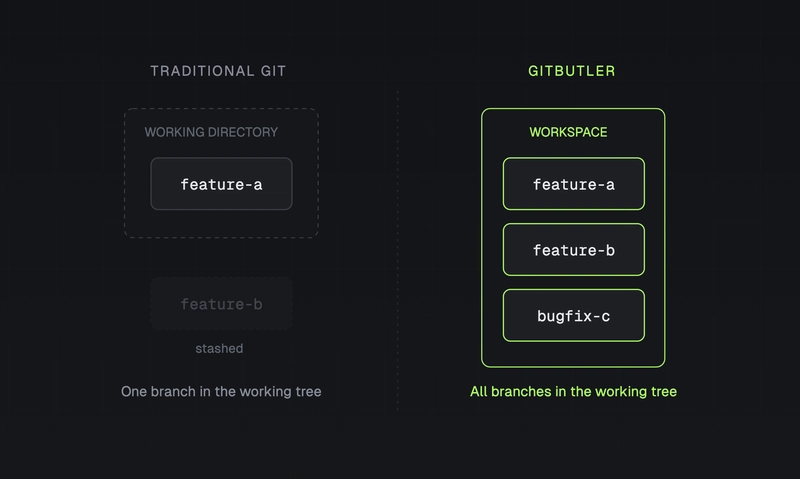
They call these "virtual branches." The key insight: instead of isolating branches by giving each one its own copy of the files, GitButler assigns changes to branches. You make changes to your files, then tell GitButler which changes belong to which branch. When you commit, each branch gets only its assigned changes.

Behind the scenes, GitButler maintains a special gitbutler/workspace branch, a merge commit representing the union of all your applied branches. Standard git tools see a single coherent state. Your dev server, your database, your tests: everything just works, because there's only one working directory.
Teaching Claude Code to use GitButler
GitButler offers Claude Code hooks that automatically assign each session's changes to a single branch. Scott Chacon wrote about this approach when it launched. For simple cases (one session, one branch, one task) this works well.
But real development isn't that clean. A single Claude Code session often produces changes that should land on multiple branches. You're adding a feature to the webapp and Claude also updates the docs. You want those in separate PRs. The hooks model can't do that because it hardwires one session to one branch.
Our approach is different: we teach Claude Code how to use the but CLI directly, via a skill. The GitButler skill tells Claude:
- Never use
git commit,git add,git push, or any git write command. Usebutinstead. - Always run
but status --jsonbefore mutations to get current CLI IDs. - Use
but commit <branch-id> --changes <file-id1>,<file-id2>to commit specific files to specific branches. - Use
but stage,but absorb,but squash,but undofor everything else.
The critical part is --changes. Claude can look at the files it modified, decide which branch each belongs to, and commit them separately in one session. Docs changes go to a docs branch. Feature code goes to a feature branch. Test updates go wherever the tests belong.
Here's what that looks like in practice:
# Claude runs but status --json, sees:
#   Branch: feat/usage-api (fe)
#   Branch: docs/usage-api (do)
#   Unassigned changes:
#     g0: apps/webapp/app/routes/api.v1.usage.ts
#     h0: apps/webapp/app/routes/api.v1.usage.test.ts
#     i0: docs/sdk/runs-usage.mdx

# Claude commits code to the feature branch:
but commit fe -m "Add /api/v1/usage endpoint" --changes g0,h0 --json --status-after

# And docs to the docs branch:
but commit do -m "Document usage API endpoint" --changes i0 --json --status-after
One session. Two branches. Two clean PRs. No hooks, no magic. Claude just knows how to use the tool.
The skill in detail
The full skill is about 150 lines of markdown. Here are the parts that matter most:
The non-negotiable rules
1. Use `but` for all write operations. Never run `git add`, `git commit`,
   `git push`, `git checkout`, `git merge`, `git rebase`, `git stash`,
   or `git cherry-pick`.
2. Always add `--json --status-after` to mutation commands.
3. Use CLI IDs from `but status --json`; never hardcode IDs.
4. Start with `but status --json` before mutations so IDs are current.
--json gives Claude structured output. --status-after returns the updated workspace state after each mutation, so it can chain operations without re-running but status.
The CLI IDs
GitButler assigns short 2-3 character IDs to everything: branches (fe, do), commits (1b, 8f), files (g0, h0), hunks (j0, k1). Claude reads them from but status --json and uses them as arguments:
but commit fe -m "message" --changes g0,h0  # commit files g0, h0 to branch fe
but stage g0 fe                              # stage file g0 to branch fe
but amend h0 1b                              # amend file h0 into commit 1b
but squash 1b 8f                             # squash commits 1b and 8f
The absorb trick
When Claude makes a small fix to code that was committed 3 commits ago, it doesn't need to create a new "fix typo" commit. It runs:
but absorb g0 --json --status-after
GitButler figures out which commit the change belongs to (by analyzing the diff context) and amends it in automatically. The commit history stays clean without Claude needing to reason about which commit to target.
The workflow
Here's what a typical session looks like.
1. Set up GitButler (once)
curl -fsSL https://gitbutler.com/install.sh | sh
cd your-project
but setup
2. Add the skill to your project
Create .claude/skills/gitbutler/SKILL.md with the rules above (or grab the one from GitHub). Add a line to your CLAUDE.md:
Use GitButler CLI (`but`) for all git operations instead of raw git commands.
3. Work normally
Start a Claude Code session and give it a task. Claude edits files, runs but status --json, creates branches if needed, and commits changes to the right places.
claude -n "usage-api"
> Add a /api/v1/usage endpoint with docs and tests.
  Code on feat/usage-api, docs on docs/usage-api.
Claude creates both branches, makes the changes, and commits code to one and docs to the other. Your dev server hot-reloads the whole time.
4. Review and push
but status        # see all branches and their changes
but push fe       # push the feature branch
but push do       # push the docs branch
but pr new fe     # create PRs
but pr new do
If the commits are messy, clean them up first:
but squash fe                    # squash all commits on the feature branch
but reword 1b -m "better msg"   # fix a commit message
but absorb g0                   # fold a fix into the right commit
Every operation is undoable. but undo reverts the last thing you did, whatever it was.
Why not hooks?
GitButler does offer Claude Code hooks that automatically route changes per session. For the "3 independent agents, 3 independent tasks" scenario, they work. Each session gets its own branch, changes auto-assign, commits happen on stop.
I don't use them because my work doesn't split that cleanly. A single session building a feature will touch the webapp, the SDK types, and the docs. I want those in separate PRs. The hooks assume 1 session = 1 branch, which means you'd need to artificially split your work into separate sessions just to get separate branches.
Teaching Claude the but CLI gives me more control. Claude can look at its own changes, decide which branch each file belongs to, and commit accordingly. It's more flexible, and honestly, it's simpler. No hooks configuration, no session ID routing. Just a skill file and a CLI.
The but CLI
The but CLI is a drop-in replacement for most git workflows:
but status            # like git status, but shows all virtual branches
but commit fe -m "add usage endpoint"  # commit to a specific branch
but stage g0 fe       # stage a specific file to a specific branch
but push              # push all branches
but undo              # undo the last operation (any operation)
Every command supports --json output, which makes it agent-friendly. GitButler maintains an operations log: every action is recorded, and but undo can revert anything. Committed to the wrong branch? but undo. Squashed when you shouldn't have? but undo. It's a genuine safety net (not the kind that catches you 50% of the time).
The full CLI reference covers branching, stacking, conflict resolution, and more.
When worktrees still make sense
I should be honest about where this approach breaks down:
Same-file conflicts. If Claude (or multiple agents) modify the same file for different branches, things get messy. Virtual branches share the physical working directory. GitButler's maintainers have confirmed that "overlapping areas can definitely lead to problems related to races and interference." If your tasks touch overlapping files, worktrees or sequential work is safer.
Build system isolation. If each task requires its own build with different configuration flags or environment variables, a single working directory won't cut it.
Heavy test suites with side effects. If running tests mutates shared state (like a database) in ways that conflict between tasks, you need real isolation.
But most work naturally involves different files. "Add a new API endpoint" and "update the docs for that endpoint" touch different parts of the codebase. GitButler just removes the infrastructure tax of keeping them on separate branches.
How I use this at Trigger.dev
Our monorepo has a Remix web app, a supervisor service, a CLI, an SDK, and a dozen internal packages. One PostgreSQL database, one Redis, one ClickHouse. Setting up a second copy of all that for a worktree would be a half-day project.
Instead, we run a single Claude Code session with the GitButler skill loaded. Claude makes changes across packages, then splits them across branches at commit time. Feature code on one branch, docs updates on another, SDK type changes on a third. We review each branch independently, squash if needed, push, and create PRs.
The but CLI has become our default for all git operations, not just agent workflows. The multiple staging areas, the undo system, the JSON output for scripting. It's a meaningful upgrade over raw git even without the AI angle.
Getting started
-
Install GitButler:
curl -fsSL https://gitbutler.com/install.sh | sh(or see installation docs) -
Set up your repo:
cd your-project && but setup -
Add the skill: Create
.claude/skills/gitbutler/SKILL.mdteaching Claude to usebutinstead of git (or use GitButler's published skill) -
Update CLAUDE.md: Add "Use GitButler CLI (
but) for all git operations instead of raw git commands" -
Start working: Claude will use
but status,but commit --changes, andbut pushautomatically
The bigger picture
The tooling advice for parallel AI development has been stuck in a "just use worktrees" rut that doesn't account for how real applications work. Your codebase doesn't exist in isolation. It's connected to databases, caches, queues, and services that don't clone as easily as source files.
GitButler's virtual branches solve the right problem: keeping multiple streams of work organized without duplicating your entire development environment. And teaching your AI agent how to use the CLI directly (instead of relying on automatic hooks) gives you the flexibility to split work across branches however you want.
If your monorepo has outgrown worktrees, this is worth an afternoon to set up.


Top comments (0)