

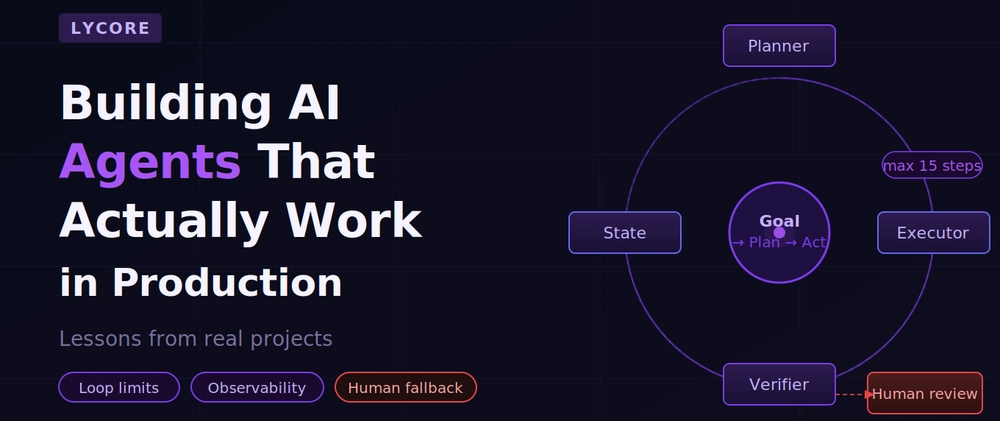

Everyone is building AI agents right now. Most of them work fine in a demo and fall apart in production. This post is about the gap between the two — what causes it, and what we have learned from shipping agents that run reliably in real business environments.
What "agent" actually means here
For this post, an agent is a system that takes a goal, plans a sequence of steps to achieve it, executes those steps using tools or APIs, and adapts based on what it finds along the way — without a human approving each action.
That is meaningfully different from a chatbot that answers questions, or a RAG pipeline that retrieves and summarises documents. An agent takes action in systems. That is what makes it powerful, and what makes it hard to get right in production.
The four failure modes we see repeatedly
1. Unbounded loops
An agent is given a task. It takes a step, evaluates the result, decides the task is not complete, takes another step — and loops. Without explicit loop limits, a poorly designed agent will happily consume API credits and time indefinitely.
Every agent we build has a hard step limit. Not a soft suggestion — a hard ceiling that raises an exception and routes to human review if hit.
class AgentExecutor:
    MAX_STEPS = 15

    def __init__(self, tools, llm):
        self.tools = tools
        self.llm = llm
        self.steps_taken = 0

    def run(self, goal: str) -> dict:
        context = {"goal": goal, "history": []}

        while self.steps_taken < self.MAX_STEPS:
            action = self._decide_next_action(context)

            if action["type"] == "complete":
                return {"status": "success", "result": action["result"]}

            result = self._execute_action(action)
            context["history"].append({"action": action, "result": result})
            self.steps_taken += 1

        # Exceeded step limit — escalate to human
        raise AgentStepLimitExceeded(
            f"Agent exceeded {self.MAX_STEPS} steps. Last context: {context}"
        )
2. Silent failures that look like success
An agent calls an external API. The API returns a 200 with an error message in the body. The agent reads the response, interprets it as success, and reports the task complete.
This is more common than it sounds. Many internal APIs have inconsistent error handling. Agents need to be taught to verify outcomes, not just record that an action was taken.
def verify_action_result(action_type: str, result: dict) -> bool:
    """
    Verify the actual outcome of an action, not just that it returned.
    """
    verifiers = {
        "send_email": lambda r: r.get("message_id") is not None,
        "create_record": lambda r: r.get("id") is not None and r.get("error") is None,
        "update_status": lambda r: r.get("updated") is True,
    }

    verifier = verifiers.get(action_type)
    if not verifier:
        # Unknown action type — log and flag for review
        logger.warning(f"No verifier for action type: {action_type}")
        return False

    return verifier(result)
3. Prompt drift under load
This one is subtle. Your agent works correctly on your test cases. In production, it sees inputs it has never encountered — slightly unusual phrasing, edge case data, requests that are adjacent to but not exactly what it was designed for. Over time, the average quality of outputs drifts.
Mitigation requires ongoing monitoring of output quality, not just uptime. We log every agent decision alongside a confidence indicator and review anything below threshold. We also run a fixed set of regression test cases against the live agent weekly.
4. Tool call hallucinations
The agent decides to call a tool that does not exist, or calls a real tool with parameters that do not match the schema. This fails with an error that confuses the agent, which then tries to recover and often makes things worse.
The fix is strict tool schema enforcement with clear error messages that the agent can actually use to correct itself:
def call_tool(tool_name: str, params: dict) -> dict:
    if tool_name not in AVAILABLE_TOOLS:
        return {
            "error": f"Tool '{tool_name}' does not exist.",
            "available_tools": list(AVAILABLE_TOOLS.keys()),
            "suggestion": "Check the tool name and try again."
        }

    tool = AVAILABLE_TOOLS[tool_name]
    validation_errors = tool.validate_params(params)

    if validation_errors:
        return {
            "error": "Invalid parameters.",
            "details": validation_errors,
            "expected_schema": tool.param_schema()
        }

    return tool.execute(params)
Returning structured, actionable error messages — rather than raising exceptions — gives the LLM something to work with when it makes a mistake.
The architecture pattern we keep coming back to
After building agents across fintech, healthcare, e-commerce, and SaaS projects, we have settled on a pattern that handles the above failure modes consistently:
The key design decisions:
Separate planning from execution. The LLM proposes a plan. A separate step validates that plan against constraints (allowed tools, scope limits, business rules) before any action is taken. This stops the agent from taking actions it is not authorised to take.
Maintain explicit state. The agent's understanding of what has happened and what still needs to happen is stored explicitly, not inferred from conversation history. This makes the state inspectable, debuggable, and resumable after failures.
Human review queue is first-class. It is not a fallback — it is a designed-in path. Any time the agent is uncertain, hits a limit, or encounters a situation outside its defined scope, it routes to the queue rather than guessing. This is what makes agents safe to run in production on real business data.
What a minimal Django integration looks like
# models.py
from django.db import models

class AgentTask(models.Model):
    STATUS_CHOICES = [
        ('pending', 'Pending'),
        ('running', 'Running'),
        ('complete', 'Complete'),
        ('failed', 'Failed'),
        ('needs_review', 'Needs Human Review'),
    ]

    goal = models.TextField()
    status = models.CharField(max_length=20, choices=STATUS_CHOICES, default='pending')
    steps_taken = models.IntegerField(default=0)
    state = models.JSONField(default=dict)
    result = models.TextField(blank=True)
    error = models.TextField(blank=True)
    created_at = models.DateTimeField(auto_now_add=True)
    updated_at = models.DateTimeField(auto_now=True)


# tasks.py (Celery task)
from celery import shared_task
from .models import AgentTask
from .agent import AgentExecutor, AgentStepLimitExceeded

@shared_task
def run_agent_task(task_id: int):
    task = AgentTask.objects.get(id=task_id)
    task.status = 'running'
    task.save(update_fields=['status'])

    try:
        executor = AgentExecutor(tools=TOOLS, llm=LLM)
        result = executor.run(task.goal)
        task.status = 'complete'
        task.result = result['result']

    except AgentStepLimitExceeded as e:
        task.status = 'needs_review'
        task.error = str(e)

    except Exception as e:
        task.status = 'failed'
        task.error = str(e)

    finally:
        task.steps_taken = executor.steps_taken
        task.state = executor.get_state()
        task.save()
This gives you a persistent, inspectable record of every agent run — what it was trying to do, how far it got, what state it left things in, and whether it needs a human to look at it.
Observability is not optional
In production, you need to know:
- How many agent tasks complete successfully vs. hit the step limit vs. fail?
- What is the distribution of steps taken per task?
- Which tool calls fail most often, and with what errors?
- What does a typical agent trajectory look like for your most common task types?
Without this data, you are flying blind. We instrument every tool call, every LLM decision, and every state transition, and pipe it to whatever monitoring stack the client is already using (Datadog, Sentry, CloudWatch — it does not matter as long as it's there).
The honest summary
Agents are genuinely useful. They can automate multi-step work that would otherwise require a human, and do it at a scale that changes what is possible for a business. But they require more careful engineering than a simple LLM API call.
If you are building your first agent: start with a narrow, well-defined task. Add hard limits everywhere. Build the human review path first, not last. Instrument everything from day one. Expand scope only once the narrow case is working reliably in production.
The teams that get agents into production successfully are not the ones who built the most ambitious agent — they are the ones who built the most observable one.
Lycore builds production AI systems for businesses — agents, RAG pipelines, LLM integrations, and custom AI applications on Django, React, Flutter, and .NET. Get in touch if you want to talk through your use case.



Top comments (0)