


title: I built a Vanna.ai for MongoDB — here's what made it genuinely hard
published: true
tags: python, mongodb, ai, opensource
cover_image:
I tried five text-to-SQL tools on a MongoDB database. None of them worked.
Not "worked poorly." They failed at the prompt. The first complained about missing table definitions. The second generated SQL and left me to adapt it manually. The third simply generated SELECT statements against a document store.
The assumption baked into every one of those tools is that the database speaks SQL. That schema lives in a DDL file somewhere. That the answer to "what fields does this collection have?" is just a catalog query away.
None of that is true for MongoDB.
So I built Mango.
Why text-to-SQL fails on MongoDB
There are four specific places where SQL-oriented tools break down.
No DDL. A SQL schema is explicit. information_schema.columns tells you exactly what fields exist, their types, and their constraints. A MongoDB collection has no equivalent. Documents within the same collection can have completely different shapes. The schema is emergent, inferred from the data itself.
Nested documents. SQL queries touch flat columns. A MongoDB aggregation may need to reach into orderItems.product.discount_pct or filter across an array of embedded subdocuments. That path is not representable in SQL grammar.
Aggregation pipelines. An MQL aggregation is not a string you generate by filling in a template. It is a JSON array of pipeline stages. A query that counts orders grouped by week looks like this:
[
  { "$match": { "created_at": { "$gte": "2024-01-01" } } },
  { "$group": { "_id": { "$week": "$created_at" }, "count": { "$sum": 1 } } },
  { "$sort": { "_id": 1 } }
]
In SQL the equivalent is SELECT EXTRACT(WEEK FROM created_at), COUNT(*) FROM orders WHERE created_at >= '2024-01-01' GROUP BY 1 ORDER BY 1. A tool designed to generate one cannot generate the other. The mental model is completely different: SQL is a declarative sentence, an MQL pipeline is an ordered sequence of transformations.
No JOINs. Cross-collection queries require $lookup stages that work nothing like SQL joins. Worse, data that would live in separate SQL tables is often embedded directly in MongoDB documents, making "join" the wrong abstraction for what the user actually wants.
How Mango works: the 7-step loop
When you send a question to Mango, seven things happen in sequence.
1. Memory search. Before touching the database, the agent retrieves semantically similar past interactions from ChromaDB. A question about orders this week might surface a stored result from a previous query about orders last month, giving the LLM a concrete example of the exact aggregation pipeline that worked.
2. System prompt construction. The agent builds a prompt that includes the database name, any pre-introspected schema, retrieved memory examples formatted as few-shot demonstrations, and behavioral rules (never write, always call describe_collection before querying a collection you have not inspected in this session, limit results to 100 rows).
3. LLM tool selection. The LLM receives the conversation history and full tool definitions. It decides what to do next: list collections, describe a collection's schema, run a query, or ask a clarifying question.
4. Tool execution. The ToolRegistry dispatches the call. For run_mql, the MongoRunner validates and executes the query. Only find, aggregate, count, and distinct are accepted. Write operations are rejected at the tool level, not by prompt instruction.
5. Result ingestion. The tool result is appended to the conversation as a tool message and fed back to the LLM.
6. Loop or answer. If the LLM needs more information, it issues another tool call and the loop repeats. It continues until the LLM produces a text answer without tool calls, or until max_iterations (default: 8) is reached.
7. Auto-save. Every successful tool call is automatically persisted to ChromaDB as a (question, tool_name, args, result_summary) tuple. The next similar question skips the exploration phase.
The whole exchange streams over SSE. Each data: line is a JSON event you can parse in any frontend:
data: {"type": "session",     "session_id": "abc123"}
data: {"type": "tool_call",   "tool_name": "list_collections", "tool_args": {}}
data: {"type": "tool_result", "tool_name": "list_collections", "success": true, "preview": "orders, customers, products..."}
data: {"type": "tool_call",   "tool_name": "run_mql", "tool_args": {"operation": "aggregate", "collection": "orders", ...}}
data: {"type": "tool_result", "tool_name": "run_mql", "success": true, "preview": "[{\"total\": 1247}]"}
data: {"type": "answer",      "text": "1,247 orders were placed in the last 7 days."}
data: {"type": "done",        "iterations": 2, "input_tokens": 1820, "output_tokens": 94}
You can watch the agent reason in real time: which collections it inspected, what pipeline it ran, how many tokens it consumed.
The schema inference problem
Mango infers schema by sampling documents. The MongoRunner pulls 50 documents sequentially and 50 more randomly via MongoDB's $sample aggregation stage, deduplicates by _id, and walks the combined sample to extract field paths, types, and presence frequencies.
The result is a SchemaInfo per collection, rendered into the system prompt in a format that conveys both structure and data quality:
- `_id`: ObjectId [indexed, unique]
- `customer_id`: ObjectId [indexed] [→ customers]
- `status`: int
- `total_amount`: float
- `items`: array
- `items.product_id`: ObjectId (92%) [→ products]
- `items.quantity`: int (92%)
- `created_at`: date [indexed]
- `shipping_address.city`: string (87%)
- `shipping_address.country`: string (87%)
The percentage is a presence frequency: (87%) means the field appeared in 87% of sampled documents. References are detected by convention. A field named customer_id is assumed to reference the customers collection if that collection exists. Same for camelCase: userId maps to a users collection.
The honest limitation: this is statistical inference on 100 documents. A field present in fewer than 1% of documents can easily be missed entirely. In practice this matters for sparse optional fields, experimental properties, or data that was added recently. Mango will not know they exist until a query fails or the user mentions them explicitly. At that point the agent calls describe_collection mid-conversation to re-introspect before retrying.
The learning loop: why it gets better over time
Every successful tool call is stored as a vector embedding in ChromaDB. The next time a semantically similar question arrives, the stored example is retrieved and injected as a few-shot demonstration before the LLM sees the question.
This means the first time you ask "how many orders were placed last week?" the agent may make three tool calls: list collections, describe the orders collection, then run the aggregation. The second time, it retrieves the stored interaction at the start of the loop and typically runs the query directly, skipping the exploration.
You can pre-seed domain knowledge without waiting for the agent to discover it:
import asyncio
from mango.integrations.chromadb import ChromaAgentMemory

memory = ChromaAgentMemory(persist_dir="./mango_memory")

async def seed():
    await memory.save_text("'active customer' means a customer who placed an order in the last 90 days")
    await memory.save_text("'revenue' always refers to the total_amount field in the orders collection")
    await memory.save_text("the 'status' field uses: 1=pending, 2=shipped, 3=delivered, 4=cancelled")
    await memory.save_text("orders reference customers via the customer_id field (ObjectId)")

asyncio.run(seed())
This is the same role as Vanna's training data: business context that anchors the LLM's interpretation of vague terms before it touches the database.
The open problem, which came up in early feedback: "returns results" is not the same as "returns correct results." A query can succeed, return data, and be auto-saved even if it answered the wrong question. Today there is no correctness validator in Mango. ValidatorTool is on the roadmap to add pre-execution MQL validation, but it does not exist yet. Until then, memory accumulates whatever the LLM decided was right, not what a human verified was right.
Get started in 3 minutes
CLI option. Install, set two environment variables, run mango:
pip install mango-ai[anthropic]

export MONGODB_URI="mongodb://localhost:27017/mydb"
export ANTHROPIC_API_KEY="sk-ant-..."
export MANGO_PROVIDER="anthropic"

mango
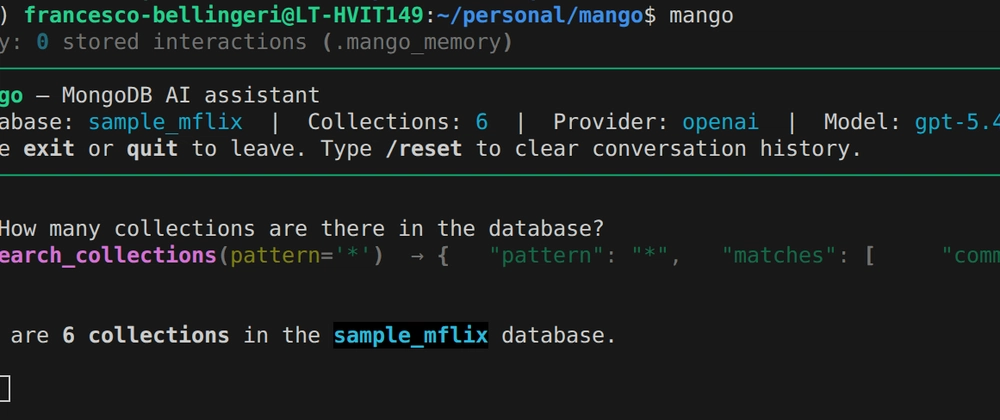
The mango command connects, samples collections, and opens an interactive REPL. Type any question. Type /reset to clear conversation history. Type exit to quit. The --verbose flag shows token usage and iteration count per response.
FastAPI option. The complete working setup, taken directly from the codebase:
import os
from mango import MangoAgent
from mango.integrations.anthropic import AnthropicLlmService
from mango.integrations.mongodb import MongoRunner
from mango.integrations.chromadb import ChromaAgentMemory
from mango.tools import (
    ToolRegistry,
    ListCollectionsTool,
    SearchCollectionsTool,
    DescribeCollectionTool,
    CollectionStatsTool,
    RunMQLTool,
    SearchSavedCorrectToolUsesTool,
    SaveTextMemoryTool,
)
from mango.servers.fastapi import MangoFastAPIServer

db = MongoRunner()
db.connect(os.getenv("MONGODB_URI"))

llm = AnthropicLlmService(
    model="claude-sonnet-4-6",
    api_key=os.getenv("ANTHROPIC_API_KEY"),
)

memory = ChromaAgentMemory(persist_dir="./mango_memory")

tools = ToolRegistry()
tools.register(ListCollectionsTool(db))
tools.register(SearchCollectionsTool(db))
tools.register(DescribeCollectionTool(db))
tools.register(CollectionStatsTool(db))
tools.register(RunMQLTool(db))
tools.register(SearchSavedCorrectToolUsesTool(memory))
tools.register(SaveTextMemoryTool(memory))

agent = MangoAgent(llm_service=llm, tool_registry=tools, db=db, agent_memory=memory)
MangoFastAPIServer(agent).run()  # http://localhost:8000
Your POST /api/v1/ask/stream endpoint is live. Pass a JSON body with question and optionally a session_id to continue a multi-turn conversation.
Known limitations
- Schema sampling is statistical. Sparse fields present in fewer than 1% of documents may not appear in the inferred schema.
- No correctness validation. A successful query is auto-saved to memory regardless of whether it answered the right question.
ValidatorToolis planned but not built yet. - No memory export. ChromaDB persists to a local directory. There is no JSON import/export API, so migrating memory between environments means copying the directory.
- The agent caps at 8 tool-call iterations per question. Complex questions requiring more steps get truncated and returned with a "please rephrase" message.
- Read-only.
RunMQLToolonly acceptsfind,aggregate,count, anddistinct. Write operations require a custom tool.
The code is at github.com/FrancescoBellingeri/mango. There is a Colab notebook at the link in the README if you want to try it without a local setup.
Mango is early. The schema inference problem in particular has open edges that I have not solved cleanly. If you have tackled NL querying on a schemaless database, I'd genuinely like to know how you approached the schema problem.



Top comments (0)